







Question: 1 . Using the same project created earlier, drag and drop the SQLite database fi le that you have created in the previous section into
1 . Using the same project created earlier, drag and drop the SQLite database fi le that you have created in the previous section into the assets folder in your Android project in Eclipse (see Figure 6-15).
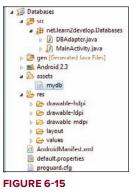
Databases netlem develop Databases DBAdapter.java MainActivity.java gente e File Android 2.3 mydb drawable-ldpi drawable mdp layout values AndroidManifest.and default properties proguard.cfg FIGURE 6-15
Step by Step Solution
There are 3 Steps involved in it
1 Expert Approved Answer
Step: 1 Unlock

Question Has Been Solved by an Expert!
Get step-by-step solutions from verified subject matter experts
Step: 2 Unlock
Step: 3 Unlock
 Study Help