



Question: Program 2.1 illustrates how to build an Excel spreadsheet for the data in Example 1. In this example the factor rating method is used to
Program 2.1 illustrates how to build an Excel spreadsheet for the data in Example 1. In this example the factor rating method is used to compare National Architects’ three potential outsourcing providers.
This program provides the data inputs for seven important factors, including their weights (0.0–1.0) and ratings (1–5 scale where 5 is the highest rating) for each country. As we see, BIM is most highly rated, with a 3.9 score, versus 3.3 for S.P.C. and 3.8 for Telco.
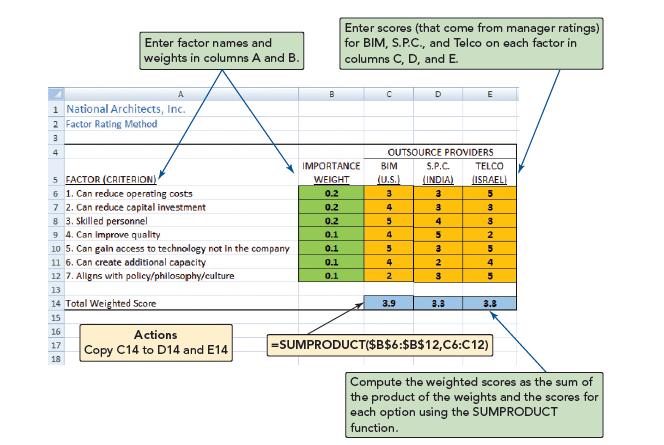
Using Excel to Develop a Factor Rating Analysis, With Data from Example 1 X USING EXCEL OM Excel OM (found in MyLab Operations Management) may be used to solve Example 1 (with the Factor Rating module).
P USING POM FOR WINDOWS POM for Windows also includes a factor rating module. For details, refer to Appendix II. POM for Windows is found in MyLab Operations Management and can solve all problems labeled with a P.
Enter factor names and weights in columns A and B. Enter scores (that come from manager ratings) for BIM, S.P.C., and Telco on each factor in columns C, D, and E. A 1 National Architects, Inc. 2 Factor Rating Method 3 4 B C D OUTSOURCE PROVIDERS 5 FACTOR (CRITERION) IMPORTANCE WEIGHT BIM S.P.C. (U.S.) (INDIA) TELCO (ISRAEL) 6 1. Can reduce operating costs 0.2 3 3 5 7 2. Can reduce capital investment 0.2 4 3 3 83. Skilled personnel 0.2 5 4 94. Can improve quality 0.1 4 5 10 5. Can gain access to technology not in the company 0.1 5 3 11 6. Can create additional capacity 0.1 4 2 12 7. Aligns with policy/philosophy/culture 0.1 2 3 32545 13 14 Total Weighted Score 15 16 17 18 Actions Copy C14 to D14 and E14 3.9 3.3 3.8 =SUMPRODUCT($B$6:$B$12,C6:C12) Compute the weighted scores as the sum of the product of the weights and the scores for each option using the SUMPRODUCT function.
Step by Step Solution
There are 3 Steps involved in it

Get step-by-step solutions from verified subject matter experts