







Question: Create a Windows Forms application. Use the following names for the project and solution, respectively: Shipping Depot Project and Shipping Depot Solution. Save the application
Create a Windows Forms application. Use the following names for the project and solution, respectively: Shipping Depot Project and Shipping Depot Solution. Save the application in the VB2017\Chap08 folder. The Shipping Depot store ships packages by FedEx, UPS, and USPS. Create the interface shown in Figure 8-50; the interface contains a group box, 11 labels, and two buttons. The Display button?s Click event procedure should declare a two-dimensional array that contains four rows (one for each week) and three columns (one for each shipper). Initialize the array using the data shown in Figure 8-50. The procedure should display the total number of packages shipped, the total shipped by FedEx, the total shipped by UPS, and the total shipped by USPS. It should also display the percentage of the total number shipped by each of the different shippers. Display the percentages with a percent sign and no decimal places. Code the application. Save the solution and then start and test the application.
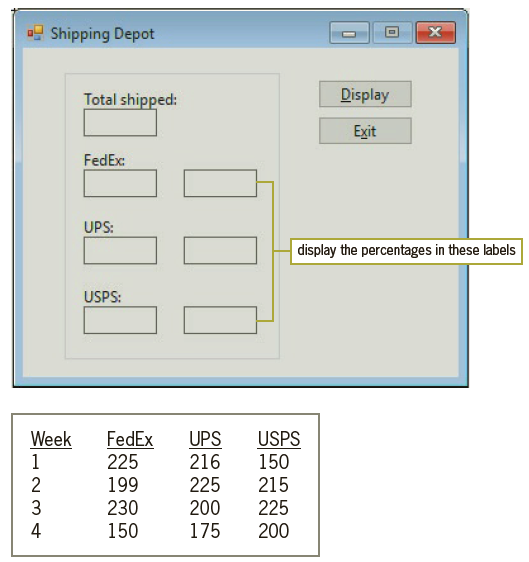
! Shipping Depot Total shipped: Display Exit FedEx: UPS: display the percentages in these labels USPS: FedEx 225 UPS 216 Week USPS 1 150 199 230 150 2 225 215 3 200 225 4 175 200
Step by Step Solution
3.51 Rating (158 Votes )
There are 3 Steps involved in it
Microsoft Visual Studio Solution File Format Version 1200 Visual Studio 15 VisualStudioVersi... View full answer

Get step-by-step solutions from verified subject matter experts
Document Format (2 attachments)

1814_60b8c122867cb_823798.pdf
180 KBs PDF File

1814_60b8c122867cb_823798.docx
120 KBs Word File
 Study Help