







Question: Open the Opals Solution.sln file contained in the VB2017Chap12Opals Solution folder. The application is already connected to the Opals.mdf file, and the OpalsDataSet has already
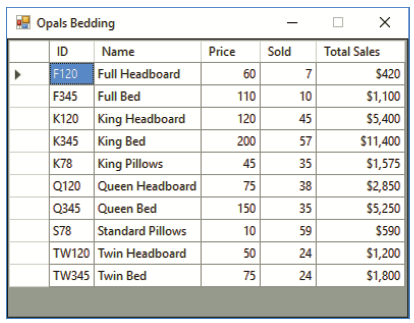
Open the Opals Solution.sln file contained in the VB2017\Chap12\Opals Solution folder. The application is already connected to the Opals.mdf file, and the OpalsDataSet has already been created. The Product table in the database is shown in Figure 12-40. Create a query that calculates the total sales amount for each item. After creating the query, display the Product table (which will now contain the calculated field) in a DataGridView control, as shown in Figure 12-41. Save the solution and then start and test the application.
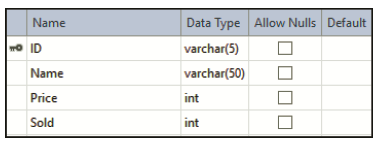
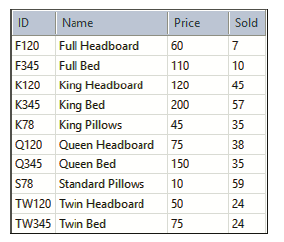
Name Data Type Allow Nulls Default O ID varchar(5) Name varchar(50) Price int int Sold int ID Name Price Sold F120 Full Headboard 60 F345 Full Bed 110 10 K120 King Headboard 120 45 King Bed King Pillows Q120 Queen Headboard 75 Q345 Queen Bed K345 200 57 K78 45 35 38 150 35 S78 Standard Pillows 10 59 TW120 Twin Headboard TW345 Twin Bed 50 24 75 24
Step by Step Solution
3.49 Rating (166 Votes )
There are 3 Steps involved in it
Microsoft Visual Studio Solution File Format Version 1200 Visual Studio 15 VisualStudioVe... View full answer

Get step-by-step solutions from verified subject matter experts
 Study Help