







Question: 2. In this exercise, you create an application that displays the ZIP code (or codes) corresponding to the city name selected in a list box.
2. In this exercise, you create an application that displays the ZIP code (or codes) corresponding to the city name selected in a list box. The city names and ZIP codes are shown in Figure 6-51. Create the application, using the following names for the solution and project, respectively: Zip Solution and Zip Project. Save the application in the VB2015\Chap06 folder. The interface should include a list box whose Sorted property is set to True. The form’s Load event procedure should add the city names to the list box and then select the first name in the list. The list box’s SelectedValueChanged event procedure should assign the item selected in the list box to a variable. It then should use the Select Case statement to display the city’s ZIP code(s) in a label control. Test the application appropriately.
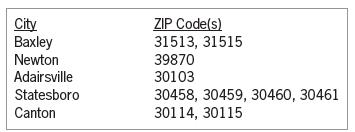
City Baxley Newton Adairsville ZIP Code(s) 31513, 31515 39870 30103 Statesboro Canton 30458, 30459, 30460, 30461 30114, 30115
Step by Step Solution
There are 3 Steps involved in it

Get step-by-step solutions from verified subject matter experts
 Study Help