







Question: Create an application, using the following names for the solution and project, respectively: MacroTech Solution and MacroTech Project. Save the application in the VB2015Chap05 folder.
Create an application, using the following names for the solution and project, respectively: MacroTech Solution and MacroTech Project. Save the application in the VB2015\Chap05 folder. Create the interface shown in Figure 5-73. MacroTech sells a software package that is available in three editions. The application should display the price of the edition a customer wants to purchase. The retail prices for the Ultimate, Professional, and Student editions are $775.99, $499.99, and 149.99, respectively. Some customers may have a coupon worth 10% off the price of the Ultimate edition, while others may have a coupon worth 20% off the price of the Student edition. Test the application appropriately.
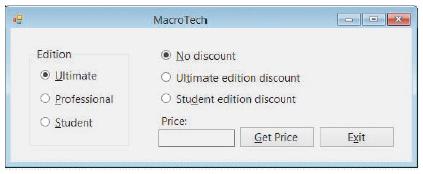
MacroTech Edition No discount O Ultimate O Utimate edition discount O Student edition discount O Professional O Student Price: Get Price Exit
Step by Step Solution
3.35 Rating (170 Votes )
There are 3 Steps involved in it
Microsoft Visual Studio Solution File Format Version 1200 Visual Studio 14 VisualStudioVersion 140225120 MinimumVisualStudioVersion 100402191 ProjectF184B08FC81C45F6A57F5ABD9991F28F MacroTech Project ... View full answer

Get step-by-step solutions from verified subject matter experts
 Study Help