







Question: Create an application, using the following names for the solution and project, respectively: Songs Solution and Songs Project. Save the application in the VB2015Chap05 folder.
Create an application, using the following names for the solution and project, respectively: Songs Solution and Songs Project. Save the application in the VB2015\Chap05 folder.
a. Create the interface shown in Figure 5-59. The four radio buttons contain song titles. The Artist Name button’s Click event procedure should display the name of the artist associated with the selected radio button. The names of the artists are Andrea Bocelli, Michael Jackson, Beyonce, and Josh Groban. Code the application, and then test it appropriately.
b. Remove the Artist Name button from the interface. Also remove the button’s code from the Code Editor window. Code the application so that the artist name automatically appears when a radio button is selected. Save the solution and then start the application. The name “Andrea Bocelli” should appear in the Artist box because the Because We Believe radio button is selected. Click the Billie Jean radio button. The name “Michael Jackson” should appear in the Artist box. Test the remaining radio buttons.
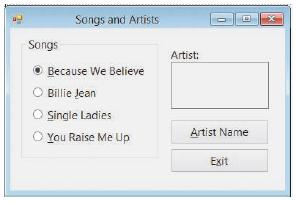
Songs and Artists Songs Artist: O Because We Believe Billie Jean O Single Ladies You Raise Me Up Artist Name Exit
Step by Step Solution
3.43 Rating (150 Votes )
There are 3 Steps involved in it
Step a Microsoft Visual Studio Solution File Format Version 1200 Visual Studio 14 VisualStudioVersion 140225120 MinimumVisualStudioVersion 100402191 ProjectF184B08FC81C45F6A57F5ABD9991F28F Songs Proje... View full answer

Get step-by-step solutions from verified subject matter experts
 Study Help