







Question: Create an application, using the following names for the solution and project, respectively: Bindy Solution and Bindy Project. Save the application in the VB2015 Chap09
Create an application, using the following names for the solution and project, respectively: Bindy Solution and Bindy Project. Save the application in the VB2015\ Chap09 folder. Bindy Enterprises sells the 10 items listed in Figure 9-61. Code the application in a way that allows the user to perform the tasks listed in the figure. (For Tasks 1 and 2, you can use either a text box or a list box to get the ID and/or color information from the user.) Test the application appropriately.
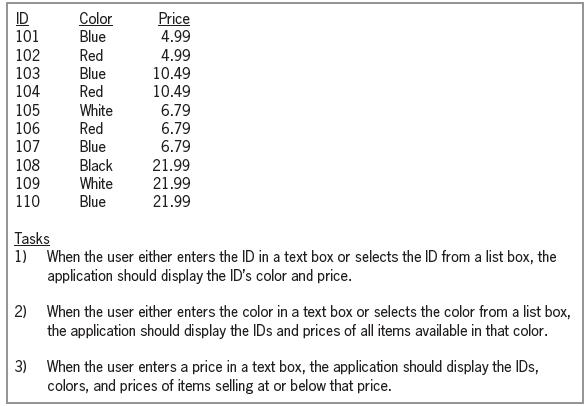
ID 101 Color Blue Price 4.99 102 103 Red Blue Red 4.99 10.49 10.49 104 105 106 107 White Red Blue 6.79 6.79 6.79 108 109 110 Black White Blue 21.99 21.99 21.99 Tasks 1) When the user either enters the ID in a text box or selects the ID from a list box, the application should display the ID's color and price. 2) When the user either enters the color in a text box or selects the color from a list box, the application should display the IDs and prices of all items available in that color. 3) When the user enters a price in a text box, the application should display the IDs, colors, and prices of items selling at or below that price.
Step by Step Solution
3.40 Rating (181 Votes )
There are 3 Steps involved in it
Microsoft Visual Studio Solution File Format Version 1200 Visual Studio 14 VisualStudioVersion 140225120 MinimumVisualStudioVersion 100402191 ProjectF184B08FC81C45F6A57F5ABD9991F28F Bindy Project Bind... View full answer

Get step-by-step solutions from verified subject matter experts
 Study Help