







Question: Create an empty Web Site application named Market and save it in the VB2015Chap12 folder. Add three new Web pages named Default.aspx, Apples.aspx, and Oranges.aspx
Create an empty Web Site application named Market and save it in the VB2015\Chap12 folder. Add three new Web pages named Default.aspx, Apples.aspx, and Oranges.aspx to the application. Change each DOCUMENT object’s Title property to Corner Market. Create Web pages similar to the ones shown in Figures 12-26 through 12-28. The images are stored in the Apple.png and Orange.png files contained in the VB2015\Chap12 folder. Save and then start the application. Close the browser window and then close the application.
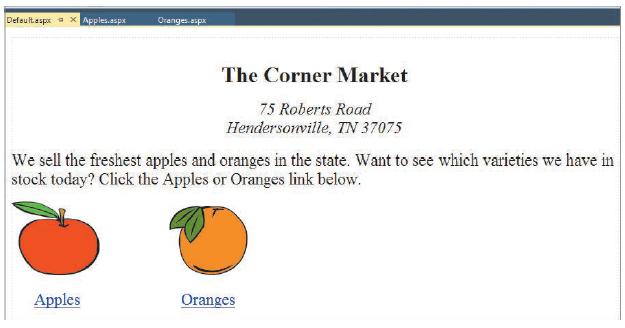
Defoultaspr a X Apples.aspx Oranges asp The Corner Market 75 Roberts Road Hendersonville, TN 37075 We sell the freshest apples and oranges in the state. Want to see which varieties we have in stock today? Click the Apples or Oranges link below. Apples Oranges
Step by Step Solution
3.43 Rating (153 Votes )
There are 3 Steps involved in it
Corner Market autostyle1 textalign center backgroundcolor FFFFFF autostyle2 textalign center color FF0000 backgroundcolor FF0000 autostyle3 background... View full answer

Get step-by-step solutions from verified subject matter experts
 Study Help