







Question: Create an empty Web Site application named ZipCode and save it in the VB2015Chap12 folder. Add a new Web page named Default.aspx to the application.
Create an empty Web Site application named ZipCode and save it in the VB2015\Chap12 folder. Add a new Web page named Default.aspx to the application. Change the DOCUMENT object’s Title property to Zip Code Verifier. Use Figure 12-47 as a guide when designing the Web page. Use a RequiredFieldValidator control to verify that the text box is not empty when the user presses the Enter key. Use a RegularExpressionValidator control to verify that the ZIP code is in the appropriate format. Save the application, and then start and test it. Close the browser window. Close the Code Editor window and then close the application.
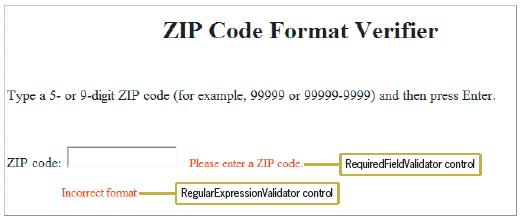
ZIP Code Format Verifier Type a 5- or 9-digit ZIP code (for example, 99999 or 99999-9999) and then press Enter. ZIP code: RequiredFieldValidator control Please enter a ZIP code. Incorrect format RegularExpressionValidator control
Step by Step Solution
3.41 Rating (160 Votes )
There are 3 Steps involved in it
Zip Code Verifier autostyle1 fontsize large ZIP Code Format Verifier Ty... View full answer

Get step-by-step solutions from verified subject matter experts
 Study Help