







Question: In this exercise, you modify the Carillo application from Exercise 13. Use Windows to make a copy of the Carillo Solution folder. Rename the copy
In this exercise, you modify the Carillo application from Exercise 13. Use Windows to make a copy of the Carillo Solution folder. Rename the copy Modified Carillo Solution. Open the Carillo Solution (Carillo Solution.sln) file contained in the Modified Carillo Solution folder. In the btnCalc_Click procedure, code the multiple-alternative selection structure using the Select Case statement rather than the If...Then...Else statement. Test the application seven times, using 125000, 165000, 15000, 165000.99, 200000, 50000, and 50000.01 as the annual sales.
Data From Exercise 13:
Open the VB2015\Chap05\Carillo Solution\Carillo Solution (Carillo Solution.sln) file. The txtSales control should accept only numbers, the period, and the Backspace key; code the appropriate procedure. The btnCalc_Click procedure calculates a 3.5% commission when the annual sales are greater than $165,000; otherwise, it calculates a 2.5% commission. Modify the procedure to use the commission rates shown below. Use the If...Then...Else statement to code the multiple-alternative selection structure. Test the application seven times, using 125000, 165000, 15000, 165000.99, 200000, 50000, and 50000.01 as the annual sales.
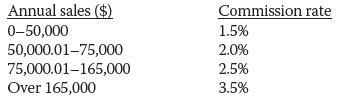
Annual sales ($) Commission rate 0-50,000 1.5% 50,000.0175,000 75,000.01165,000 Over 165,000 2.0% 2.5% 3.5%
Step by Step Solution
3.38 Rating (164 Votes )
There are 3 Steps involved in it
Microsoft Visual Studio Solution File Format Version 1200 Visual Studio 14 VisualStudioVersion 140225120 MinimumVisualStudioVersion 100402191 ProjectF184B08FC81C45F6A57F5ABD9991F28F Carillo Project Ca... View full answer

Get step-by-step solutions from verified subject matter experts
 Study Help