







Question: In this exercise, you modify the Mats-R-Us application from Exercise 9. Use Windows to make a copy of the Mats Solution folder. Rename the copy
In this exercise, you modify the Mats-R-Us application from Exercise 9. Use Windows to make a copy of the Mats Solution folder. Rename the copy Modified Mats Solution. Open the Mats Solution (Mats Solution.sln) file contained in the Modified Mats Solution folder. Change the function to an independent Sub procedure. Test the application appropriately.
Data From Exercise 9:
Create an application, using the following names for the solution and project, respectively: Mats Solution and Mats Project. Save the application in the VB2015\ Chap07 folder. Mats-R-Us sells three different type of mats: Standard ($99), Deluxe ($129), and Premium ($179). All of the mats are available in blue, red ($10 extra), and pink ($15 extra). There is also an extra $25 charge if the customer wants the mat to be foldable. The application’s interface is shown in Figure 7-55. Use a function to calculate the total additional charge (if any). Test the application appropriately.
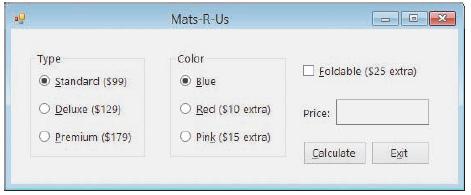
Mats-R-Us Color O Eoldable (S25 extra) standard (599) Blue Deluxe ($129) Red ($10 extra) Price: Premium ($179) O Pink ($15 extra) Calculate Exit
Step by Step Solution
3.39 Rating (161 Votes )
There are 3 Steps involved in it
Microsoft Visual Studio Solution File Format Version 1200 Visual Studio 2012 ProjectF184B08FC81C45F6A57F5ABD9991F28F Mats Project Mats ProjectMats Projectvbproj 6347172D605F4D2D9E6A68D2EC329CAB EndPro... View full answer

Get step-by-step solutions from verified subject matter experts
 Study Help