







Question: Open the Golf Solution (Golf Solution.sln) file contained in the VB2015Chap04Golf Solution-Ex18 folder. Test the application using the data shown in Exercise 17s Figure 5-39.
Open the Golf Solution (Golf Solution.sln) file contained in the VB2015\Chap04\Golf Solution-Ex18 folder. Test the application using the data shown in Exercise 17’s Figure 5-39. Modify the code to produce the correct results.
Data From Exercise 17:
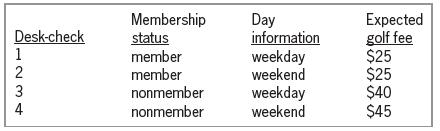
Membership status member member nonmember Day information weekday weekend Expected golf fee $25 $25 $40 $45 Desk-check weekday weekend nonmember 1234
Step by Step Solution
3.34 Rating (157 Votes )
There are 3 Steps involved in it
Microsoft Visual Studio Solution File Format Version 1200 Visual Studio 14 VisualStudioVersion 140220131 MinimumVisualStudioVersion 100402191 ProjectF184B08FC81C45F6A57F5ABD9991F28F Golf Project Golf ... View full answer

Get step-by-step solutions from verified subject matter experts
 Study Help