







Question: ! ! ! ! ! ! ! ! ! ! ! ! ! ! ! ! ! ! ! ! ! ! ! ! !
I NEED FULL ANSWER FOR EACH FILE. WORKING & TESTED CODE. REMEMBER
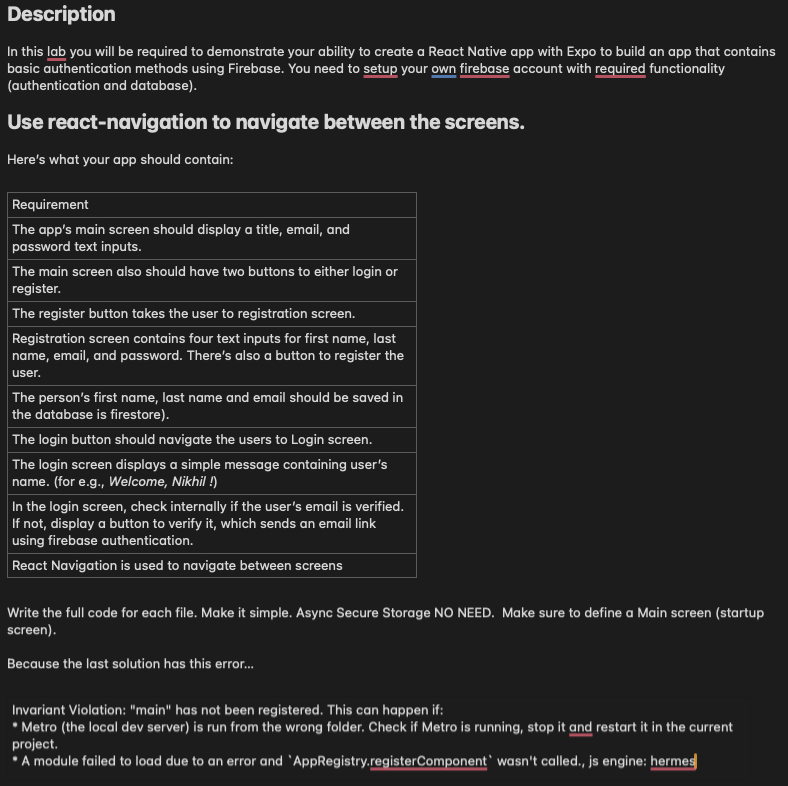
Description
In this lab you will be required to demonstrate your ability to create a React Native app with Expo to build an app that contains
basic authentication methods using Firebase. You need to setup your own firebase account with required functionality
authentication and database
Use reactnavigation to navigate between the screens.
Here's what your app should contain:
Requirement
The app's main screen should display a title, email, and
password text inputs.
The main screen also should have two buttons to either login or
register.
The register button takes the user to registration screen.
Registration screen contains four text inputs for first name, last
name, email, and password. There's also a button to register the
user.
The person's first name, last name and email should be saved in
the database is firestore
The login button should navigate the users to Login screen.
The login screen displays a simple message containing user's
name. for eg Welcome, Nikhil
In the login screen, check internally if the user's email is verified.
If not, display a button to verify it which sends an email link
using firebase authentication.
React Navigation is used to navigate between screens
Write the full code for each file. Make it simple. Async Secure Storage NO NEED. Make sure to define a Main screen startup
screen
Because the last solution has this error...
Invariant Violation: "main" has not been registered. This can happen if:
Metro the local dev server is run from the wrong folder. Check if Metro is running, stop it and restart it in the current
project.
"A module failed to load due to an error and 'AppRegistry.registerComponent' wasn't called., js engine: hermes
I NEED FULL ANSWER FOR EACH FILE. WORKING & TESTED CODE. REMEMBER
Step by Step Solution
There are 3 Steps involved in it
1 Expert Approved Answer
Step: 1 Unlock

Question Has Been Solved by an Expert!
Get step-by-step solutions from verified subject matter experts
Step: 2 Unlock
Step: 3 Unlock
 Study Help