







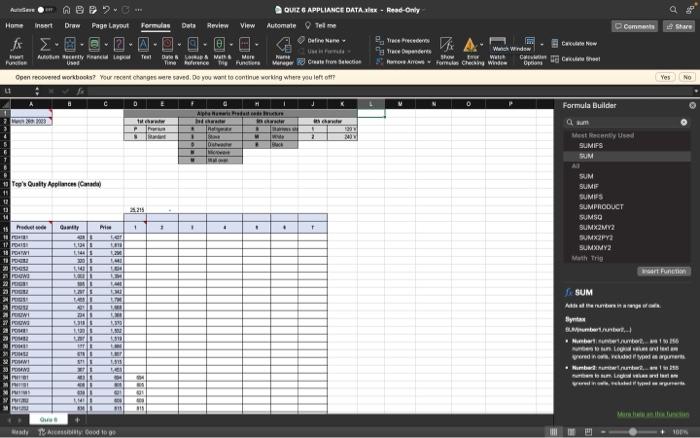
Question: (0) In E16: Use the product code breakdown provided at the top of the worksheet as a guide to create appropriate nested functions to complete
(0)
In E16: Use the product code breakdown provided at the top of the worksheet as a guide to create appropriate nested functions to complete the following: If the product is a Standard Dishwasher insert the product Quantity, otherwise the cell should be blank. Copy the function down to the other cells in the column. In cell E14 use the appropriate function to calculate the total from the results. Format comma style, 0 decimal.
In F16: Use the product code breakdown provided at the top of the worksheet as a guide to create appropriate nested functions to complete the following:If the product is a Black, 240 V, Wall Oven insert the product Quantity, otherwise the cell should be blank. Copy the function down to the other cells in the column.In cell F14 use the appropriate function to calculate the total from the results. Format comma style, 0 decimal.
In G16: Use the product code breakdown provided at the top of the worksheet as a guide to create appropriate nested functions to complete the following:If the product is a Premium, Stainless Steel, 120 V, Microwave insert the product Price, otherwise the cell should be blank. Copy the function down to the other cells in the column.In cell G14 use the appropriate function to calculate the total from the results. Format comma style, 0 decimal.
In H16: Use the product code breakdown provided at the top of the worksheet as a guide to create appropriate nested functions to complete the following:If the product is a Premium, Black, Dishwasher or Stove insert the product Quantity, otherwise the cell should be blank. Copy the function down to the other cells in the column. In cell H14 use the appropriate function to calculate the total from the results. Format comma style, 0 decimal.
In I16: Use the product code breakdown provided at the top of the worksheet as a guide to create appropriate nested functions to complete the following: If the product is a Black or White, 240 V, Refrigerator or Stove insert the product Price, otherwise the cell should be blank. Copy the function down to the other cells in the column. In cell I14 use the appropriate function to calculate the total from the results. Format comma style, 0 decimal.
In J16: Use the product code breakdown provided at the top of the worksheet as a guide to create appropriate nested functions to complete the following: If the product is Black or Stainless Steel, Dishwasher or Microwave, 120 V or Premium insert the product Price, otherwise the cell should be blank. Copy the function down to the other cells in the column. In cell J14 use the appropriate function to calculate the total from the results. Format comma style, 0 decimal.
Tceis Qusttr Repilntees (Canada)
Step by Step Solution
There are 3 Steps involved in it
1 Expert Approved Answer
Step: 1 Unlock

Question Has Been Solved by an Expert!
Get step-by-step solutions from verified subject matter experts
Step: 2 Unlock
Step: 3 Unlock
 Study Help