





Question: In E 16 : Use the product code breakdown provided at the top of the worksheet as a guide to create appropriate nested functions to

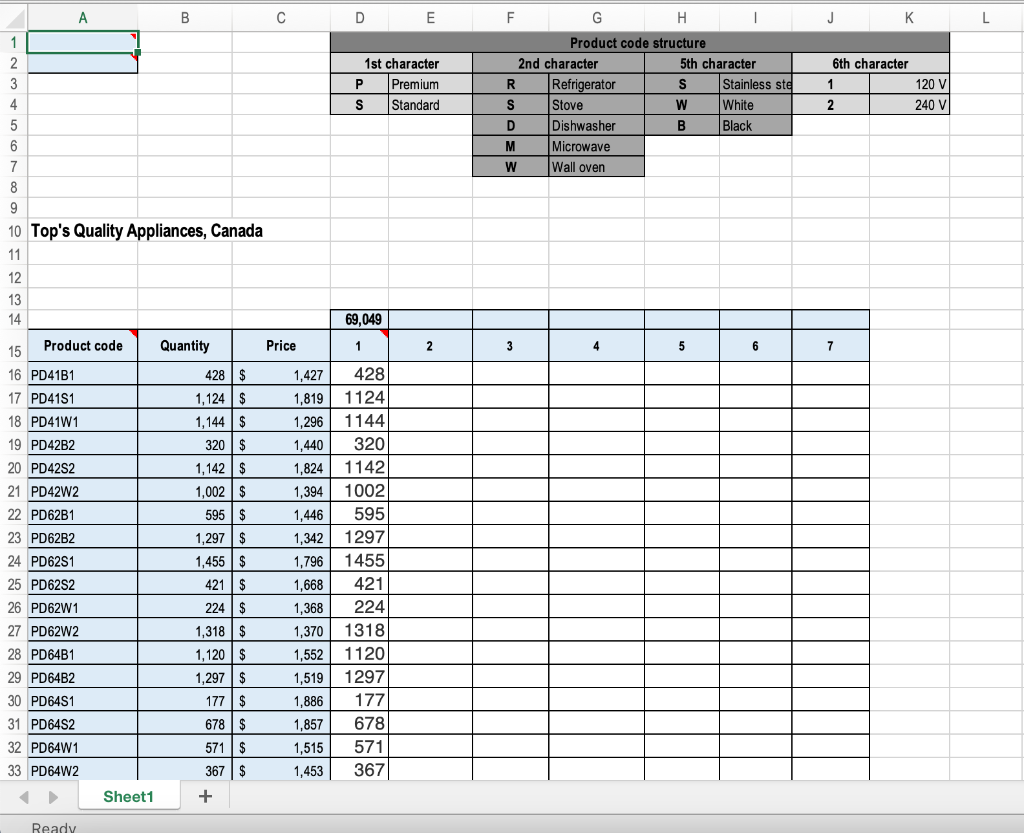
In E16: Use the product code breakdown provided at the top of the worksheet as a guide to create appropriate nested functions to complete the following:

If the product is Stainless Steel and 240 V insert the product Quantity, otherwise the cell should be blank. Copy the function down to the other cells in the column.

In cell E14 use the appropriate function to calculate the total from the results. Format comma style, 0 decimal.
In E 16 : Use the product code breakdown provided

B D E F G H 1 J K L 1 2 3 4 5 1st character P Premium S Standard Product code structure 2nd character 5th character R Refrigerator S Stainless ste S Stove W White D Dishwasher B Black M Microwave W Wall oven 6th character 1 2 120 V 240 V 6 7 8 9 10 Top's Quality Appliances, Canada 11 12 13 14 69,049 Product code Quantity Price 1 2 3 4 5 15 6 7 16 PD41B1 17 PD41S1 1,427 1,819 1,296 1,440 428 $ 1,124 $ 1,144 $ 320$ 1,142 $ 1,002 $ 595$ 1,297 $ 18 PD41W1 19 PD42B2 20 PD4252 21 PD42W2 22 PD62B1 23 PD62B2 24 PD6251 25 PD6252 26 PD62W1 1,824 1,455 $ 428 1124 1144 320 1142 1002 595 1297 1455 421 224 1318 1120 1297 177 678 571 367 27 PD62W2 1,394 1,446 1,342 1,796 1,668 1,368 1,370 1,552 1,519 1,886 1,857 1,515 1,453 421 $ 224 $ 1,318$ 1,120$ 1,297 $ 177 $ 678$ 571 $ 28 PD64B1 29 PD64B2 30 PD6451 31 PD6452 32 PD64W1 33 PD64W2 367 $ Sheet1 + Ready

Step by Step Solution

There are 3 Steps involved in it

1 Expert Approved Answer
Step: 1 Unlock blur-text-image

Question Has Been Solved by an Expert!

Get step-by-step solutions from verified subject matter experts

Step: 2 Unlock
Step: 3 Unlock

Students Have Also Explored These Related General Management Questions!