







Question: 0 Start Excel. Open Exp19 Excel_AppCapstone Comp.xlsx. Grader has automatically added your last name to the beginning of the filename. 2 2 Fill the range
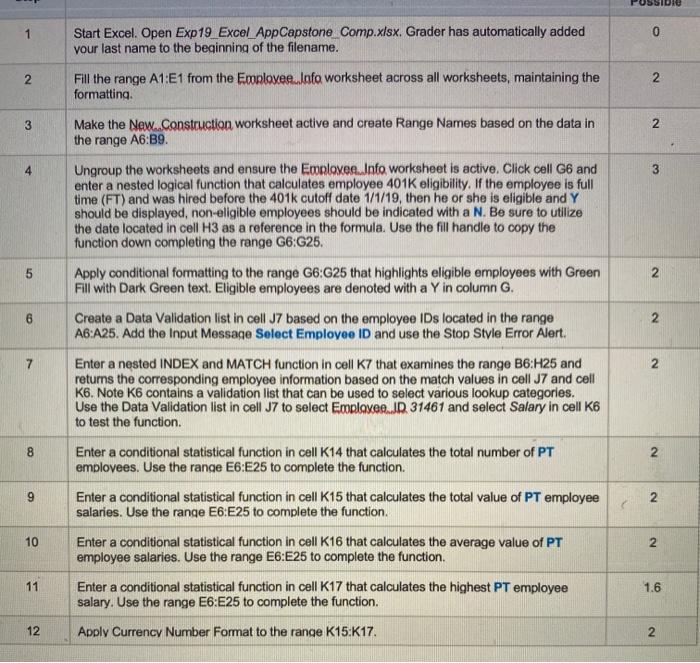
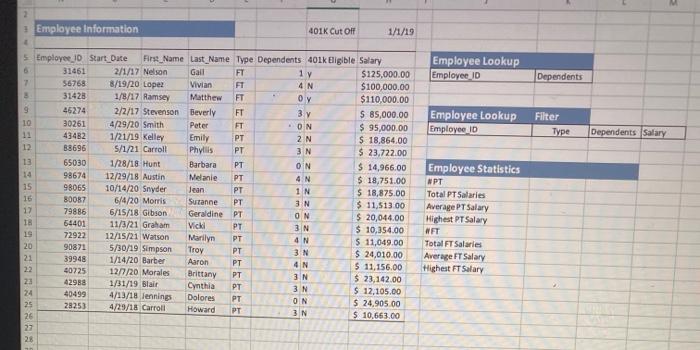
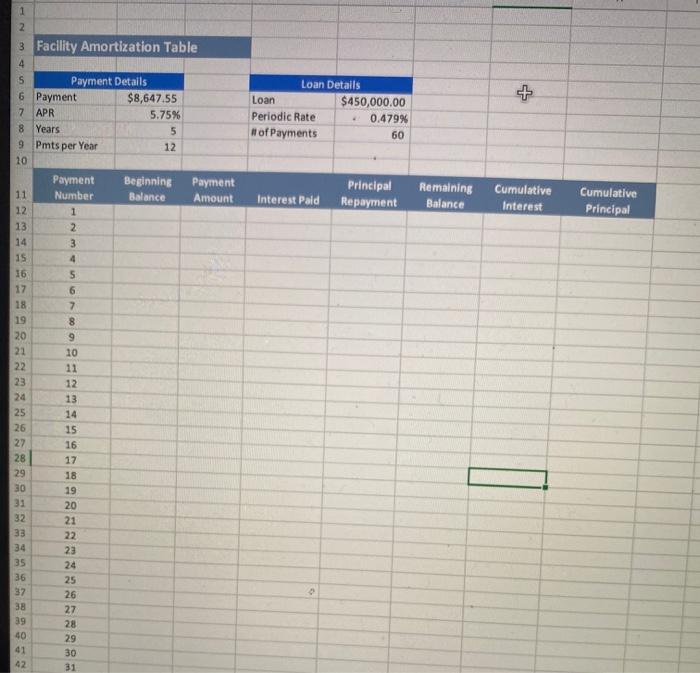
0 Start Excel. Open Exp19 Excel_AppCapstone Comp.xlsx. Grader has automatically added your last name to the beginning of the filename. 2 2 Fill the range A1:E1 from the Employee.Iafo worksheet across all worksheets, maintaining the formatting 3 N Make the New..Construction worksheet active and create Range Names based on the data in the range A6:39 4 3 5 2 Ungroup the worksheets and ensure the Employee.Info worksheet is active. Click cell G6 and enter a nested logical function that calculates employee 401K eligibility. If the employee is full time (FT) and was hired before the 401k cutoff date 1/1/19, then he or she is eligible and Y should be displayed, non-eligible employees should be indicated with a N. Be sure to utilize the date located in cell H3 as a reference in the formula. Use the fill handle to copy the function down completing the range G6:G25. Apply conditional formatting to the range G6:G25 that highlights eligible employees with Green Fill with Dark Green text. Eligible employees are denoted with a Y in column G. Create a Data Validation list in cell J7 based on the employee IDs located in the range A6:A25. Add the Input Message Select Employee ID and use the Stop Style Error Alert. Enter a nested INDEX and MATCH function in cell K7 that examines the range B6:H25 and returns the corresponding employee information based on the match values in cell J7 and cell K6 Note K6 contains a validation list that can be used to select various lookup categories. Use the Data Validation list in cell J7 to select Employee JD 31461 and select Salary in cell K6 to test the function. 6 2 7 2 8 2 9 2 Enter a conditional statistical function in cell K14 that calculates the total number of PT employees. Use the range E6:25 to complete the function Enter a conditional statistical function in cell K15 that calculates the total value of PT employee salaries. Use the range E6:E25 to complete the function. Enter a conditional statistical function in cell K16 that calculates the average value of PT employee salaries. Use the range E6:E25 to complete the function. Enter a conditional statistical function in cell K17 that calculates the highest PT employee salary. Use the range E6:E25 to complete the function. 10 2 11 1.6 12 Apply Currency Number Format to the range K15:K17. 2 2 Employee Information 401K Cut Off 1/1/19 Employee Lookup Employee ID Dependents Employee Lookup Employee ID Filter Type Dependents Salary 5 Employee 10 Start Date First Name Last_Name Type Dependents 401k Eligible Salary 31461 2/1/17 Nelson Gail FT 1 y $125,000.00 7 56768 8/19/20 Lopez Vivian FT 4 N $100,000.00 3 31428 1/8/17 Ramsey Matthew FT Oy $110,000.00 9 46274 2/2/17 Stevenson Beverly FT 3 v $ 85,000.00 10 30261 4/29/20 Smith Peter FT ON $ 95,000.00 43482 1/21/19 Kelley Emily PT 2N $ 18,864,00 12 88696 5/1/21 Carroll Phyllis PT 3 N $ 23,722.00 13 65030 1/28/18 Hunt Barbara PT ON $ 14,966.00 14 98674 12/29/18 Austin Melanie PT 4 N $ 18,751.00 15 98065 10/14/20 Snyder Jean PT 1 N $ 18,875.00 16 6/4/20 Morris Sutanne PT 3N $ 11,51300 17 79886 6/15/18 Gibson Geraldine PT ON $ 20,044.00 18 54401 11/3/21 Graham Vicki PT 3 N $ 10,354.00 19 72922 12/15/21 Watson Marilyn PT 4 N $ 11,049.00 20 90871 5/30/19 Simpson PT 3 N $ 24,010.00 21 39948 1/14/20 Barber Aaron PT 4 N $ 11,156,00 22 40725 121/20 Morales Brittany PT 3 N $ 23,142.00 23 42988 1/31/19 Blair Cynthia PT 3 N $ 12,105.00 24 40499 4/13/18 Jennings Dolores PT ON $ 24,905.00 25 28253 4/29/18 Carroll Howard PT 3N 5 10.663.00 26 27 28 80087 Employee Statistics NPT Total PT Salaries Average PT Salary Highest PT Salary FT Total FT Salaries Average FT Salary Highest FT Salary Troy Loan Details Loan $450,000.00 Periodic Rate 0.479% of Payments 60 Interest Pald Principal Repayment Remaining Balance Cumulative Interest Cumulative Principal 1 2 3 Facility Amortization Table 4 5 Payment Details 6 Payment $8,647.55 7 APR 5.75% 8 Years 5 9 Pmts per Year 12 10 Payment Beginning Payment 11 Number Balance Amount 12 1 13 2 14 3 15 4 16 5 17 6 18 7 19 8 20 9 21 10 22 11 23 12 24 13 25 14 26 15 27 16 28 17 29 18 30 19 31 20 32 21 33 22 34 23 35 24 36 37 26 38 27 39 28 40 29 41 30 42 31 25 0 Start Excel. Open Exp19 Excel_AppCapstone Comp.xlsx. Grader has automatically added your last name to the beginning of the filename. 2 2 Fill the range A1:E1 from the Employee.Iafo worksheet across all worksheets, maintaining the formatting 3 N Make the New..Construction worksheet active and create Range Names based on the data in the range A6:39 4 3 5 2 Ungroup the worksheets and ensure the Employee.Info worksheet is active. Click cell G6 and enter a nested logical function that calculates employee 401K eligibility. If the employee is full time (FT) and was hired before the 401k cutoff date 1/1/19, then he or she is eligible and Y should be displayed, non-eligible employees should be indicated with a N. Be sure to utilize the date located in cell H3 as a reference in the formula. Use the fill handle to copy the function down completing the range G6:G25. Apply conditional formatting to the range G6:G25 that highlights eligible employees with Green Fill with Dark Green text. Eligible employees are denoted with a Y in column G. Create a Data Validation list in cell J7 based on the employee IDs located in the range A6:A25. Add the Input Message Select Employee ID and use the Stop Style Error Alert. Enter a nested INDEX and MATCH function in cell K7 that examines the range B6:H25 and returns the corresponding employee information based on the match values in cell J7 and cell K6 Note K6 contains a validation list that can be used to select various lookup categories. Use the Data Validation list in cell J7 to select Employee JD 31461 and select Salary in cell K6 to test the function. 6 2 7 2 8 2 9 2 Enter a conditional statistical function in cell K14 that calculates the total number of PT employees. Use the range E6:25 to complete the function Enter a conditional statistical function in cell K15 that calculates the total value of PT employee salaries. Use the range E6:E25 to complete the function. Enter a conditional statistical function in cell K16 that calculates the average value of PT employee salaries. Use the range E6:E25 to complete the function. Enter a conditional statistical function in cell K17 that calculates the highest PT employee salary. Use the range E6:E25 to complete the function. 10 2 11 1.6 12 Apply Currency Number Format to the range K15:K17. 2 2 Employee Information 401K Cut Off 1/1/19 Employee Lookup Employee ID Dependents Employee Lookup Employee ID Filter Type Dependents Salary 5 Employee 10 Start Date First Name Last_Name Type Dependents 401k Eligible Salary 31461 2/1/17 Nelson Gail FT 1 y $125,000.00 7 56768 8/19/20 Lopez Vivian FT 4 N $100,000.00 3 31428 1/8/17 Ramsey Matthew FT Oy $110,000.00 9 46274 2/2/17 Stevenson Beverly FT 3 v $ 85,000.00 10 30261 4/29/20 Smith Peter FT ON $ 95,000.00 43482 1/21/19 Kelley Emily PT 2N $ 18,864,00 12 88696 5/1/21 Carroll Phyllis PT 3 N $ 23,722.00 13 65030 1/28/18 Hunt Barbara PT ON $ 14,966.00 14 98674 12/29/18 Austin Melanie PT 4 N $ 18,751.00 15 98065 10/14/20 Snyder Jean PT 1 N $ 18,875.00 16 6/4/20 Morris Sutanne PT 3N $ 11,51300 17 79886 6/15/18 Gibson Geraldine PT ON $ 20,044.00 18 54401 11/3/21 Graham Vicki PT 3 N $ 10,354.00 19 72922 12/15/21 Watson Marilyn PT 4 N $ 11,049.00 20 90871 5/30/19 Simpson PT 3 N $ 24,010.00 21 39948 1/14/20 Barber Aaron PT 4 N $ 11,156,00 22 40725 121/20 Morales Brittany PT 3 N $ 23,142.00 23 42988 1/31/19 Blair Cynthia PT 3 N $ 12,105.00 24 40499 4/13/18 Jennings Dolores PT ON $ 24,905.00 25 28253 4/29/18 Carroll Howard PT 3N 5 10.663.00 26 27 28 80087 Employee Statistics NPT Total PT Salaries Average PT Salary Highest PT Salary FT Total FT Salaries Average FT Salary Highest FT Salary Troy Loan Details Loan $450,000.00 Periodic Rate 0.479% of Payments 60 Interest Pald Principal Repayment Remaining Balance Cumulative Interest Cumulative Principal 1 2 3 Facility Amortization Table 4 5 Payment Details 6 Payment $8,647.55 7 APR 5.75% 8 Years 5 9 Pmts per Year 12 10 Payment Beginning Payment 11 Number Balance Amount 12 1 13 2 14 3 15 4 16 5 17 6 18 7 19 8 20 9 21 10 22 11 23 12 24 13 25 14 26 15 27 16 28 17 29 18 30 19 31 20 32 21 33 22 34 23 35 24 36 37 26 38 27 39 28 40 29 41 30 42 31 25
Step by Step Solution
There are 3 Steps involved in it

Get step-by-step solutions from verified subject matter experts
 Study Help