







Question: with an excel chart with an excel chart 3 . 11 D 18 Sta Wh Sheena 170, AT Copy Mive them O Change the of
with an excel chart 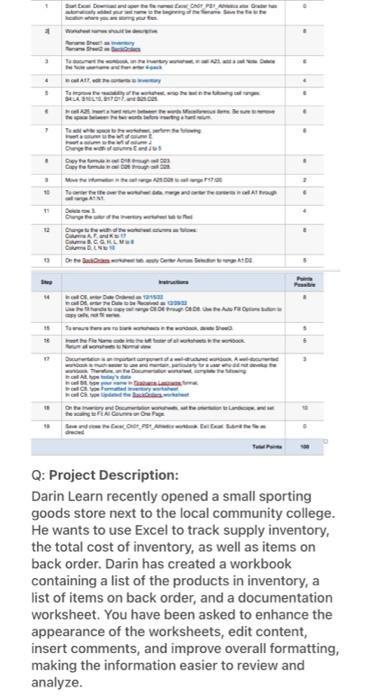
with an excel chart 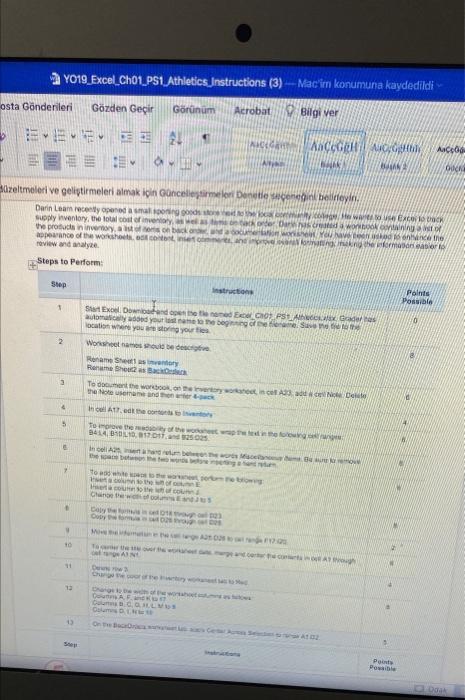
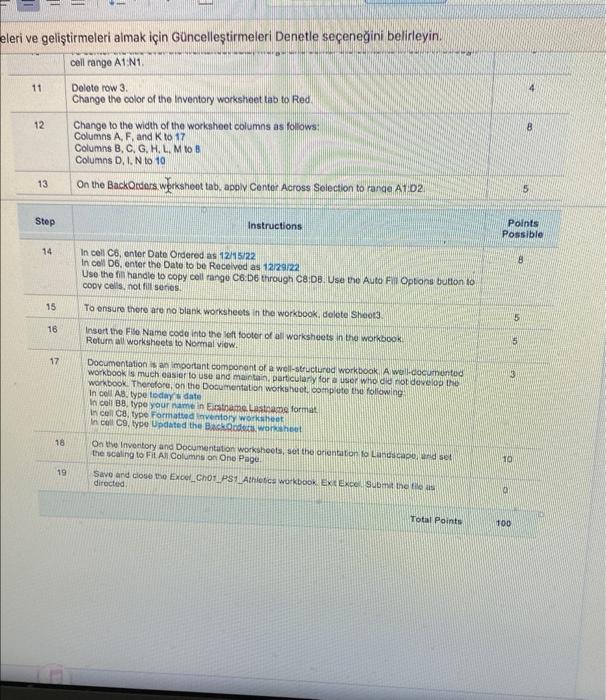
3 . 11 D 18 Sta Wh Sheena 170, AT Copy Mive them O Change the of the al son Ourense with the wor ECHT PA y the the the wing The Mes 17:00 CEDEU the Auto Op F Cype A Brough * . . 2 . 4 " Perk Prost 6 the aw mory and Do H FA Cunes One Page 16 Save and the Ch dreced Q: Project Description: Darin Learn recently opened a small sporting goods store next to the local community college. He wants to use Excel to track supply inventory, the total cost of inventory, as well as items on back order. Darin has created a workbook containing a list of the products in inventory, a list of items on back order, and a documentation worksheet. You have been asked to enhance the appearance of the worksheets, edit content, insert comments, and improve overall formatting, making the information easier to review and analyze. YO19 Excel Ch01 PS1 Athletics Instructions (3)-Mac'im konumuna kaydedildi osta Gnderileri Gzden Geir Grnm Acrobat Bilgi ver ER EN AaCcGgH AGH Ancode Acant Atan BANK BULAN 2 OUCK - 11- zeltmeleri ve gelitirmeleri almak iin Gncelletirmeleri Denetie seeneini belirleyin. to the local coetanity cong He wants to use Exco to track tack order Dari has created a workbook containing Lof Darin Leam recently opened a small sporing goods supply inventory, the total cost of inventory, as well the products in inventory, a list of ents on back o appearance of the worksheets, act content, inset review and analyze workshet. You have been asked to enhance the bn ng the information easier to Steps to Perform: Step Instructions Points Possible 1 10 Start Excel, Download and open the the named Excel Chot PS1 Athletickx Grader has automatically added your last name the beginning of the fiename. Save the the to the location where you are storing your fies Worksheet names should be descriptive Rename Sheet1 as inventory Rename Sheet as Back To document the workbook, on the inventory workaneet, in cel A23, add a cell Not De the Note username and then enter 4-pack 4 In cell A17.edt the contents to inventory To improve the readability of the worksheet wap the text in the following anges 9414, B10110, 917017, and 925025 In cell A2, insert a hard retum between the words Miscellano bene Bove the space between the two words before inserting and r 7 to add white so to the net per the towing et column to the of serta column to the left of cou Change the s olunandANS Copy the fo Copy the formul Move 12 To c mage and center the contin o A1 through on Den row 3 M Columns Calum 2 3 5 16 . 9 10 12 13 Step 1018 tough 23 trough ng A2 028 to GILMUS S The Baceri & C $ Paints Possible 8 d 140 eleri ve gelitirmeleri almak iin Gncelletirmeleri Denetle seeneini belirleyin. cell range A1:N1. 11 Delete row 3. Change the color of the Inventory worksheet tab to Red. Change to the width of the worksheet columns as follows: Columns A, F, and K to 17 Columns B, C, G, H, L, M to B Columns D. I. N to 10. On the BackOrders worksheet tab, apply Center Across Selection to range A1:02 Instructions In cell C6, enter Date Ordered as 12/15/22 In cell D6, enter the Date to be Received as 12/29/22 Use the fill handle to copy cell range C6:06 through C8:DB. Use the Auto Fill Options button to copy cells, not fill series. 15 To ensure there are no blank worksheets in the workbook, delete Sheet3. Insert the File Name code into the left footer of all worksheets in the workbook. Return all worksheets to Normal view. Documentation is an important component of a well-structured workbook. A well-documented workbook is much easier to use and maintain, particularly for a user who did not develop the workbook. Therefore, on the Documentation worksheet, complete the following: In cell AB, type today's date In cell B8, type your name in Erstname Lastname format In cell CB, type Formatted Inventory worksheet In cell C9, type Updated the BackOcders, worksheet 18 On the Inventory and Documentation worksheets, set the orientation to Landscape, and set the scaling to Fit All Columns on One Page. 19 Save and close the Excel Ch01 PS1 Athletics workbook Exit Excel Submit the file as directed. Total Points 12 13 Step 14 16 17 5 Points Possible 8 15 5 12 8 10 10 100 3 . 11 D 18 Sta Wh Sheena 170, AT Copy Mive them O Change the of the al son Ourense with the wor ECHT PA y the the the wing The Mes 17:00 CEDEU the Auto Op F Cype A Brough * . . 2 . 4 " Perk Prost 6 the aw mory and Do H FA Cunes One Page 16 Save and the Ch dreced Q: Project Description: Darin Learn recently opened a small sporting goods store next to the local community college. He wants to use Excel to track supply inventory, the total cost of inventory, as well as items on back order. Darin has created a workbook containing a list of the products in inventory, a list of items on back order, and a documentation worksheet. You have been asked to enhance the appearance of the worksheets, edit content, insert comments, and improve overall formatting, making the information easier to review and analyze. YO19 Excel Ch01 PS1 Athletics Instructions (3)-Mac'im konumuna kaydedildi osta Gnderileri Gzden Geir Grnm Acrobat Bilgi ver ER EN AaCcGgH AGH Ancode Acant Atan BANK BULAN 2 OUCK - 11- zeltmeleri ve gelitirmeleri almak iin Gncelletirmeleri Denetie seeneini belirleyin. to the local coetanity cong He wants to use Exco to track tack order Dari has created a workbook containing Lof Darin Leam recently opened a small sporing goods supply inventory, the total cost of inventory, as well the products in inventory, a list of ents on back o appearance of the worksheets, act content, inset review and analyze workshet. You have been asked to enhance the bn ng the information easier to Steps to Perform: Step Instructions Points Possible 1 10 Start Excel, Download and open the the named Excel Chot PS1 Athletickx Grader has automatically added your last name the beginning of the fiename. Save the the to the location where you are storing your fies Worksheet names should be descriptive Rename Sheet1 as inventory Rename Sheet as Back To document the workbook, on the inventory workaneet, in cel A23, add a cell Not De the Note username and then enter 4-pack 4 In cell A17.edt the contents to inventory To improve the readability of the worksheet wap the text in the following anges 9414, B10110, 917017, and 925025 In cell A2, insert a hard retum between the words Miscellano bene Bove the space between the two words before inserting and r 7 to add white so to the net per the towing et column to the of serta column to the left of cou Change the s olunandANS Copy the fo Copy the formul Move 12 To c mage and center the contin o A1 through on Den row 3 M Columns Calum 2 3 5 16 . 9 10 12 13 Step 1018 tough 23 trough ng A2 028 to GILMUS S The Baceri & C $ Paints Possible 8 d 140 eleri ve gelitirmeleri almak iin Gncelletirmeleri Denetle seeneini belirleyin. cell range A1:N1. 11 Delete row 3. Change the color of the Inventory worksheet tab to Red. Change to the width of the worksheet columns as follows: Columns A, F, and K to 17 Columns B, C, G, H, L, M to B Columns D. I. N to 10. On the BackOrders worksheet tab, apply Center Across Selection to range A1:02 Instructions In cell C6, enter Date Ordered as 12/15/22 In cell D6, enter the Date to be Received as 12/29/22 Use the fill handle to copy cell range C6:06 through C8:DB. Use the Auto Fill Options button to copy cells, not fill series. 15 To ensure there are no blank worksheets in the workbook, delete Sheet3. Insert the File Name code into the left footer of all worksheets in the workbook. Return all worksheets to Normal view. Documentation is an important component of a well-structured workbook. A well-documented workbook is much easier to use and maintain, particularly for a user who did not develop the workbook. Therefore, on the Documentation worksheet, complete the following: In cell AB, type today's date In cell B8, type your name in Erstname Lastname format In cell CB, type Formatted Inventory worksheet In cell C9, type Updated the BackOcders, worksheet 18 On the Inventory and Documentation worksheets, set the orientation to Landscape, and set the scaling to Fit All Columns on One Page. 19 Save and close the Excel Ch01 PS1 Athletics workbook Exit Excel Submit the file as directed. Total Points 12 13 Step 14 16 17 5 Points Possible 8 15 5 12 8 10 10 100 Step by Step Solution
There are 3 Steps involved in it
1 Expert Approved Answer
Step: 1 Unlock

Question Has Been Solved by an Expert!
Get step-by-step solutions from verified subject matter experts
Step: 2 Unlock
Step: 3 Unlock
 Study Help