







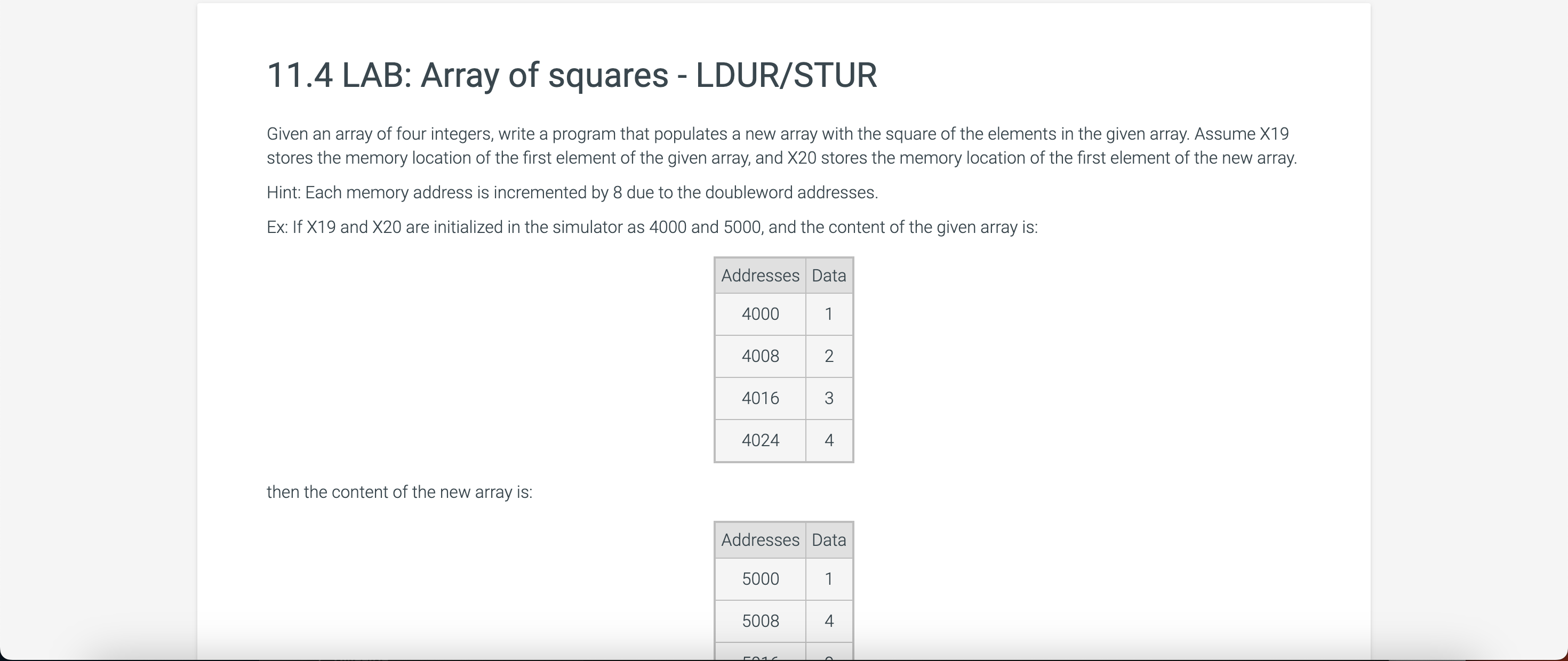
Question: 1 1 . 4 LAB: Array of squares - LDUR / STUR Given an array of four integers, write a program that populates a new
LAB: Array of squares LDURSTUR
Given an array of four integers, write a program that populates a new array with the square of the elements in the given array. Assume X
stores the memory location of the first element of the given array, and X stores the memory location of the first element of the new array.
Hint: Each memory address is incremented by due to the doubleword addresses.
Ex: If X and X are initialized in the simulator as and and the content of the given array is:
then the content of the new array is: stores the memory location of the first element of the given array, and X stores the memory location of the first element of the new array.
Hint: Each memory address is incremented by due to the doubleword addresses.
Ex: If X and X are initialized in the simulator as and and the content of the given array is:
then the content of the new array is:
Note: Use the button under the Registers and Memory display to initialize X X and the four memory locations of the given array. Note: Use the button under the Registers and Memory display to initialize X X and the four memory locations of the given array.
Load default template...
Assembly
Line Type your code here.
Line Do not initialize X and X here.
Line Use the button under the Register
Line
Registers
Memory
Each has value Each has value
RUN
More options This zyLab platform supports the following LEGv instructions:
Arithmetic: ADD, ADDS, ADDI, ADDIS, MUL, SDIV, SUB, SUBS, SUBI, SUBIS
Data transfer: LDURB, LDUR, LDURH, LDURSW, MOVK, MOVZ, STURB, STUR, STURH, STURW
Logical: AND, ANDI, EOR, EORI, ORR, ORRI, LSL LSR
Conditional branch: BHS BLO BEQ
BGT
BGE BHI
BLT BLE
BLS BMI
BNE
BVCBVS
BPL CBZ CBNZ
Unconditional jump: B BL BR
WARNING: Use only the following code commands in the last image, so do not use MOV for example!
Step by Step Solution
There are 3 Steps involved in it
1 Expert Approved Answer
Step: 1 Unlock

Question Has Been Solved by an Expert!
Get step-by-step solutions from verified subject matter experts
Step: 2 Unlock
Step: 3 Unlock
 Study Help