







Question: 1 2 3 4 Simulation 5 6 7 8 9 10 11 12 13 6/14/22 20 21 22 23 24 25 26 Random Number
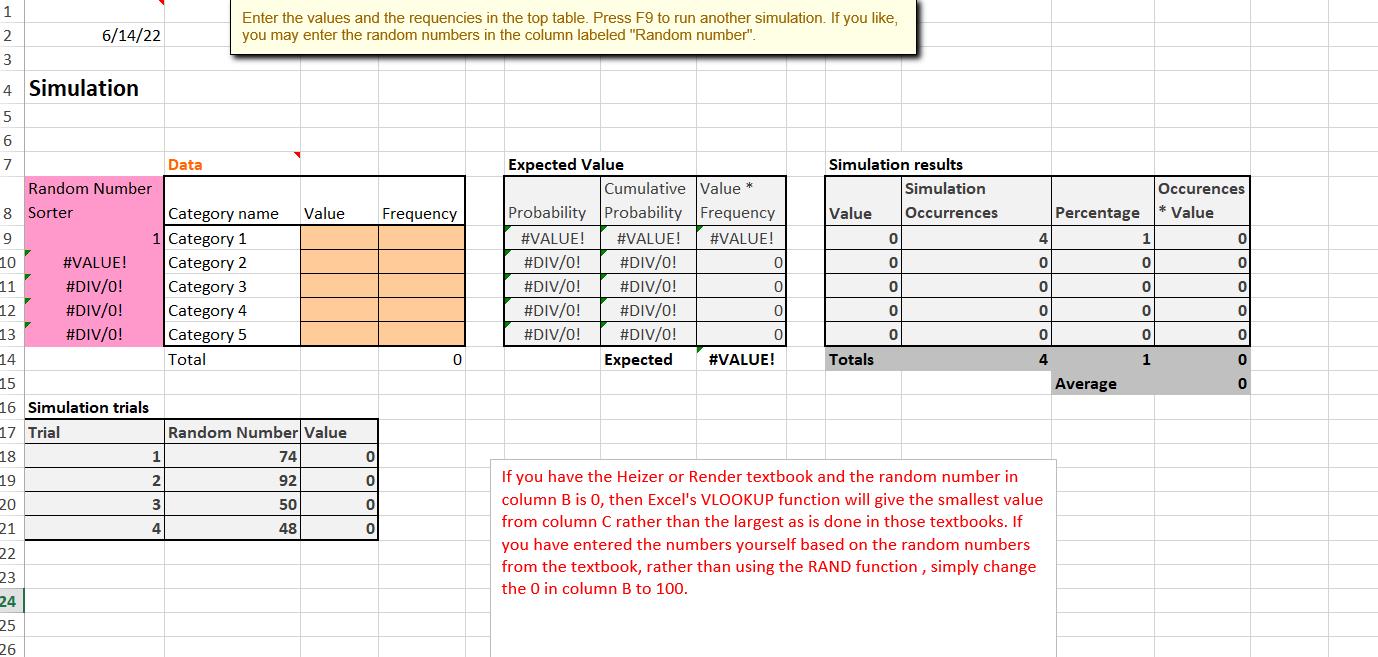
1 2 3 4 Simulation 5 6 7 8 9 10 11 12 13 6/14/22 20 21 22 23 24 25 26 Random Number Sorter #VALUE! #DIV/0! #DIV/0! #DIV/0! 14 15 16 Simulation trials 17 Trial 18 19 Data 1 2 3 4 Enter the values and the requencies in the top table. Press F9 to run another simulation. If you like, you may enter the random numbers in the column labeled "Random number". Category name Value 1 Category 1 Category 2 Category 3 Category 4 Category 5 Total Random Number Value 74 92 50 48 0 0 0 0 Frequency 0 Expected Value Cumulative Value * Probability Probability Frequency #VALUE! #VALUE! #VALUE! #DIV/0! #DIV/0! #DIV/0! #DIV/0! #DIV/0! #DIV/0! #DIV/0! #DIV/0! Expected 0 0 0 0 #VALUE! Simulation results Simulation Occurrences Value Totals 0 0 0 0 0 4 0 0 0 0 4 If you have the Heizer or Render textbook and the random number in column B is 0, then Excel's VLOOKUP function will give the smallest value from column C rather than the largest as is done in those textbooks. If you have entered the numbers yourself based on the random numbers from the textbook, rather than using the RAND function, simply change the 0 in column B to 100. Percentage Average 1 0 0 0 0 1 Occurences * Value 0 0 0 0 0 0 0
Step by Step Solution
3.46 Rating (166 Votes )
There are 3 Steps involved in it
SOLUTION It looks like you have a table set up with the following columns 1 Category name 2 ... View full answer

Get step-by-step solutions from verified subject matter experts
 Study Help