







Question: 1 (6 pts.). Write an HTML document prob1.html, which is placed below your | document root, and whose initial rendering is shown in the screenshot
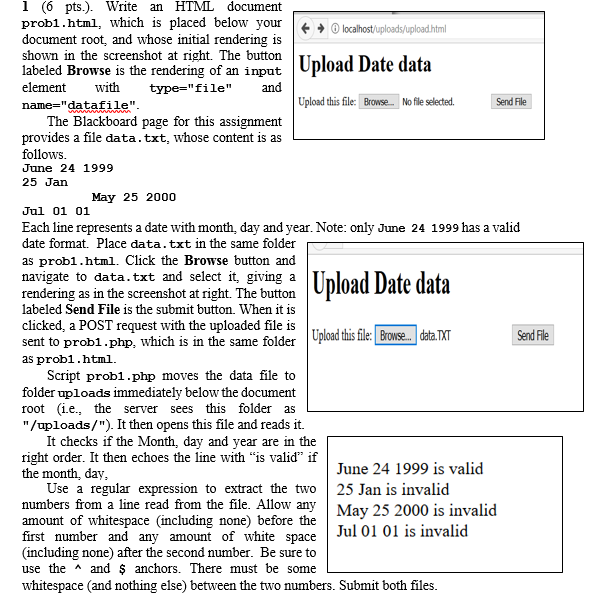
1 (6 pts.). Write an HTML document prob1.html, which is placed below your | document root, and whose initial rendering is shown in the screenshot at right. The button labeled Browse is the rendering of an input element ith type-"file" and name=" datafi le" Upload Date data Upload this file:Browse No file selected. Send File The Blackboard page for this assignment provides a file data.txt, whose content is as follows June 24 1999 25 Jan May 25 2000 Jul 01 01 Each line represents a date with month, day and year. Note: only June 24 1999 has a valid date format. Place data.txt in the same folder as prob1.html. Click the Browse button and navigate to data.txt and select it, giving a TT rendering as in the screenshot at right. The button labeled Send File is the submit button. When it is clicked, a POST request with the uploaded file is ate data sent to probl.php, which is in the same folder Uploadthis iwe. ata XT Send File as prob1.html. Script probl.php moves the data file to folder uploads immediately below the document root (i.e., the server sees this folder as "/uploads/"). It then opens this file and reads it. It checks if the Month, day and year are in the right order. It then echoes the line with "is valid" if the month, day June 24 1999 is valid Use a regular expression to extract the two25 Jan is invalid numbers from a line read from the file. Allow any Mav 25 2000 is invalid amount of whitespace (including none) before the first number and (including none) after the second number. Be sure to use the A and $ anchors. There must be some whitespace (and nothing else) between the two numbers. Submit both files any amount of white spaceJul 01 01 is invalid
Step by Step Solution
There are 3 Steps involved in it

Get step-by-step solutions from verified subject matter experts
 Study Help