







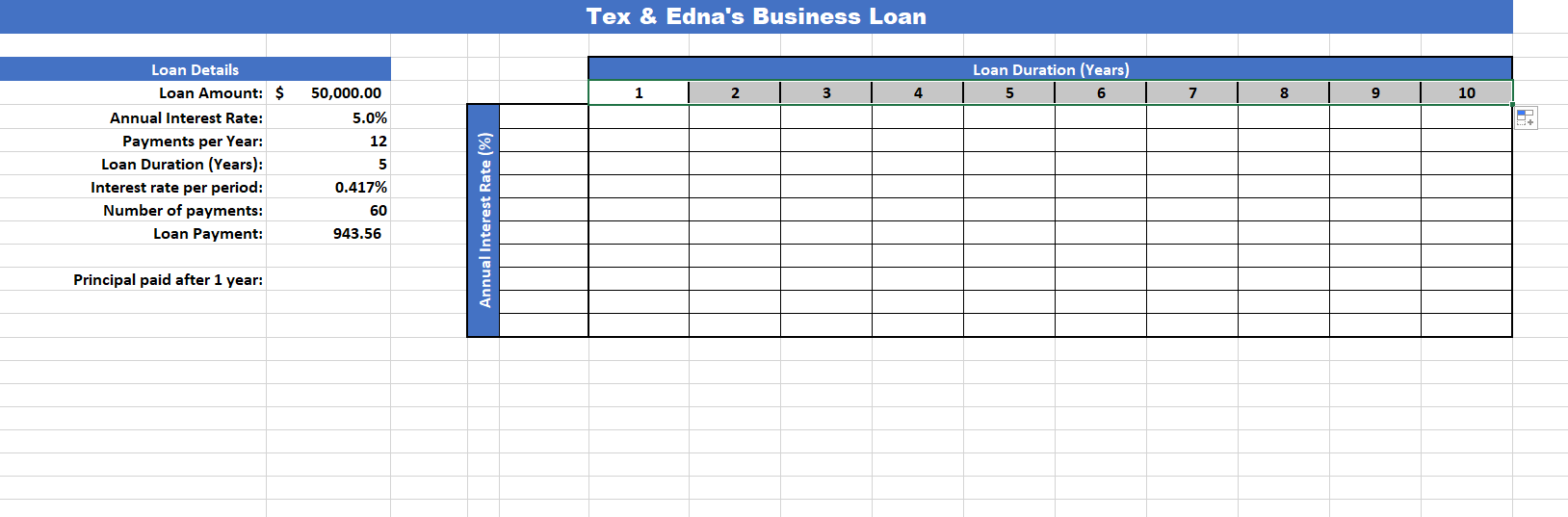
Question: 1 6 . Starting at cell E 5 , fill in the range of annual interest rates of 1 % through 1 0 % ,
Starting at cell E fill in the range of annual interest rates of through in increments of
Enter a reference for the loan payment cell B into the appropriate location in the data table.
Complete the two variable data table to display the loan payment for each corresponding loan
duration and annual interest rate.
Open the Solver and set an objective of for the loan payment cell B by changing the annual
interest rate cell B and the loan duration cell B
Add a Solver integer constraint for the loan duration cell B
Run the Solver to solve for the solution. Keep the solution but do not generate any reports.
Create a formula in cell B that calculates the cumulative principal repaid on the loan after year
of payments. Assume that loan payments are made at the end of the payment period.
Step by Step Solution
There are 3 Steps involved in it
1 Expert Approved Answer
Step: 1 Unlock

Question Has Been Solved by an Expert!
Get step-by-step solutions from verified subject matter experts
Step: 2 Unlock
Step: 3 Unlock
 Study Help