







Question: 1. Apply conditional formatting to column C. Use the 3 Traffic Lights (Unrimmed) rule. The green light should be displayed when the value is >=
1. Apply conditional formatting to column C. Use the “3 Traffic Lights (Unrimmed)” rule. The green light should be displayed when the value is >= 15. The yellow light should be displayed when the value is = The red light should be displayed when the value is
4. Apply conditional formatting to column D. TRUE values should be formatted to display with a green fill with dark green text. FALSE values should be formatted to display with a light red fill with dark red text.
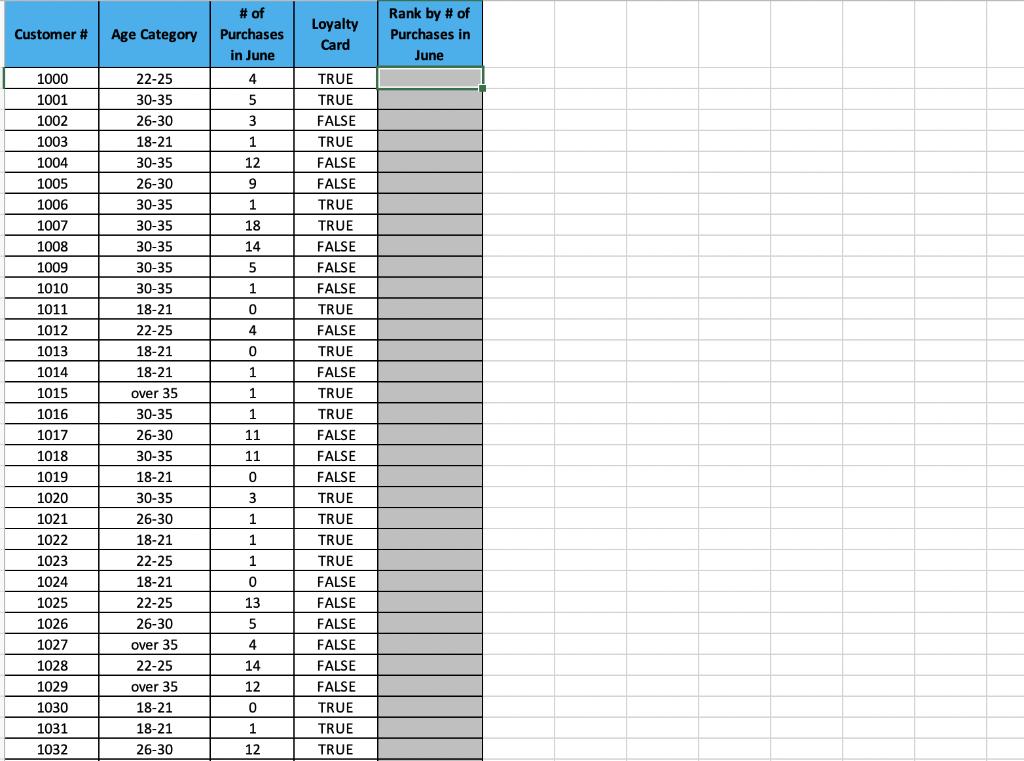
Please show the formulas you use to get the answer .
# of Rank by # of Loyalty Customer # Age Category Purchases Purchases in Card in June June 1000 22-25 4 TRUE 1001 30-35 5 TRUE 1002 26-30 3 FALSE 1003 18-21 1 TRUE 1004 30-35 12 FALSE 1005 26-30 9 FALSE 1006 30-35 1 TRUE 1007 30-35 18 TRUE 1008 30-35 14 FALSE 1009 30-35 FALSE 1010 30-35 1 FALSE 1011 18-21 TRUE 1012 22-25 4 FALSE 1013 18-21 TRUE 1014 18-21 FALSE 1015 over 35 1 TRUE 1016 30-35 1 TRUE 1017 26-30 11 FALSE 1018 30-35 11 FALSE 1019 18-21 FALSE 1020 30-35 3 TRUE 1021 26-30 1 TRUE 1022 18-21 1 TRUE 1023 22-25 1 TRUE 1024 18-21 FALSE 1025 22-25 13 FALSE 1026 26-30 5 FALSE 1027 over 35 4 FALSE 1028 22-25 14 FALSE 1029 over 35 12 FALSE 1030 18-21 TRUE 1031 18-21 1 TRUE 1032 26-30 12 TRUE
Step by Step Solution
3.34 Rating (151 Votes )
There are 3 Steps involved in it
Assuming the question relates to Conditional Formating in Microsoft Excel please find below the solu... View full answer

Get step-by-step solutions from verified subject matter experts
 Study Help