







Question: 1. Based on the background information determine the Access tables you need for your database, and the fields you need in each table; and do
1. Based on the background information determine the Access tables you need for your database, and the fields you need in each table; and do Assignment 2A. In this step will make up your own data (come up with customer names, coupon deals, and sign up customers to deals)
2. Do Assignment 2B
Final Output: Here is what your final access file should include:
Tables Created in Access (Customers, Deals, Sign-ups)
Form and subform: Deals (with sign-ups subform)
Query 1: Maximum Price
Query 2: Percentage Bargain
Query 3: Sign-ups equal to or over 30
Query 4: Most popular deal
Query 5: For report
Report: Notification
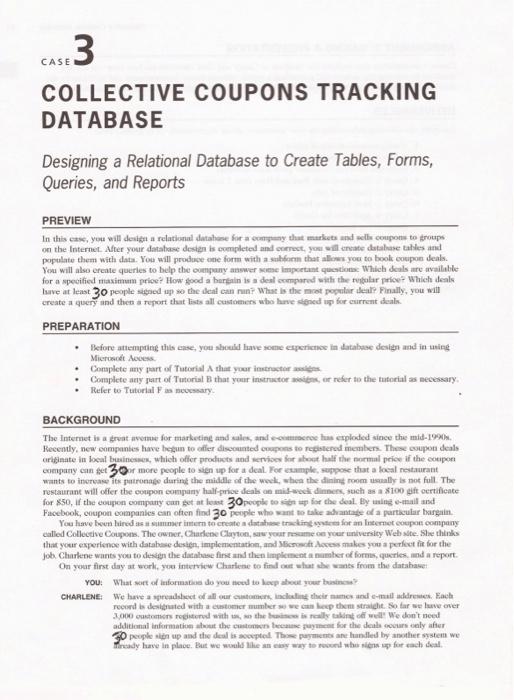
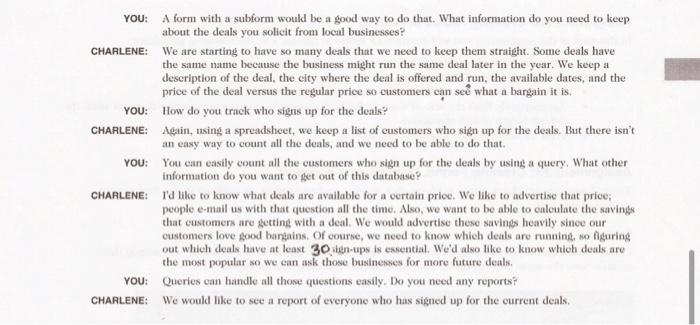
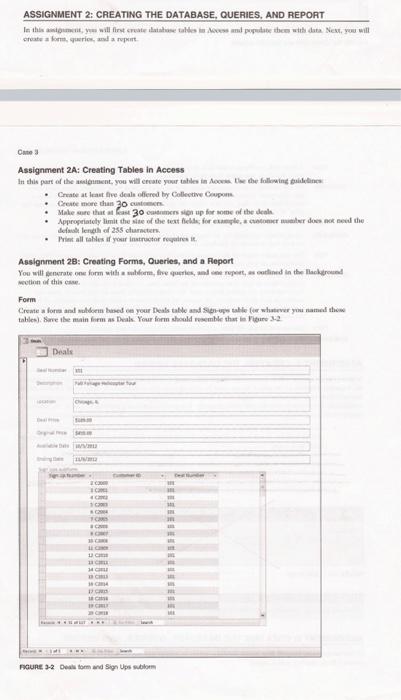
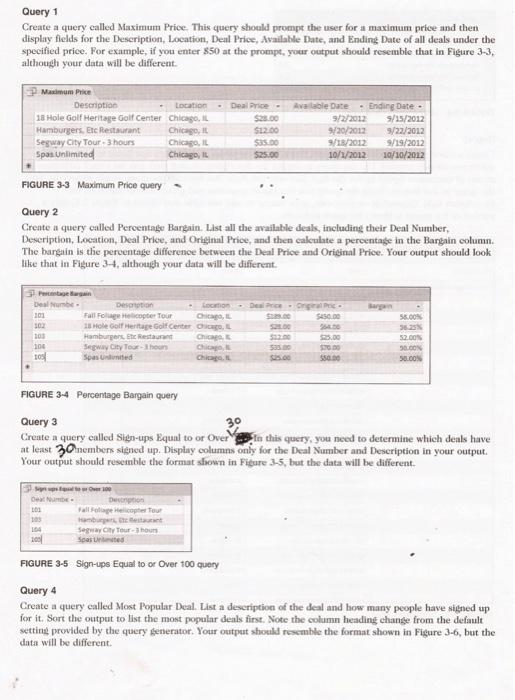
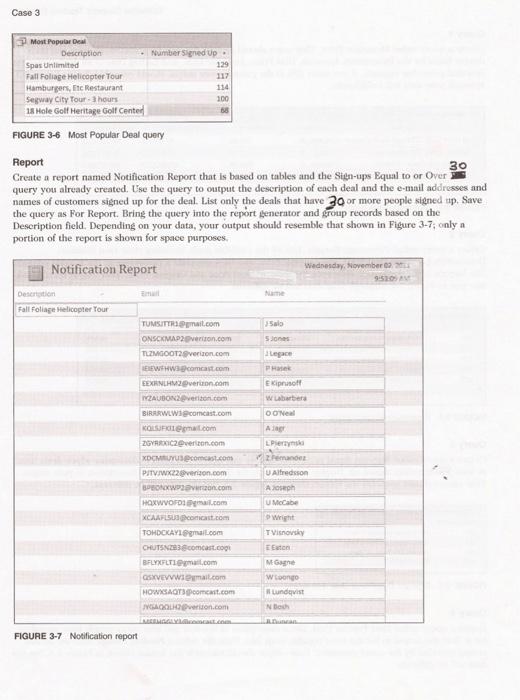
CASE COLLECTIVE COUPONS TRACKING DATABASE Designing a Relational Database to Create Tables, Forms, Queries, and Reports PREVIEW on the Internet. After yout database desten is oxempleted and onerect, yoal will ensate datahase tahles and populate them with data. You mill produce one form with a sahform that allives you to book coupon deals. You will alse ereate queries to belp the oumpany answer mene important queations: Which desils are availithe Isuve at least 30 people sigried ap so the deal can nan? What is the mot popular theap Finally, you will create a query and then a report that lists all custeteners who hare elfined up for current datals. PREPARATION Mikruncet Aocess. - Contaplete any part of Tutorial A that your itentractor assitas - Complete aety fact of Tutorial B that your instructor asoibis, er refer to the tutorial as necessary. - Refer te Tutorial F as necocsary. BACKGROUND coengany can get 3 out more people to sien up for a deal. For esample, soppose that a focal nectaurant for 850 , if the coupon company oan ket at hese 30 people to kint ap for the deal. By tating e-mail and Facebook, entipon companks can often find 30 people who want to talke ashantage of a particular hargain. that yout experienoe wieh databese desien, implementation, and Mbsosoft dovess makes yeu a perfoet fit for the job. Charkene wants yoe to dewign the datahase fine and then implement a namber of formis, queries. ind a report. On your first day at worli, yoe interview Charlene to find cuit =hat whe wanes from the datahaset You: What sart of informativa do you theed to hocp about your businces? YOU: A form with a subform would be a good way to do that. What information do you need to keep about the deals you solicit from local businesses? CHARLENE: We are starting to have so many deals that we need to keep them straight. Some deals have the same name because the business might run the same deal later in the year. We keep a description of the deal, the city where the deal is offered and run, the available dates, and the price of the deal versus the regular price so customers can see what a bargain it is. YOU: How do you track who signs up for the deals? CHARLENE: Again, using a spreadsheet, we keep a list of customers who sign up for the deals. But there isn't an easy way to count all the deals, and we need to be able to do that. YoU: You ean easily count all the customers who sign up for the deals by using a query. What other information do you want to get out of this datahase? CHARLENE: I'd like to know what deals are available for a eertain price. We like to advertise that price; people e-mail as with that question all the time. Also, we want to be able to calculate the savings that customers are getting with a deal. We would advertise these savings heavily sinee our customers love good bargains. Of course, we need to know which deals are running, no figuring out which deals have at least 30 sign-ups is essential. We'd also like to know which deals are the most popular so we ean ask those businesses for more future deals. YOU: Queries can handle all those questions easily. Do you need any reports? CHARLENE: We would like to see a report of everyone who has sigined up for the current deals. ASSIGNMENT 2; CREATING THE DATABASE, QUERIES, AND REPORT reate a forth. Guerice. and a repert. Este 3 Assignment 2A: Creating Tables in Access - Groate at heat live deale ollered by Collevtive Cougeners - Creste more than 30 cuatiever. - Male mere that at fose 30 evienmens siper up for mome of the deals defwal lendith of 255 cluracters. - Priat all tahiles if your instruetor revaires ie. Assignment 2B: Creating Forms, Queries, and a Report wotinh of this esues. Form Foune 22 Deak bom and Sign Ups whion Query 1 Create a query called Maximum Price. This query should prompt the user for a maximum price and then display flelds for the Deseription, Location, Deal Price, Available Date, and Ending Date of all deals under the specified price. For example, if you enter 850 at the prompt, your output should resemble that in Figure 3-3, although your data will be different. FIGURE 3-3 Maximum Price query Query 2 Crente a query called Percentage Bargain. List all the available deak, including their Deal Number, Deseription, Loeation, Deal Price, and Original Price, and then calculate a percentage in the Bargain column. The bargain is the percentage difference between the Deal Price and Orieinal Price. Your output should look like that in Figure 3-4, although your data will be different. FIGUAE 3-4 Percentage Bargain query Query 3 Create a query called Sign-ups Bqual to or Over gagin this query, you need to determine which deals have at least 3 Onembens signed up. Display columns only for the Deal Number and Deseription in your output. Your output should resemble the format shown in Figure 3.5, but the data will be different. FIGUAE 3-5 Sign-ups Equal to or Over 100 query Query 4 Create a query ealled Most Popular Deal. List a description of the deal and how many people have signed up for it. Sort the output to list the most popular deals first. Note the column heading change from the default setting provided by the query generator. Your output should resemble the format shown in Figure 3-6, but the data will be different. FIGURE 3-6 Most Popular Deal query Report Create a report named Notitication Report that is based on tables and the Sign-ups Bqual to or Over query you already ereated. Lse the query to output the deseription of each deal and the e-tanil addresses and names of customers signed up for the deal. List only the deals that have 30 or more people signed rp, Save the query as For Report. Bring the query into the report generator and grom records based on the Deseription field. Depending on your data, your output should resemble that shown in Figure 3-7; only a portion of the report is shown for space purposes. CASE COLLECTIVE COUPONS TRACKING DATABASE Designing a Relational Database to Create Tables, Forms, Queries, and Reports PREVIEW on the Internet. After yout database desten is oxempleted and onerect, yoal will ensate datahase tahles and populate them with data. You mill produce one form with a sahform that allives you to book coupon deals. You will alse ereate queries to belp the oumpany answer mene important queations: Which desils are availithe Isuve at least 30 people sigried ap so the deal can nan? What is the mot popular theap Finally, you will create a query and then a report that lists all custeteners who hare elfined up for current datals. PREPARATION Mikruncet Aocess. - Contaplete any part of Tutorial A that your itentractor assitas - Complete aety fact of Tutorial B that your instructor asoibis, er refer to the tutorial as necessary. - Refer te Tutorial F as necocsary. BACKGROUND coengany can get 3 out more people to sien up for a deal. For esample, soppose that a focal nectaurant for 850 , if the coupon company oan ket at hese 30 people to kint ap for the deal. By tating e-mail and Facebook, entipon companks can often find 30 people who want to talke ashantage of a particular hargain. that yout experienoe wieh databese desien, implementation, and Mbsosoft dovess makes yeu a perfoet fit for the job. Charkene wants yoe to dewign the datahase fine and then implement a namber of formis, queries. ind a report. On your first day at worli, yoe interview Charlene to find cuit =hat whe wanes from the datahaset You: What sart of informativa do you theed to hocp about your businces? YOU: A form with a subform would be a good way to do that. What information do you need to keep about the deals you solicit from local businesses? CHARLENE: We are starting to have so many deals that we need to keep them straight. Some deals have the same name because the business might run the same deal later in the year. We keep a description of the deal, the city where the deal is offered and run, the available dates, and the price of the deal versus the regular price so customers can see what a bargain it is. YOU: How do you track who signs up for the deals? CHARLENE: Again, using a spreadsheet, we keep a list of customers who sign up for the deals. But there isn't an easy way to count all the deals, and we need to be able to do that. YoU: You ean easily count all the customers who sign up for the deals by using a query. What other information do you want to get out of this datahase? CHARLENE: I'd like to know what deals are available for a eertain price. We like to advertise that price; people e-mail as with that question all the time. Also, we want to be able to calculate the savings that customers are getting with a deal. We would advertise these savings heavily sinee our customers love good bargains. Of course, we need to know which deals are running, no figuring out which deals have at least 30 sign-ups is essential. We'd also like to know which deals are the most popular so we ean ask those businesses for more future deals. YOU: Queries can handle all those questions easily. Do you need any reports? CHARLENE: We would like to see a report of everyone who has sigined up for the current deals. ASSIGNMENT 2; CREATING THE DATABASE, QUERIES, AND REPORT reate a forth. Guerice. and a repert. Este 3 Assignment 2A: Creating Tables in Access - Groate at heat live deale ollered by Collevtive Cougeners - Creste more than 30 cuatiever. - Male mere that at fose 30 evienmens siper up for mome of the deals defwal lendith of 255 cluracters. - Priat all tahiles if your instruetor revaires ie. Assignment 2B: Creating Forms, Queries, and a Report wotinh of this esues. Form Foune 22 Deak bom and Sign Ups whion Query 1 Create a query called Maximum Price. This query should prompt the user for a maximum price and then display flelds for the Deseription, Location, Deal Price, Available Date, and Ending Date of all deals under the specified price. For example, if you enter 850 at the prompt, your output should resemble that in Figure 3-3, although your data will be different. FIGURE 3-3 Maximum Price query Query 2 Crente a query called Percentage Bargain. List all the available deak, including their Deal Number, Deseription, Loeation, Deal Price, and Original Price, and then calculate a percentage in the Bargain column. The bargain is the percentage difference between the Deal Price and Orieinal Price. Your output should look like that in Figure 3-4, although your data will be different. FIGUAE 3-4 Percentage Bargain query Query 3 Create a query called Sign-ups Bqual to or Over gagin this query, you need to determine which deals have at least 3 Onembens signed up. Display columns only for the Deal Number and Deseription in your output. Your output should resemble the format shown in Figure 3.5, but the data will be different. FIGUAE 3-5 Sign-ups Equal to or Over 100 query Query 4 Create a query ealled Most Popular Deal. List a description of the deal and how many people have signed up for it. Sort the output to list the most popular deals first. Note the column heading change from the default setting provided by the query generator. Your output should resemble the format shown in Figure 3-6, but the data will be different. FIGURE 3-6 Most Popular Deal query Report Create a report named Notitication Report that is based on tables and the Sign-ups Bqual to or Over query you already ereated. Lse the query to output the deseription of each deal and the e-tanil addresses and names of customers signed up for the deal. List only the deals that have 30 or more people signed rp, Save the query as For Report. Bring the query into the report generator and grom records based on the Deseription field. Depending on your data, your output should resemble that shown in Figure 3-7; only a portion of the report is shown for space purposes
Step by Step Solution
There are 3 Steps involved in it

Get step-by-step solutions from verified subject matter experts
 Study Help