





Question: 1. Based on the lecture in class on HTML Forms, write the HTML code to create a static web form as shown in the picture
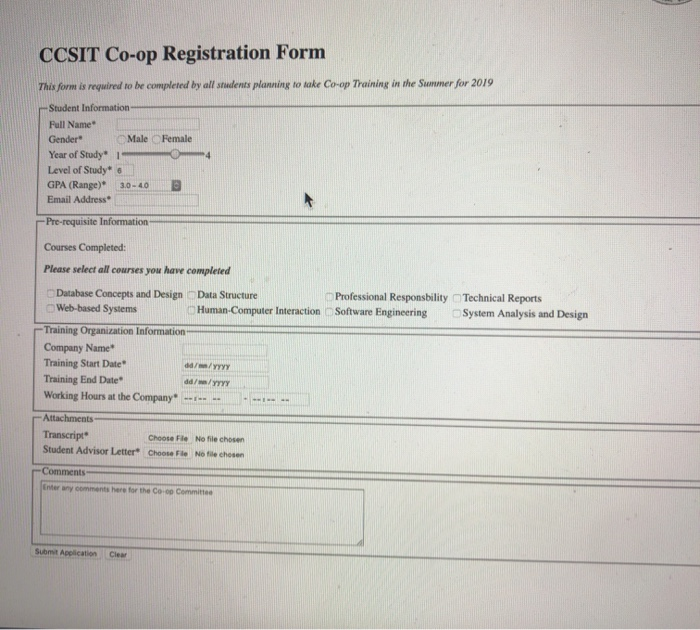
1. Based on the lecture in class on HTML Forms, write the HTML code to create a static web form as shown in the picture below.
2. Save your code with the following name Forms_firstname_lastname_id.html
Note:
1. The values for GPA range are (the default selected should be 3.0 4.0)
a. Less than 1.0
b. 1.0 2.0
c. 2.0 3.0
d. 3.0 4.0
e. More than 4.0
2. The range for Year of Study is between 1 and 4 with step of 1 and default value as 3
3. The number for Level of Study is between 1 and 8 with step of 1 and default value as 6
4. All * fields are required
5. Use all the attributes necessary for the input fields
6. The label and the input field should be connected (when you click on the label, the field should be highlighted)
7. There is a placeholder for the textarea
Most Important Requirement:
1. The content of each fieldset is a table. The forms inside each fieldset is organized in a table.
2. The table has two columns. The first column has the label and the second column has the input field.
3. For the section with checkboxes, the table has two rows and four columns for each course and its checkbo
 1. Based on the lecture in class on HTML Forms, write

CCSIT Co-op Registration Form This form is required to be completed by all students planning to take Co-op Training in the Summer for 2019 Student Information Full Name Gender Male Female Year of Study* 1 Level of Study* 6 GPA (Range)* 3.0 - 4.0 Email Address - Pre-requisite Information Professional Responsbility Software Engineering Courses Completed: Please select all courses you have completed Database Concepts and Design Data Structure Web-based Systems Human-Computer Interaction Training Organization Information Company Name* Training Start Date / /YYYY Training End Date did/w /YYYY Working Hours at the Company - Technical Reports System Analysis and Design Attachments - Transcript Student Advisor Letter Choose File No file chosen Choose File No file chosen Comments Enter any comments here for the Coco Committee Submit Application Clear

Step by Step Solution

There are 3 Steps involved in it

1 Expert Approved Answer
Step: 1 Unlock blur-text-image
Question Has Been Solved by an Expert!

Get step-by-step solutions from verified subject matter experts

Step: 2 Unlock
Step: 3 Unlock

Students Have Also Explored These Related Databases Questions!