







Question: 1 Complete the code to iterate through the keys and values of the car_prices dictionary, printing out some information about each one. 1. def car_listing(car_prices):
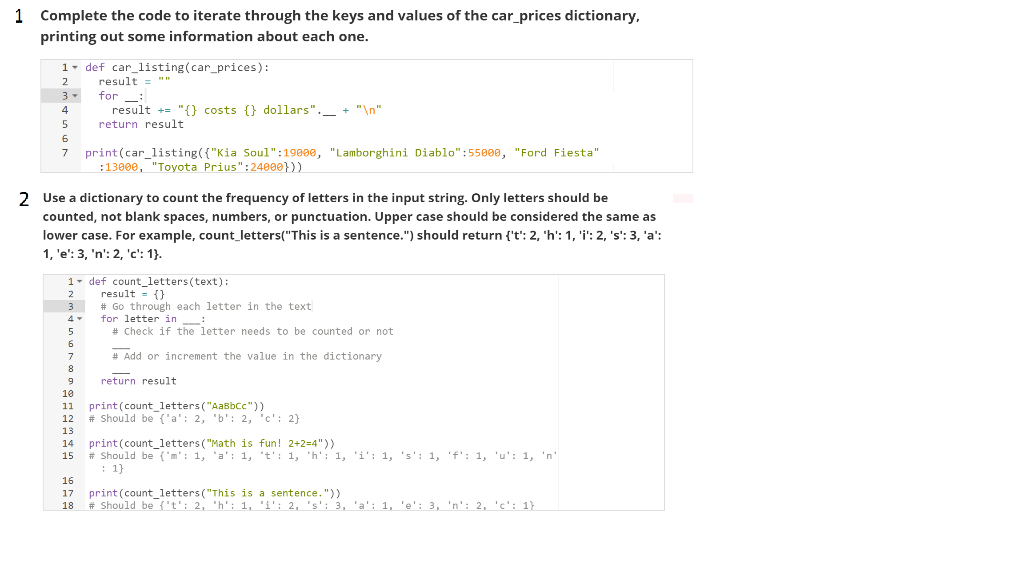
1 Complete the code to iterate through the keys and values of the car_prices dictionary, printing out some information about each one. 1. def car_listing(car_prices): result = "" 3- for : result += "{} costs {} dollars". _ + " " return result 7 print(car_listing({"Kia Soul":19900, "Lamborghini Diablo":55000, "Ford Fiesta" :13000, "Toyota Prius":24000})) 2 Use a dictionary to count the frequency of letters in the input string. Only letters should be counted, not blank spaces, numbers, or punctuation. Upper case should be considered the same as lower case. For example, count_letters("This is a sentence.") should return ('t': 2, 'h': 1, 'i': 2, 's': 3, 'a': 1, 'e': 3, 'n': 2, 'c': 1}. 1 - def count_letters (text): 2 result = {} # Go through each letter in the text for letter in : # Check if the letter needs to be counted or not # Add or increment the value in the dictionary return result print(count_letters ("AaBbcc")) # Should be {'a': 2, "b': 2, 'c': 2) print(count_letters ("Math is fun! 2+2=4")) # Should be {'m': 1, 'a': 1, 't': 1, 'h': 1, 'i': 1, 's': 1, 'f': 1, 'u': 1, 'n' 17 17 18 print(count_letters ("This is a sentence.")) # Should be {'t': 2, 'h': 1, "i': 2, 's': 3, 'a': 1, 'e': 3, 'n': 2, 'c': 1)
Step by Step Solution
There are 3 Steps involved in it

Get step-by-step solutions from verified subject matter experts
 Study Help