







Question: 1. Create a Folder on your saving location called Lab4_YourLastName 2. In your Lab4_YourLastName folder, create a C++ Program called Lab4_YourFirstName_YourLastName.cpp 3. Write a console
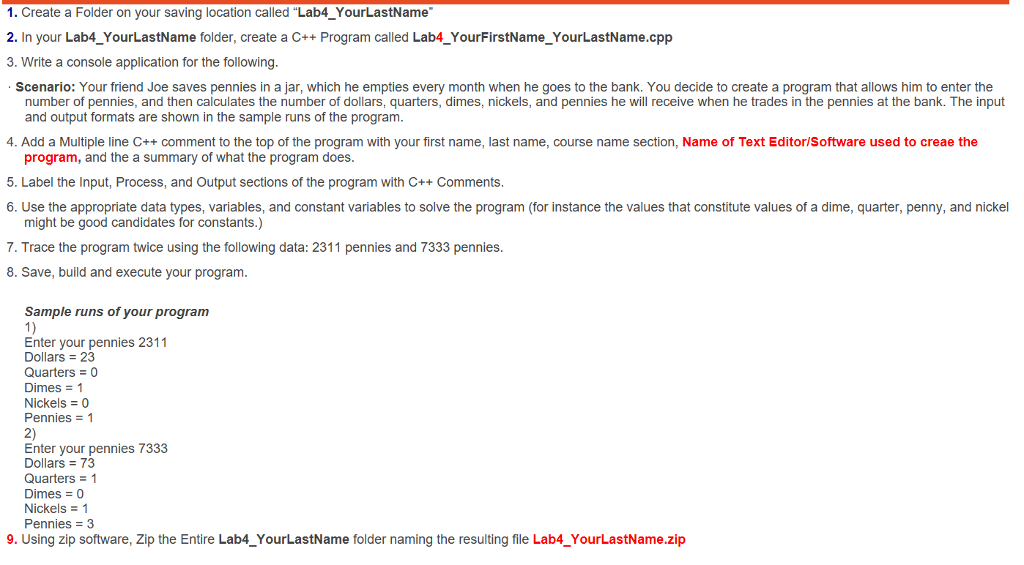
1. Create a Folder on your saving location called "Lab4_YourLastName" 2. In your Lab4_YourLastName folder, create a C++ Program called Lab4_YourFirstName_YourLastName.cpp 3. Write a console application for the following. Scenario: Your friend Joe saves pennies in a jar, which he empties every month when he goes to the bank. You decide to create a program that allows him to enter the number of pennies, and then calculates the number of dollars, quarters, dimes, nickels, and pennies he will receive when he trades in the pennies at the bank. The input and output formats are shown in the sample runs of the program. 4. Add a Multiple line C++ comment to the top of the program with your first name, last name, course name section, Name of Text Editor/Software used to create the program, and the a summary of what the program does. 5. Label the Input, Process, and Output sections of the program with C++ Comments. 6. Use the appropriate data types, variables, and constant variables to solve the program (for instance the values that constitute values of a dime, quarter, penny, and nickel might be good candidates for constants.) 7. Trace the program twice using the following data: 2311 pennies and 7333 pennies. 8. Save, build and execute your program. Sample runs of your program 1) Enter your pennies 2311 Dollars = 23 Quarters = 0 Dimes = 1 Nickels = 0 Pennies = 1 2) Enter your pennies 7333 Dollars = 73 Quarters = 1 Dimes = 0 Nickels = 1 Pennies = 3 9. Using zip software, Zip the Entire Lab4_YourLastName folder naming the resulting file Lab4_YourLastName.zip
Step by Step Solution
There are 3 Steps involved in it

Get step-by-step solutions from verified subject matter experts
 Study Help