







Question: 1 . Create a new project and use the start date as March 1 8 , 2 0 2 3 . 2 . Set New
Create a new project and use the start date as March
Set "New Tasks" to "Auto Scheduled"
All tasks are Finish to Start relationships.
Enter the tasks. copypaste from last page
Indent tasks under the summary tasks
Enter Milestones. Don't forget to outdent the milestones.
Enter the durations manually.
Make sure the Summary Tasks are accurate.
Row Task Name Duration
Planning and Preparation
Conduct Stakeholder Consultation
Assess Park Area and Requirements
Develop Playground Design Concept
Finalize Playground Design
Plans Approved
Procurement
Prepare Equipment and Material List
Source Playground Equipment
Receive Playground Equipment
Site Preparation
Prepare Site for Playground Installation
Clear and Level the Ground
Playground Installation
Assemble Playground Structures
Install Swings and Slides
Prepare Ground for Safety Surfacing
Install Safety Surfacing
Install Playground Fencing
Plant Trees and Shrubs
Lay Sod and Mulch
Install Playground Signage
Playground ready for inspection
Playground Handover
Perform Safety Inspection
Resolve Deficiencies
Cleanup the Site
Document Project Completion
Handover Playground to Authorities
Ready for Families
QLink the tasks according to the following chart
Planning and Preparation
Conduct Stakeholder Consultation
Assess Park Area and Requirements
Develop Playground Design Concept
Finalize Playground Design
Plans Approved
Procurement
Prepare Equipment and Material List
Source Playground Equipment
Receive Playground Equipment
Site Preparation
Prepare Site for Playground Installation
Clear and Level the Ground
Playeround Installation
Assemble Playground Structures
Install Swings and Slides
Prepare Ground for Safety Surfacing
Install Safety Surfacing
Install Playground Fencing
Plant Trees and Shrubs
Lay Sod and Mulch
Install Playground Signage
Playground ready for inspection
Playground Handover
Perform Safety Inspection
Resolve Deficiencies
Clean up the Site
Document Project Completion
Handover Playground to Authorities
Ready for Families
Q Add following resources to the Resource sheet. You may Cut and Paste these
Project Manager
Community Stakeholders
Playground Designer
Procurement Team
Playground Installer
Landscape Crew
Safety Surface Installer
Safety Inspector
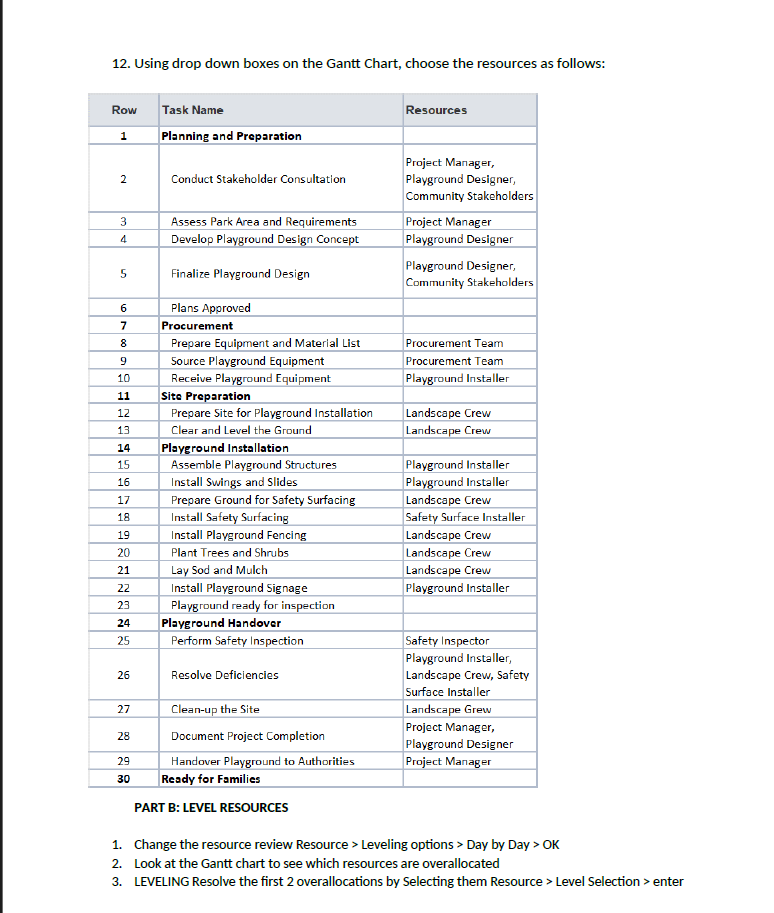
Using drop down boxes on the Gantt Chart, choose the resources as follows:
Using drop down boxes on the Gantt Chart, choose the resources as follows:
PART B: LEVEL RESOURCES
Change the resource review Resource Leveling options Day by Day
Look at the Gantt chart to see which resources are overallocated
LEVELING Resolve the first overallocations by Selecting them Resource Level Selection enter
Task name for copy pasting
Planning and Preparation
Conduct Stakeholder Consultation
Assess Park Area and Requirements
Develop Playground Design Concept
Finalize Playground Design
Plans Approved
Procurement
Prepare Equipment and Material List
Source Playground Equipment
Receive Playground Equipment
Site Preparation
Prepare Site for Playground Installation
Clear and Level the Ground
Playground Installation
Assemble Playground Structures
Install Swings and Slides
Prepare Ground for Safety Surfacing
Install Safety Surfacing
Install Playground Fencing
Plant Trees and Shrubs
Lay Sod and Mulch
Install Playground Signage
Playground ready for inspection
Playground Handover
Perform Safety Inspection
Resolve Deficiencies
Cleanup the Site
Document Project Completion
Handover Playground to Authorities
Playground ready for families
Kindly guide me step by step details on how to do these in microsoft project. Image guidance would be really appreciated as I haven't used this software before and this assignment is crucial for clearing the program. A speedy response will be appreciated. Milestone unable to understand what is milestone and how to set itif it takes more than hours kindly guide in this and other important parts cause it's due in hours.
Step by Step Solution
There are 3 Steps involved in it
1 Expert Approved Answer
Step: 1 Unlock

Question Has Been Solved by an Expert!
Get step-by-step solutions from verified subject matter experts
Step: 2 Unlock
Step: 3 Unlock
 Study Help