







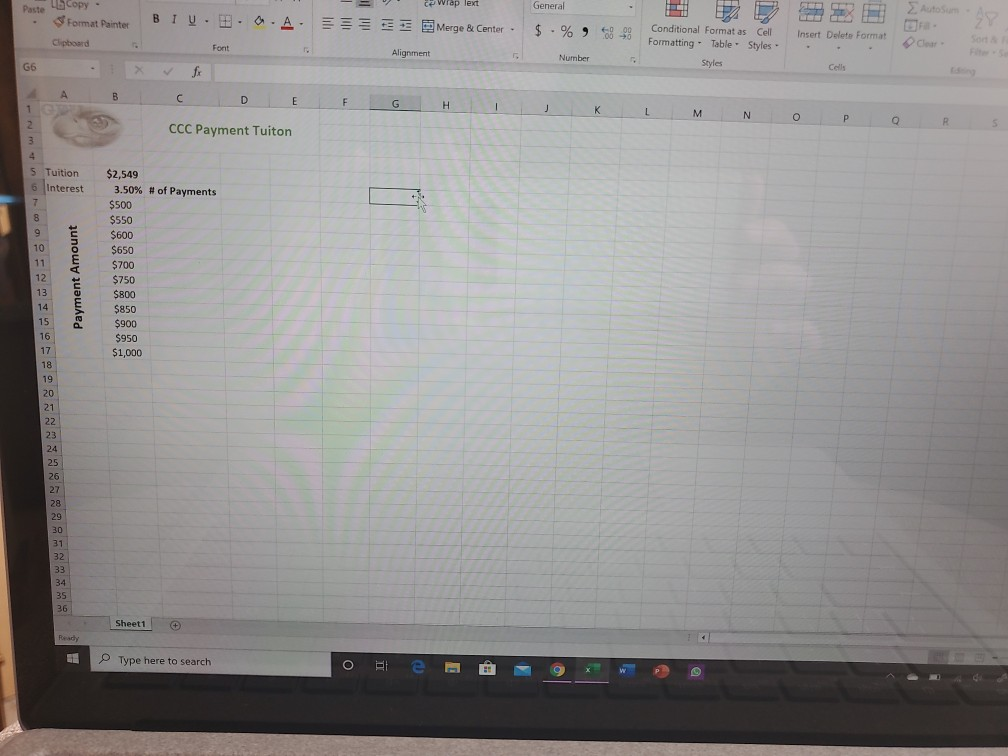
Question: 1. Create a NPER function for column C that calculates how many payments a student would be required to make depending on the payment amounts
1. Create a NPER function for column C that calculates how many payments a student would be required to make depending on the payment amounts in column B. DO NOT add any spaces to the function. Use the PV argument to make the answer a positive number. -Enter the first NPER function in cell C7, using the $500 payment amount, then Autofill the function through cell C17 to determine the number of payments for each payment amount. -The interest rate should be divided by 12
2. Create a scenario using cell B5 as the changing cell and leave the value for the changing cell as 2549. Remove all text from the comments box as you create the scenario. Name the scenario: General Studies.
3. Create four more scenarios. Remove all text from the comments box as you create each scenario. Use the following information within the.l scenarios:
-Use $2,758 as the value for the changing cell B5 and name the scenario: Math Major
-Use $2,792 as the value for the changing cell B5 and name the scenario: Arts Major
-use $2,978 as the value for the changing cell B5 and name the scenario: Science Major
-use $2,986 as the value for the changing cell B5 and name the scenario: Health Science Major
4. Show the Arts Major scenario, then close the Scenario Manager.
wrap text General Paste a copy Format Painter Clipboard B T U . B .A. Merge & Center. $ . % Conditional Format as Cell Formatting Table - Styles Insert Delete Format Font Alignment Number Styles Cell K L M N O P Q R S CCC Payment Tuiton 5 6 Tuition Interest Payment Amount $2,549 3.50% # of Payments $500 $550 $600 $650 $700 $750 $800 $850 $900 $950 $1,000 Sheet1 Ready Type here to search ote S
Step by Step Solution
There are 3 Steps involved in it

Get step-by-step solutions from verified subject matter experts
 Study Help