







Question: 1. Create a Python file named as lab7-4.py. Write a program to let the user input the number of sides and it will draw a
1. Create a Python file named as lab7-4.py. Write a program to let the user input the number of sides and it will draw a regular shape with the specified number of sides.
---------------------------------------------------------------------------------------------
Turtle graphics also provides us a function to draw a circle easily. By calling the circle function of a turtle, the turtle can draw a circle with the radius you passed as an argument. For example, tina.circle(50) will draw a circle of radius 50. Try to run the program below:
import turtle
wn = turtle.Screen()
tina = turtle.Turtle()
tina.circle(50)
wn.exitonclicnk()
2. Create a Python file named as lab7-5.py. Modify the above program and use a for loop to have a turtle named tina to draw seven connected circles with different colors as the picture below:
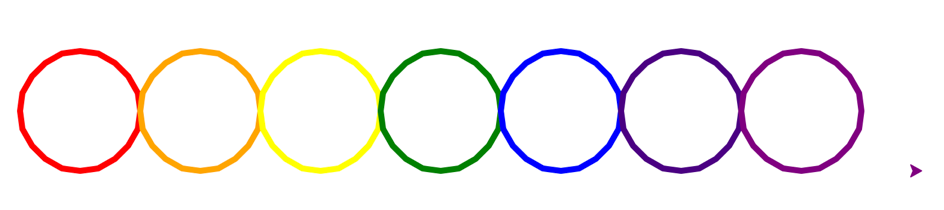
Hints:
Remember to pick up the tinas pen when it moves to a new location, and then put the pen down to draw another circle.
Color the circles in rainbow colors: "red", "orange", "yellow", "green", "blue", "indigo", "purple".
To get a thicker line, you may change the pen size.
After tina completes each circle, she will go to a new position to start drawing a new circle, which is 2* radius away from the previous position. Assume the tina starts at (0, 0) to draw the first circle of radius 50, she will draw the second circle at (100, 0), the third one at (200, 0), the fourth one at (300, 0) and so on. Let x = 0, during each iteration, the start position of tina can be calculated by x = x + 100.
Step by Step Solution
There are 3 Steps involved in it

Get step-by-step solutions from verified subject matter experts
 Study Help