







Question: 1. Create a query using the F_Staffs and Locations tables to display state_province and the birthdate in the form of Mon NINETEENTH of March, 1979
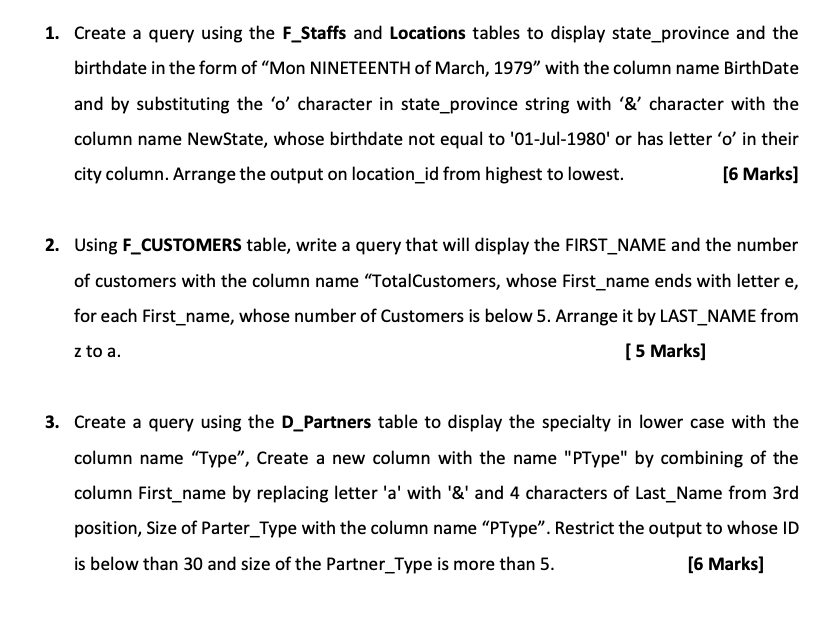
1. Create a query using the F_Staffs and Locations tables to display state_province and the birthdate in the form of Mon NINETEENTH of March, 1979 with the column name BirthDate and by substituting the 'o' character in state_province string with '&' character with the column name NewState, whose birthdate not equal to '01-Jul-1980' or has letter 'o' in their city column. Arrange the output on location_id from highest to lowest. [6 Marks) 2. Using F_CUSTOMERS table, write a query that will display the FIRST_NAME and the number of customers with the column name TotalCustomers, whose First_name ends with lettere, for each First_name, whose number of Customers is below 5. Arrange it by LAST_NAME from z to a. [ 5 Marks] 3. Create a query using the D_Partners table to display the specialty in lower case with the column name "Type", Create a new column with the name "PType" by combining of the column First_name by replacing letter 'a' with '&' and 4 characters of Last_Name from 3rd position, Size of Parter_Type with the column name PType. Restrict the output to whose ID is below than 30 and size of the Partner_Type is more than 5. [6 Marks) 1. Create a query using the F_Staffs and Locations tables to display state_province and the birthdate in the form of Mon NINETEENTH of March, 1979 with the column name BirthDate and by substituting the 'o' character in state_province string with '&' character with the column name NewState, whose birthdate not equal to '01-Jul-1980' or has letter 'o' in their city column. Arrange the output on location_id from highest to lowest. [6 Marks) 2. Using F_CUSTOMERS table, write a query that will display the FIRST_NAME and the number of customers with the column name TotalCustomers, whose First_name ends with lettere, for each First_name, whose number of Customers is below 5. Arrange it by LAST_NAME from z to a. [ 5 Marks] 3. Create a query using the D_Partners table to display the specialty in lower case with the column name "Type", Create a new column with the name "PType" by combining of the column First_name by replacing letter 'a' with '&' and 4 characters of Last_Name from 3rd position, Size of Parter_Type with the column name PType. Restrict the output to whose ID is below than 30 and size of the Partner_Type is more than 5. [6 Marks)
Step by Step Solution
There are 3 Steps involved in it

Get step-by-step solutions from verified subject matter experts
 Study Help