





Question: 1. Create a spreadsheet similar to the one below. B D E F G 1 BISI 3230: Information 2 Fall 2016 3 4 STUDENT NAMES
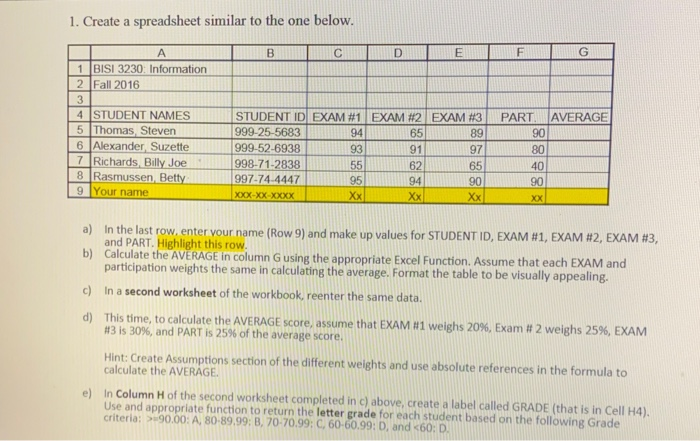
1. Create a spreadsheet similar to the one below.
1. Create a spreadsheet similar to the one below. B D E F G 1 BISI 3230: Information 2 Fall 2016 3 4 STUDENT NAMES 5 Thomas Steven 6 Alexander Suzette 7 Richards Billy Joe 8 Rasmussen Betty 9 Your name STUDENT ID EXAM #1 EXAM #2 EXAM #3 999-25-5683 94 65 89 999-52-6938 93 91 97 998-71-2838 55 62 65 997-74-4447 95 94 90 XOX-XX-XXXX Xx Xx PART AVERAGE 90 80 40 90 XX a) In the last row, enter your name (Row 9) and make up values for STUDENT ID, EXAM #1, EXAM #2, EXAM #3, and PART. Highlight this row. b) Calculate the AVERAGE in column G using the appropriate Excel Function. Assume that each EXAM and participation weights the same in calculating the average. Format the table to be visually appealing. c) In a second worksheet of the workbook, reenter the same data. d) This time, to calculate the AVERAGE score, assume that EXAM #1 weighs 20%, Exam # 2 weighs 25%, EXAM #43 is 30%, and PART is 25% of the average score. Hint: Create Assumptions section of the different weights and use absolute references in the formula to calculate the AVERAGE e) In Column Hof the second worksheet completed in c) above, create a label called GRADE (that is in Cell H4). Use and appropriate function to return the letter grade for each student based on the following Grade criteria: > 90.00: A, 80-89.99: B, 70-70.99: C, 60-60.99: D, and

Step by Step Solution

There are 3 Steps involved in it

1 Expert Approved Answer
Step: 1 Unlock blur-text-image

Question Has Been Solved by an Expert!

Get step-by-step solutions from verified subject matter experts

Step: 2 Unlock
Step: 3 Unlock

Students Have Also Explored These Related General Management Questions!