







Question: 1. Create a user interface similar to that shown in the screen capture below. - use one Activity and three Fragments - - MainActivity (UI:
1. Create a user interface similar to that shown in the screen capture below. - use one Activity and three Fragments - - MainActivity (UI: containers for the three fragments) - - TotalsFragment (UI: Total Amount and caption) - - Tax Fragment (UI: Tax Rate Seekbar, Tax Rate, Tax Amount and captions) - - ItemsFragment (UI: Four Editboxes and captions in Scrollview) - the ItemsFragment should be contained in a ScrollView so that it can move up with the keyboard. 2. Allow the user to select a tax rate using the SeekBar. The tax rate should range from 0 to 25%. Moving the SeekBar should update the tax rate, tax amount and total amount. 3. Allow the user to enter amounts in each of the four Item EditText boxes (use the decimal keyboard). The item amounts should be scroll-able via the use of a ScrollView. 4. Whenever an item amount or tax rate changes, the total amount should reflect the change. 5. The app should preserve state (including the state of the tax rate) by persisting all of the amounts in SharedPreferences using onPause() and onResume() . 6. Check to insure that you have resolved all errors and warnings.
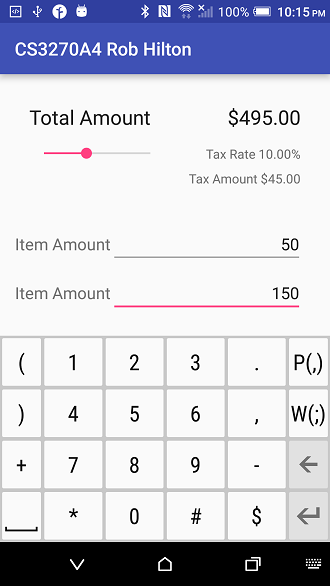
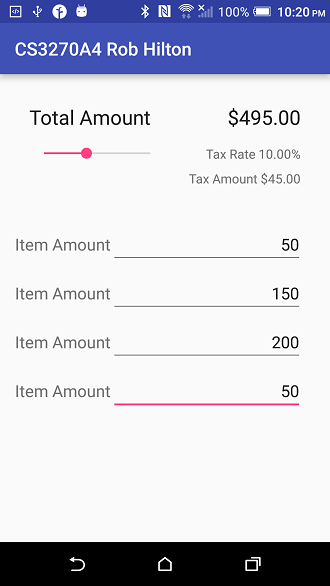
* N 1 0096 ? 10:15 PM CS3270A4 Rob Hilton $495.00 Tax Rate 10.00% Tax Amount $45.00 Total Amount 50 Item Amount 150 Item Amount 12 3 PC) WC) 4
Step by Step Solution
There are 3 Steps involved in it

Get step-by-step solutions from verified subject matter experts
 Study Help