







Question: 1. Create an XCode Project named FinalExam 2. (20pts) Create a state Class that has: a. Name b. Type (Red, Blue, Swing) c. Trump Votes
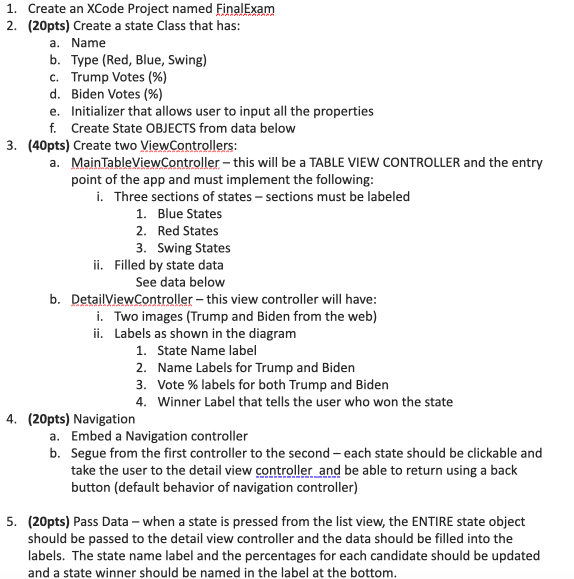
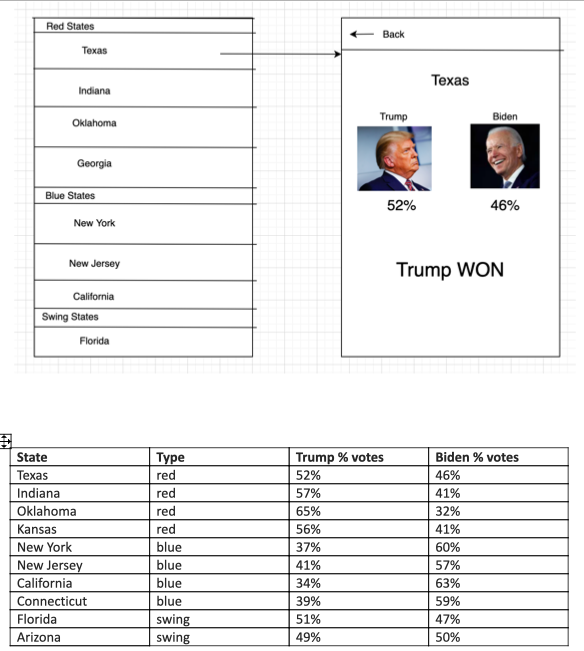
1. Create an XCode Project named FinalExam 2. (20pts) Create a state Class that has: a. Name b. Type (Red, Blue, Swing) c. Trump Votes (%) d. Biden Votes (%) e. Initializer that allows user to input all the properties f. Create State OBJECTS from data below 3. (40pts) Create two ViewControllers: a. MainTableViewController - this will be a TABLE VIEW CONTROLLER and the entry point of the app and must implement the following: i. Three sections of states - sections must be labeled 1. Blue States 2. Red States 3. Swing States ii. Filled by state data See data below b. DetailViewController - this view controller will have: i. Two images (Trump and Biden from the web) ii. Labels as shown in the diagram 1. State Name label 2. Name Labels for Trump and Biden 3. Vote % labels for both Trump and Biden 4. Winner Label that tells the user who won the state 4. (20pts) Navigation a. Embed a Navigation controller b. Segue from the first controller to the second - each state should be clickable and take the user to the detail view controller and be able to return using a back button (default behavior of navigation controller) 5. (20pts) Pass Data - when a state is pressed from the list view, the ENTIRE state object should be passed to the detail view controller and the data should be filled into the labels. The state name label and the percentages for each candidate should be updated and a state winner should be named in the label at the bottom. Red States Texas Back Texas Indiana Oklahoma Trump Biden Georgia Blue States 52% 46% New York New Jersey Trump WON California Swing States Florida State Texas Indiana Oklahoma Kansas New York New Jersey California Connecticut Florida Arizona Type red red red red blue blue blue blue swing swing Trump % votes 52% 57% 65% 56% 37% 41% 34% 39% 51% 49% Biden % votes 46% 41% 32% 41% 60% 57% 63% 59% 47% 50% 1. Create an XCode Project named FinalExam 2. (20pts) Create a state Class that has: a. Name b. Type (Red, Blue, Swing) c. Trump Votes (%) d. Biden Votes (%) e. Initializer that allows user to input all the properties f. Create State OBJECTS from data below 3. (40pts) Create two ViewControllers: a. MainTableViewController - this will be a TABLE VIEW CONTROLLER and the entry point of the app and must implement the following: i. Three sections of states - sections must be labeled 1. Blue States 2. Red States 3. Swing States ii. Filled by state data See data below b. DetailViewController - this view controller will have: i. Two images (Trump and Biden from the web) ii. Labels as shown in the diagram 1. State Name label 2. Name Labels for Trump and Biden 3. Vote % labels for both Trump and Biden 4. Winner Label that tells the user who won the state 4. (20pts) Navigation a. Embed a Navigation controller b. Segue from the first controller to the second - each state should be clickable and take the user to the detail view controller and be able to return using a back button (default behavior of navigation controller) 5. (20pts) Pass Data - when a state is pressed from the list view, the ENTIRE state object should be passed to the detail view controller and the data should be filled into the labels. The state name label and the percentages for each candidate should be updated and a state winner should be named in the label at the bottom. Red States Texas Back Texas Indiana Oklahoma Trump Biden Georgia Blue States 52% 46% New York New Jersey Trump WON California Swing States Florida State Texas Indiana Oklahoma Kansas New York New Jersey California Connecticut Florida Arizona Type red red red red blue blue blue blue swing swing Trump % votes 52% 57% 65% 56% 37% 41% 34% 39% 51% 49% Biden % votes 46% 41% 32% 41% 60% 57% 63% 59% 47% 50%
Step by Step Solution
There are 3 Steps involved in it

Get step-by-step solutions from verified subject matter experts
 Study Help