







Question: 1. Create Angular project as _Mid2017 2. The Angular application should display the following data and the last item Your Name should be
1. Create Angular project as _Mid2017
2. The Angular application should display the following data and the last item “Your Name” should be replaced with actual name a. Fields - ID, Product Name and Product Description
3. Create appropriate components, type scripts files and etc.
4. Display a star (*) symbol next to ‘Your Name’ and you’ve to follow *ngIf directive for this
Please refer https://angular.io/guide/quickstart and https://angular.io/tutorial/toh-pt2
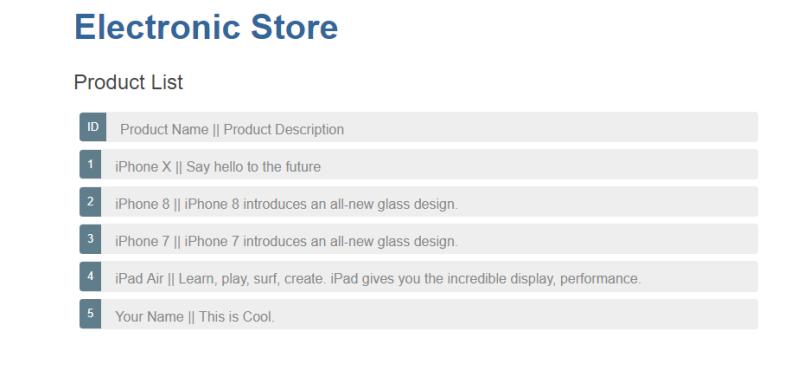 Question B (Display Details.)
1) Clicking an item from the above list should display the selected record at the end of the product list with following fields
a. ID – read-only
b. Product Name – display the data in textbox
c. Product Description – display the data in textbox
Note: Refer https://angular.io/tutorial/toh-pt2#selecting-a-hero
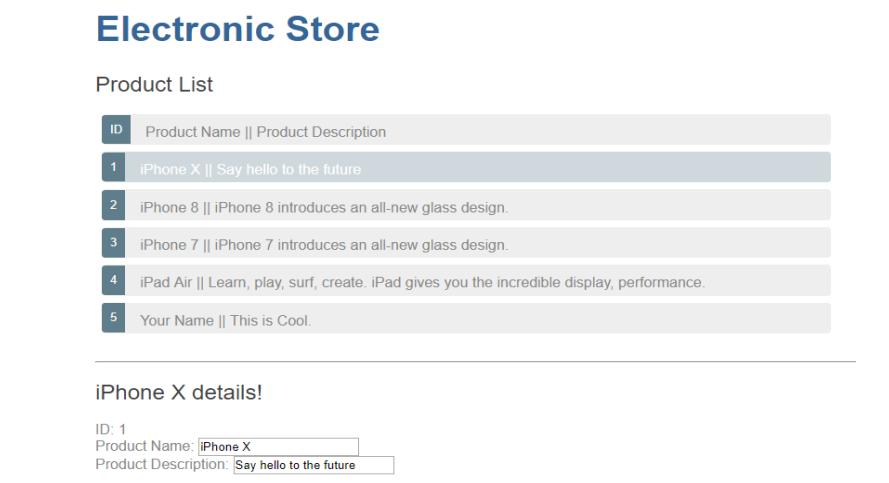 Question C (Edit Name and Description)
1) Allow edit the name and description fields
2) Changing the data should respectively reflected on the list
Question D: Answer the following:
1) Explain 3 built-in directives and discuss the directives used in the questions A-C
2) Data binding: Explain Property Binding and Two-way binding, using examples.
Question E: Answer the following:
1) Pipes. Discuss about Pipes and Custom Pipes with examples
2) How do you pass data from one Component to another? Explain, how you implemented that in Question B
Electronic Store Product List ID Product Name || Product Description 1iPhone X || Say hello to the future 2 iPhone 8 || iPhone 8 introduces an all-new glass design. 3 iPhone 7 || iPhone 7 introduces an all-new glass design. 4 iPad Air || Learn, play, surf, create, iPad gives you the incredible display, performance. Your Name || This is Cool.
Step by Step Solution
3.38 Rating (145 Votes )
There are 3 Steps involved in it
Question A Create Angular project as Mid2017 Use Angular CLI to create a new project ng newMid2017 Angular application structure and display data Crea... View full answer

Get step-by-step solutions from verified subject matter experts
 Study Help