





Question: 1. Declare a new variable to hold information about yourself and assign an empty object to the variable ( hint: {}) 2. Add a property
1. Declare a new variable to hold information

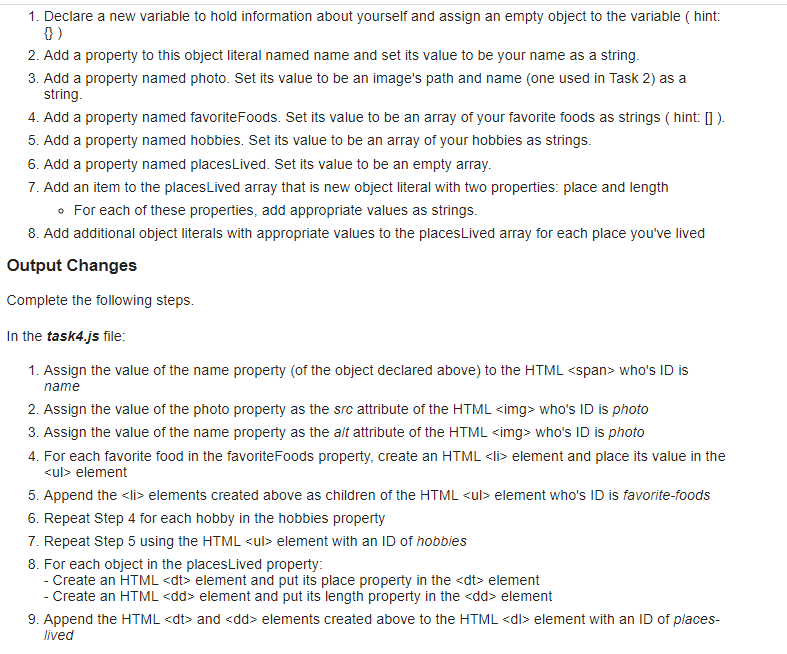
1. Declare a new variable to hold information about yourself and assign an empty object to the variable ( hint: \{\}) 2. Add a property to this object literal named name and set its value to be your name as a string. 3. Add a property named photo. Set its value to be an image's path and name (one used in Task 2) as a string. 4. Add a property named favoriteFoods. Set its value to be an array of your favorite foods as strings (hint: [] ). 5. Add a property named hobbies. Set its value to be an array of your hobbies as strings. 6. Add a property named placesLived. Set its value to be an empty array. 7. Add an item to the placesLived array that is new object literal with two properties: place and length - For each of these properties, add appropriate values as strings. 8. Add additional object literals with appropriate values to the placesLived array for each place you've lived Output Changes Complete the following steps. In the task4.js file: 1. Assign the value of the name property (of the object declared above) to the HTML Span > who's ID is name 2. Assign the value of the photo property as the src attribute of the HTML who's ID is photo 3. Assign the value of the name property as the alt attribute of the HTML who's ID is photo 4. For each favorite food in the favoriteFoods property, create an HTML
  • element and place its value in the element 5. Append the elements created above as children of the HTML element who's ID is favorite-foods 6. Repeat Step 4 for each hobby in the hobbies property 7. Repeat Step 5 using the HTML element with an ID of hobbies 8. For each object in the placesLived property: - Create an HTML element and put its place property in the element - Create an HTML
    element and put its length property in the element 9. Append the HTML
    and
    elements created above to the HTML element with an ID of placeslived
  • Step by Step Solution

    There are 3 Steps involved in it

    1 Expert Approved Answer
    Step: 1 Unlock blur-text-image

    Question Has Been Solved by an Expert!

    Get step-by-step solutions from verified subject matter experts

    Step: 2 Unlock
    Step: 3 Unlock

    Students Have Also Explored These Related Databases Questions!