







Question: 1) FILTER (2 marks) a. In cell E2, enter the correct Function that will return the Time, Competitor and Country only for Competitors with
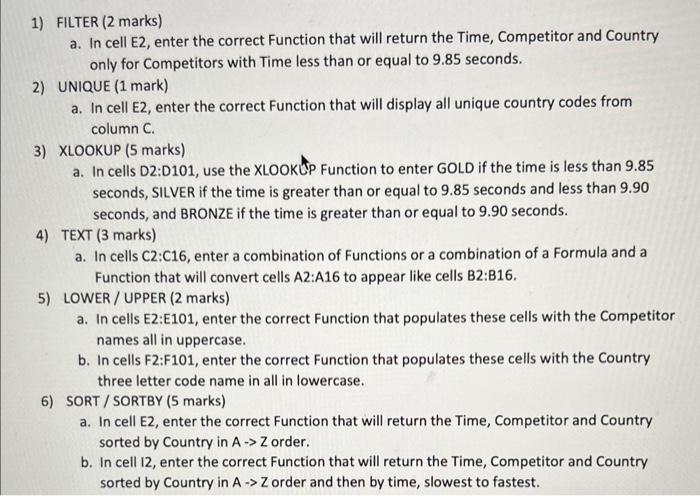
1) FILTER (2 marks) a. In cell E2, enter the correct Function that will return the Time, Competitor and Country only for Competitors with Time less than or equal to 9.85 seconds. 2) UNIQUE (1 mark) a. In cell E2, enter the correct Function that will display all unique country codes from column C. 3) XLOOKUP (5 marks) a. In cells D2:D101, use the XLOOKUP Function to enter GOLD if the time is less than 9.85 seconds, SILVER if the time is greater than or equal to 9.85 seconds and less than 9.90 seconds, and BRONZE if the time is greater than or equal to 9.90 seconds. 4) TEXT (3 marks) a. In cells C2:C16, enter a combination of Functions or a combination of a Formula and a Function that will convert cells A2:A16 to appear like cells B2:B16. 5) LOWER/UPPER (2 marks) a. In cells E2:E101, enter the correct Function that populates these cells with the Competitor names all in uppercase. b. In cells F2:F101, enter the correct Function that populates these cells with the Country three letter code name in all in lowercase. 6) SORT/SORTBY (5 marks) a. In cell E2, enter the correct Function that will return the Time, Competitor and Country sorted by Country in A -> Z order. b. In cell 12, enter the correct Function that will return the Time, Competitor and Country sorted by Country in A -> Z order and then by time, slowest to fastest.
Step by Step Solution
There are 3 Steps involved in it

Get step-by-step solutions from verified subject matter experts
 Study Help