







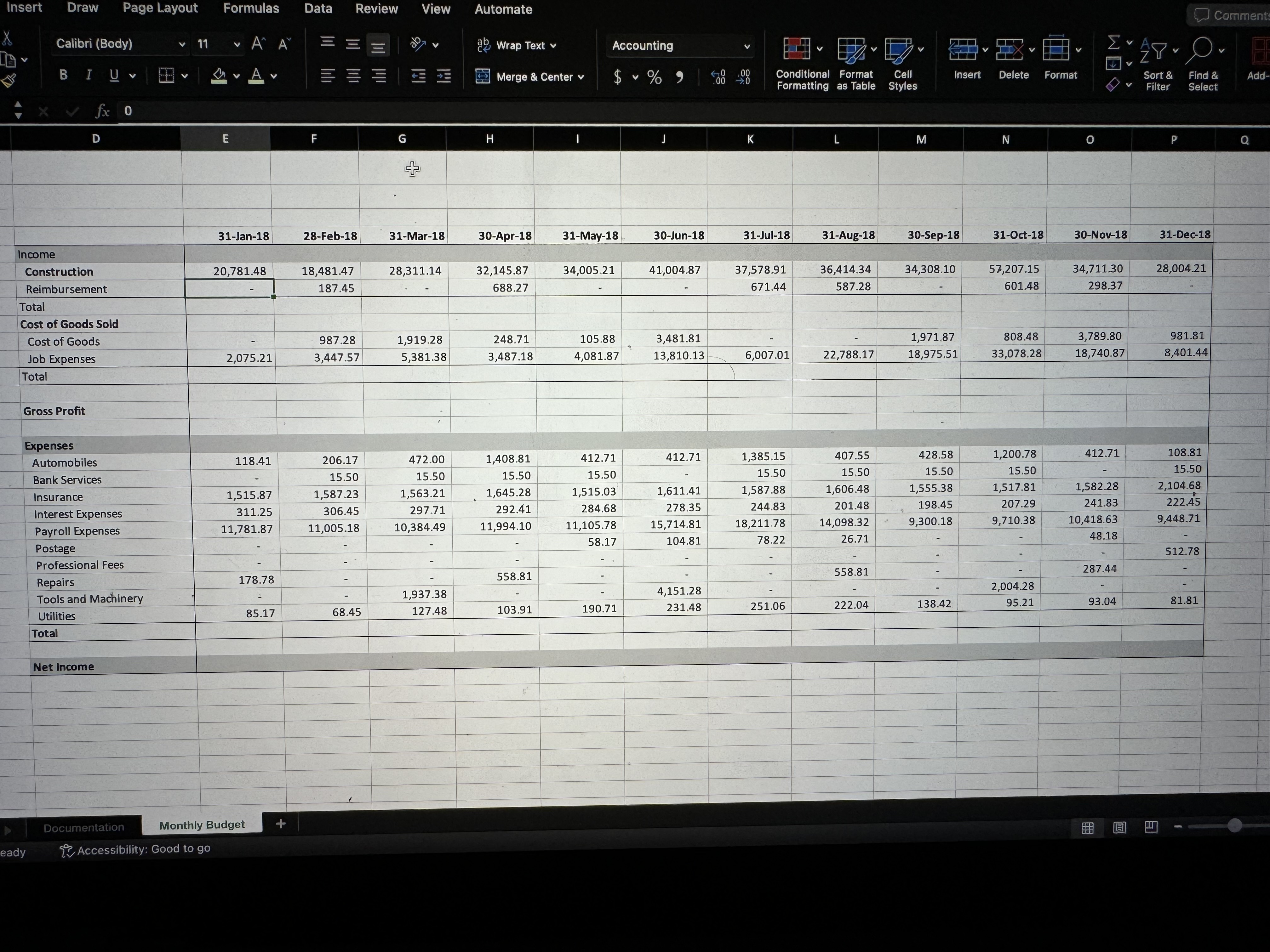
Question: 1 ) Format the spreadsheet by doing the following: ( 1 0 points ) Bold cells: D 5 , D 9 , D 1 4
Format the spreadsheet by doing the following: points
Bold cells: D D D D D D
Indent cells, D:D D:D D:D
Apply a light blue background to cells: D:P; D:P; D:P; D:P
In cell E create a formula to calculate the total monthly income E:E Copy the formula to P points
In cell E create a formula to add the cost of goods and Job expenses E:E Copy the formula to P points
In cell E calculate the companys monthly gross profit, which is equal to the difference between the monthly income E and the monthly cost of goods sold E Copy to P points
In cell E create a formula to add the expenses E:E Copy the formula to P points
In cell E calculate the companys net income equal to the difference between its gross profit and its total expenses. points
Apply conditional formatting to cells E:P If the value is a negative number change the font color to dark red. points
show step by step please and answers, thank youu
Step by Step Solution
There are 3 Steps involved in it
1 Expert Approved Answer
Step: 1 Unlock

Question Has Been Solved by an Expert!
Get step-by-step solutions from verified subject matter experts
Step: 2 Unlock
Step: 3 Unlock
 Study Help