







Question: 1 function link_set = place_links (links_in_world, link_end_set_with_base) 2 Use the locations of the ends of a set of links to place the 3 % start-and-end
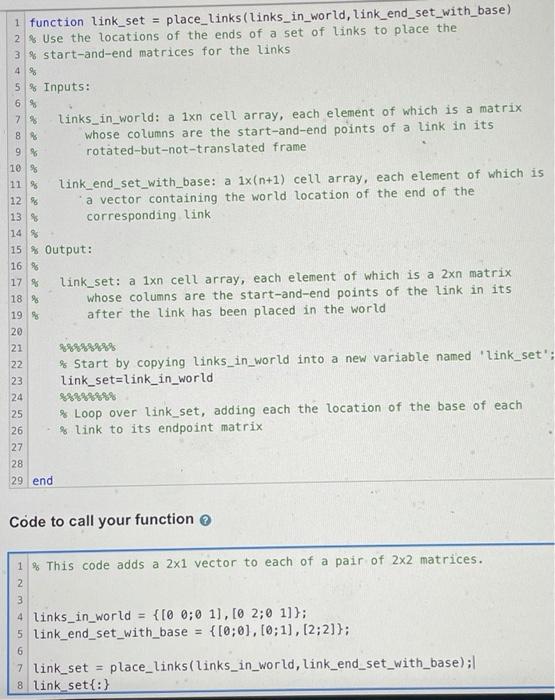
1 function link_set = place_links (links_in_world, link_end_set_with_base) 2 Use the locations of the ends of a set of links to place the 3 % start-and-end matrices for the links 4 % 5 % Inputs: 6 % 7 % links_in_world: a 1xn cell array, each element of which is a matrix 8 % whose columns are the start-and-end points of a link in its 9 % rotated-but-not-translated frame 10 % 11 % link_end_set_with_base: a 1x(n+1) cell array, each element of which is 12 % a vector containing the world location of the end of the 13 % corresponding link 14 % 15 % Output: 16 % 17 % link_set: a 1xn cell array, each element of which is a 2xn matrix whose columns are the start-and-end points of the link in its 19 % after the link has been placed in the world 20 21 22 % Start by copying links_in_world into a new variable named 'link_set": 23 link_set=link_in_world 24 %%%%%99% 25 % Loop over link_set, adding each the location of the base of each 26 % link to its endpoint matrix 27 28 29 end 18 % a Code to call your function 1 % This code adds a 2x1 vector to each of a pair of 2x2 matrices. Nm 4 links_in_world = {[0 0;0 1], [0 2;0 1]); 5 link_end_set_with_base= {[0,0], [0:1], [2:2] }; 6 7 link_set = place_links(links_in_world, link_end_set_with_base); 8 link set{:}
Step by Step Solution
There are 3 Steps involved in it

Get step-by-step solutions from verified subject matter experts
 Study Help