







Question: 1. In this lab, you will work with nested loops drawing stuff with the turtle. In IDLE, create a new Python program. 2. Import the
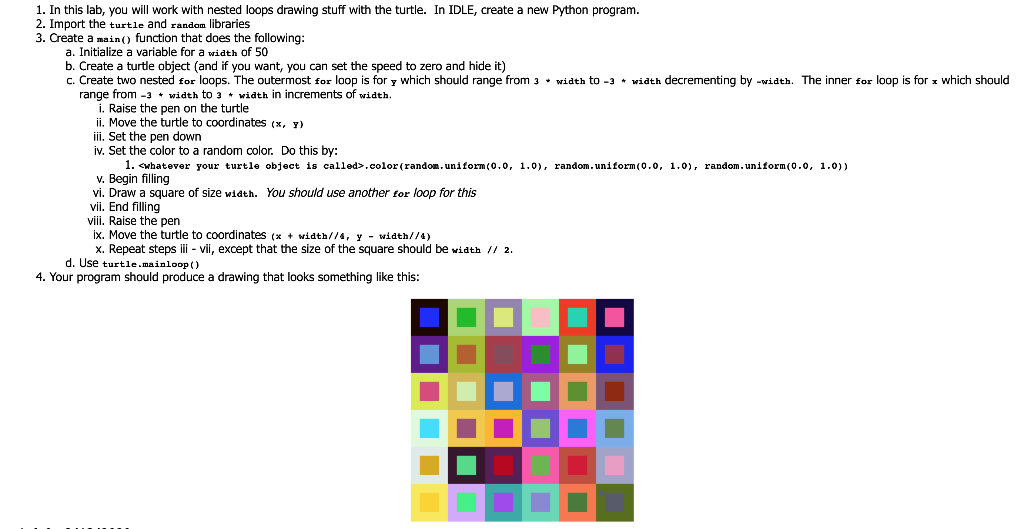
1. In this lab, you will work with nested loops drawing stuff with the turtle. In IDLE, create a new Python program. 2. Import the turtle and random libraries 3. Create a main() function that does the following: a. Initialize a variable for a width of 50 b. Create a turtle object (and if you want, you can set the speed to zero and hide it) C. Create two nested for loops. The outermost for loop is for y which should range from 3. width to -3 + width decrementing by -width. The inner for loop is for which should range from -3 + width to 3 + width in increments of width. i. Raise the pen on the turtle ii. Move the turtle to coordinates (X, Y) iii. Set the pen down iv. Set the color to a random color. Do this by: 1. whatever your turtle object is called>.color(random.uniform(0.0, 1.0), random.uniform(0.0, 1.0), random.uniform(0.0, 1.0)) v. Begin filling vi. Draw a square of size width. You should use another for loop for this vii. End filling viii. Raise the pen ix. Move the turtle to coordinates (x + width//4, y - width//4) X. Repeat steps iii - vii, except that the size of the square should be width // 2. d. Use turtle.mainloop() 4. Your program should produce a drawing that looks something like this
Step by Step Solution
There are 3 Steps involved in it

Get step-by-step solutions from verified subject matter experts
 Study Help