







Question: 1. Login as linuxuser (su - linuxuser) a. cp /scripts/hello-2.8.tar.gz b. Extract the contents using the tar command c. Create a bzip'd tar file named
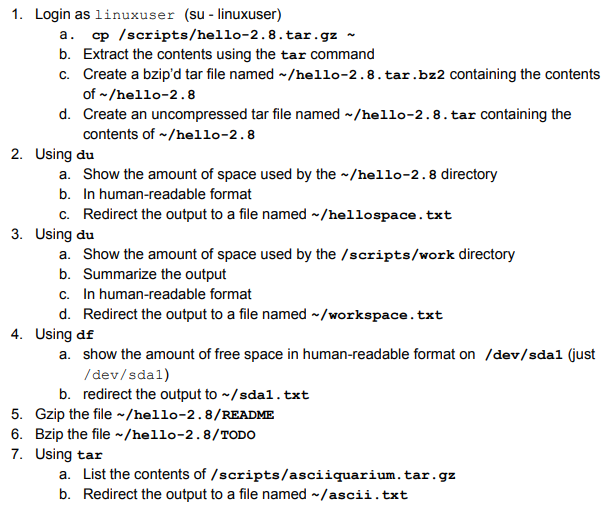
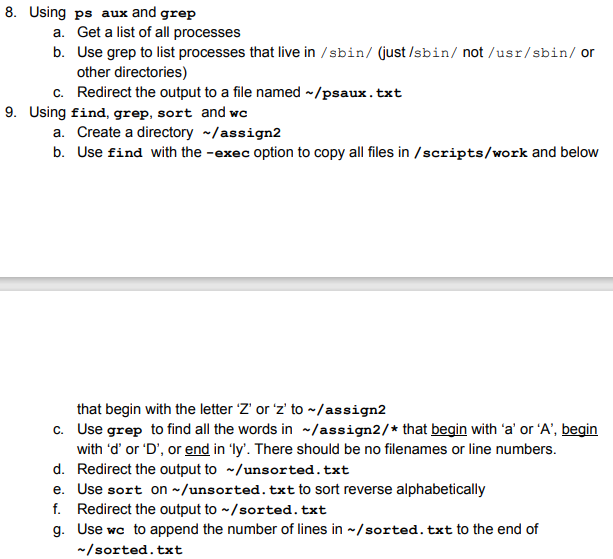
1. Login as linuxuser (su - linuxuser) a. cp /scripts/hello-2.8.tar.gz b. Extract the contents using the tar command c. Create a bzip'd tar file named -/hello-2.8. tar.bz2 containing the contents of -/hello-2.8 d. Create an uncompressed tar file named -/hello-2.8. tar containing the contents of -/hello-2.8 2. Using du a. Show the amount of space used by the ~/hello-2.8 directory b. In human-readable format C. Redirect the output to a file named -/hellospace.txt 3. Using du a. Show the amount of space used by the /scripts/work directory b. Summarize the output C. In human-readable format d. Redirect the output to a file named /workspace.txt 4. Using de a show the amount of free space in human-readable format on /dev/sdal (just /dev/sdal) b. redirect the output to /sdal.txt 5. Gzip the file/hello-2.8/README 6. Bzip the file/hello-2.8/TODO 7. Using tar a. List the contents of /scripts/asciiquarium.tar.gz b. Redirect the output to a file named -/ascii.txt 8. Using ps aux and grep a. Get a list of all processes b. Use grep to list processes that live in /sbin/ (just /sbin/ not /usr/sbin/or other directories) C. Redirect the output to a file named - /psaux.txt 9. Using find, grep, sort and wc a. Create a directory -/assign2 b. Use find with the -exec option to copy all files in /scripts/work and below that begin with the letter 'Z' or 'z' to -/assign2 C. Use grep to find all the words in ~/assign2/* that begin with 'a' or 'A', begin with 'd' or 'D', or end in 'ly'. There should be no filenames or line numbers. d. Redirect the output to -/unsorted.txt e. Use sort on-/unsorted. txt to sort reverse alphabetically f. Redirect the output to /sorted. txt g. Use wc to append the number of lines in /sorted. txt to the end of - /sorted.txt 1. Login as linuxuser (su - linuxuser) a. cp /scripts/hello-2.8.tar.gz b. Extract the contents using the tar command c. Create a bzip'd tar file named -/hello-2.8. tar.bz2 containing the contents of -/hello-2.8 d. Create an uncompressed tar file named -/hello-2.8. tar containing the contents of -/hello-2.8 2. Using du a. Show the amount of space used by the ~/hello-2.8 directory b. In human-readable format C. Redirect the output to a file named -/hellospace.txt 3. Using du a. Show the amount of space used by the /scripts/work directory b. Summarize the output C. In human-readable format d. Redirect the output to a file named /workspace.txt 4. Using de a show the amount of free space in human-readable format on /dev/sdal (just /dev/sdal) b. redirect the output to /sdal.txt 5. Gzip the file/hello-2.8/README 6. Bzip the file/hello-2.8/TODO 7. Using tar a. List the contents of /scripts/asciiquarium.tar.gz b. Redirect the output to a file named -/ascii.txt 8. Using ps aux and grep a. Get a list of all processes b. Use grep to list processes that live in /sbin/ (just /sbin/ not /usr/sbin/or other directories) C. Redirect the output to a file named - /psaux.txt 9. Using find, grep, sort and wc a. Create a directory -/assign2 b. Use find with the -exec option to copy all files in /scripts/work and below that begin with the letter 'Z' or 'z' to -/assign2 C. Use grep to find all the words in ~/assign2/* that begin with 'a' or 'A', begin with 'd' or 'D', or end in 'ly'. There should be no filenames or line numbers. d. Redirect the output to -/unsorted.txt e. Use sort on-/unsorted. txt to sort reverse alphabetically f. Redirect the output to /sorted. txt g. Use wc to append the number of lines in /sorted. txt to the end of - /sorted.txt
Step by Step Solution
There are 3 Steps involved in it

Get step-by-step solutions from verified subject matter experts
 Study Help