







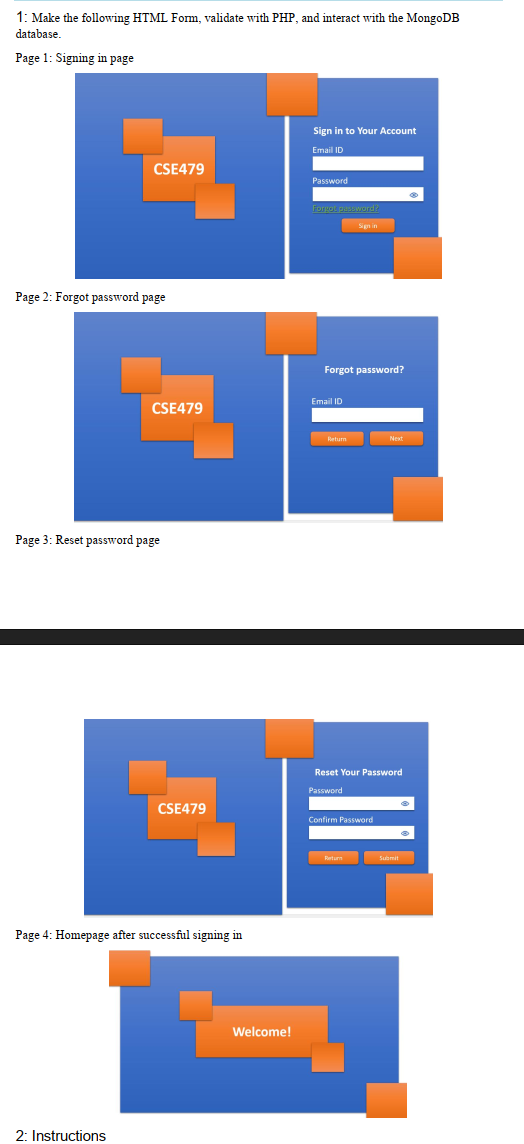
Question: 1 : Make the following HTML Form, validate with PHP , and interact with the MongoDB database. Page 1 : Signing in page Page 2
: Make the following HTML Form, validate with PHP and interact with the MongoDB
database.
Page : Signing in page
Page : Forgot password page
Page : Reset password page
Page : Homepage after successful signing in
: Instructions
nstructions
Prepare a database with the necessary fields to store email ID and password so that one
can sign into the homepage. Insert some dummy data into the database since there is no
signup form.
Retrieve the data from the database to match the email ID and password when they click
the sign in button Page Same instruction for page
When someone tries to reset the password, update the field in the database Page
Password should not the visible. The confirm password must match the password option.
Do not use any encryption to store the password.
Whenever one clicks the return button, redirect them to the page page.
You may add or modify the necessary HTML or CSS code if required.
Step by Step Solution
There are 3 Steps involved in it
1 Expert Approved Answer
Step: 1 Unlock

Question Has Been Solved by an Expert!
Get step-by-step solutions from verified subject matter experts
Step: 2 Unlock
Step: 3 Unlock
 Study Help