



Question: 1 Name 2 3 4 5 From the following data, use Excel to calculate the direct materials price and quantity variances, the direct labor rate
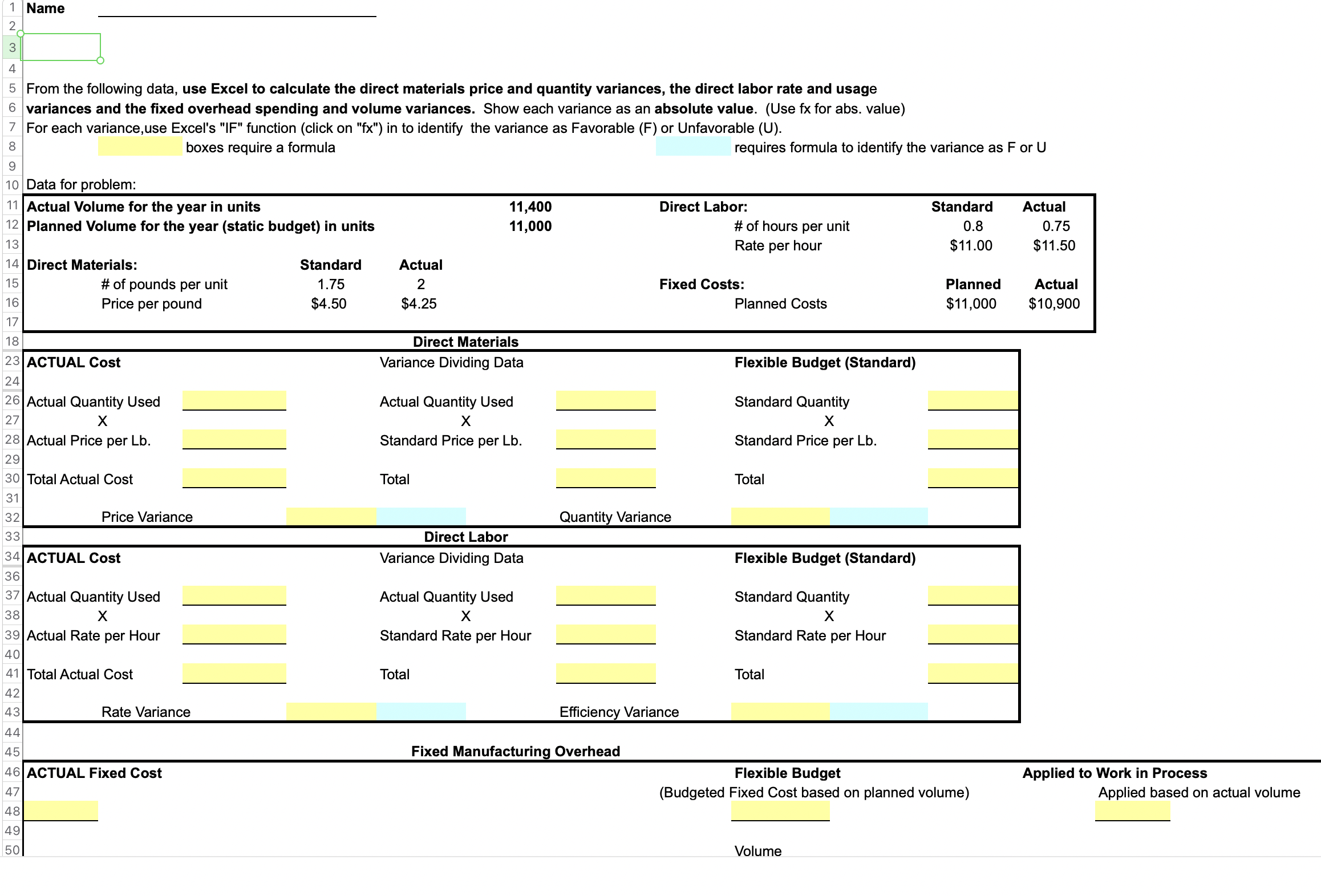
1 Name 2 3 4 5 From the following data, use Excel to calculate the direct materials price and quantity variances, the direct labor rate and usage 6 variances and the fixed overhead spending and volume variances. Show each variance as an absolute value. (Use fx for abs. value) 7 For each variance,use Excel's "IF" function (click on "fx") in to identify the variance as Favorable (F) or Unfavorable (U). 8 boxes require a formula requires formula to identify the variance as For U 9 10 Data for problem: 11 Actual Volume for the year in units 11,400 Direct Labor: Standard Actual 12 Planned Volume for the year (static budget) in units 11,000 # of hours per unit 0.8 0.75 13 Rate per hour $11.00 $11.50 14 Direct Materials: Standard Actual 15 # of pounds per unit 1.75 2 Fixed Costs: Planned Actual 16 Price per pound $4.50 $4.25 Planned Costs $11,000 $10,900 17 18 Direct Materials 23 ACTUAL Cost Variance Dividing Data Flexible Budget (Standard) 24 26|Actual Quantity Used Actual Quantity Used Standard Quantity 27 X 28 Actual Price per Lb. Standard Price per Lb. Standard Price per Lb. 29 30 Total Actual Cost Total Total 31 Price Variance Quantity Variance 32 33 Direct Labor Variance Dividing Data Flexible Budget (Standard) 34 ACTUAL Cost 36 37 | Actual Quantity Used 38 x 39 Actual Rate per Hour 40 41 Total Actual Cost 42 Rate Variance Actual Quantity Used Standard Rate per Hour Standard Quantity Standard Rate per Hour Total Total 43 Efficiency Variance 44 45 Fixed Manufacturing Overhead 46 ACTUAL Fixed Cost 47 48 Flexible Budget (Budgeted Fixed Cost based on planned volume) Applied to Work in Process Applied based on actual volume 49 007 50 Volume
Step by Step Solution
There are 3 Steps involved in it

Get step-by-step solutions from verified subject matter experts