







Question: 1. Numbers in only one cell, after that reference the cell they are in. 2. Calculated fields(formulas) should only contain cell references, don't put data
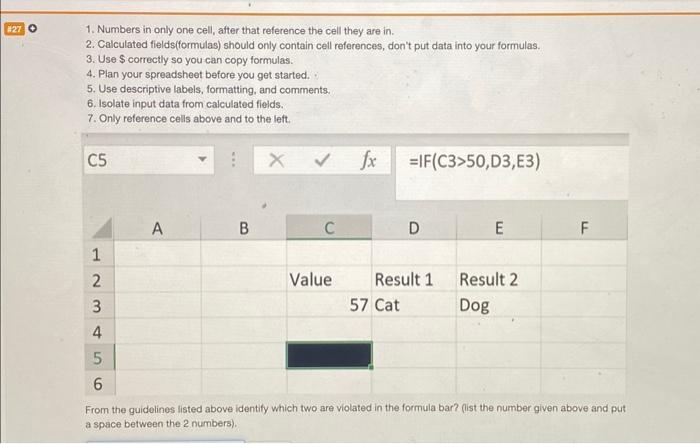
1. Numbers in only one cell, after that reference the cell they are in. 2. Calculated fields(formulas) should only contain cell references, don't put data into your formulas. 3. Use $ correctly so you can copy formulas. 4. Plan your spreadsheet before you get started. 5. Use descriptive labels, formatting, and comments, 6. Isolate input data from calculated fieids. 7. Only reference cells above and to the left. fx=IF(C3>50,D3,E3) From the guidelines listed above identify which two are violated in the formula bar? (list the number given above and put a space between the 2 numbers)
Step by Step Solution
There are 3 Steps involved in it
1 Expert Approved Answer
Step: 1 Unlock

Question Has Been Solved by an Expert!
Get step-by-step solutions from verified subject matter experts
Step: 2 Unlock
Step: 3 Unlock
 Study Help