







Question: 1. Open the file IPv6_Troubleshooting.pkt. Try pinging each computer. (PC1-PC2, PC1, PC3) PC-PT Switch-PT PC1S1 -60/2 2911 Switch-PT LL- R1 S3 PC-PT PC3 Switch-PT PC-PT
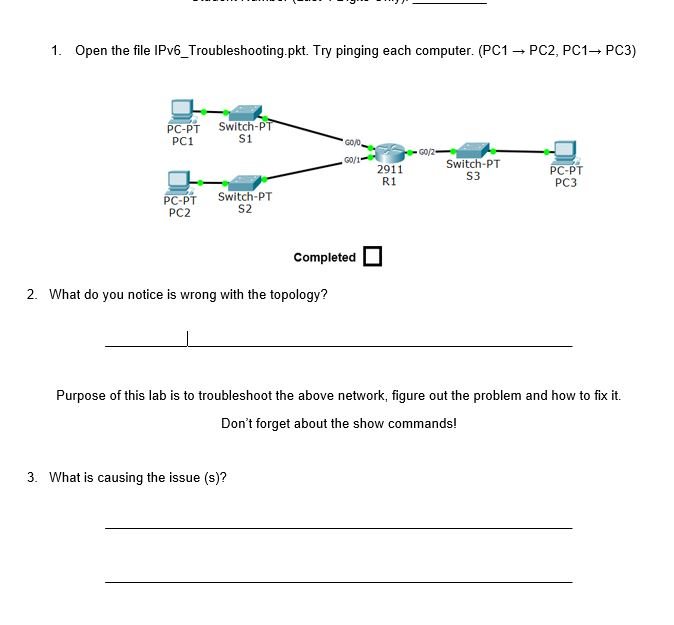
1. Open the file IPv6_Troubleshooting.pkt. Try pinging each computer. (PC1-PC2, PC1, PC3) PC-PT Switch-PT PC1S1 -60/2 2911 Switch-PT LL- R1 S3 PC-PT PC3 Switch-PT PC-PT PC2 Completed 2. What do you notice is wrong with the topology? Purpose of this lab is to troubleshoot the above network, figure out the problem and how to fix it. Don't forget about the show commands! 3. What is causing the issue (s)? 1. Open the file IPv6_Troubleshooting.pkt. Try pinging each computer. (PC1-PC2, PC1, PC3) PC-PT Switch-PT PC1S1 -60/2 2911 Switch-PT LL- R1 S3 PC-PT PC3 Switch-PT PC-PT PC2 Completed 2. What do you notice is wrong with the topology? Purpose of this lab is to troubleshoot the above network, figure out the problem and how to fix it. Don't forget about the show commands! 3. What is causing the issue (s)
Step by Step Solution
There are 3 Steps involved in it

Get step-by-step solutions from verified subject matter experts
 Study Help