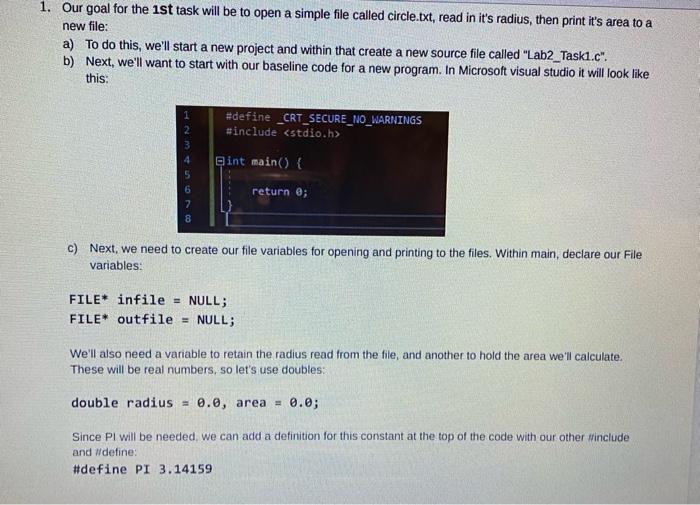
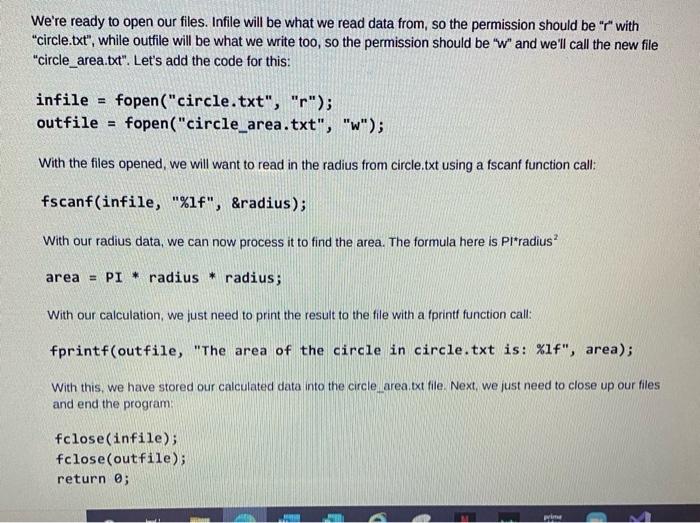
1. Our goal for the 1st task will be to open a simple file called circle.txt, read in it's radius, then print it's area to a new file: a) To do this, we'll start a new project and within that create a new source file called "Lab2_Taski.c". b) Next, we'll want to start with our baseline code for a new program. In Microsoft visual studio it will look like this: 1 2 3 #define _CRT_SECURE_NO_WARNINGS #include Gint main() { 4 5 6 7 8 return; c) Next, we need to create our file variables for opening and printing to the files. Within main, declare our File variables: FILE* infile = NULL; FILE* outfile = NULL; We'll also need a varable to retain the radius read from the file, and another to hold the area we'll calculate. These will be real numbers, so let's use doubles: double radius = 0.0, area = 0.0; Since PI will be needed, we can add a definition for this constant at the top of the code with our other #include and ildefine: #define PI 3.14159 We're ready to open our files. Infile will be what we read data from, so the permission should be "r" with "circle.txt", while outfile will be what we write too, so the permission should be "W" and we'll call the new file "circle_area.txt". Let's add the code for this: infile = fopen("circle.txt", "r"); outfile = fopen("circle_area.txt", "w"); With the files opened, we will want to read in the radius from circle.txt using a fscanf function call: fscanf(infile, "%1f", &radius); With our radius data, we can now process it to find the area. The formula here is Pl*radius? area = PI * radius * radius; With our calculation, we just need to print the result to the file with a fprintf function call: fprintf(outfile, "The area of the circle in circle.txt is: %1f", area); With this, we have stored our calculated data into the circle area.txt file. Next, we just need to close up our files and end the program fclose(infile) fclose(outfile); return 0; pri