







Question: 1. Program05.m 1) Create a MATLAB Program titled Program05.m and open the file. 2) Call myPrompt function and store the returned array in retArr, if
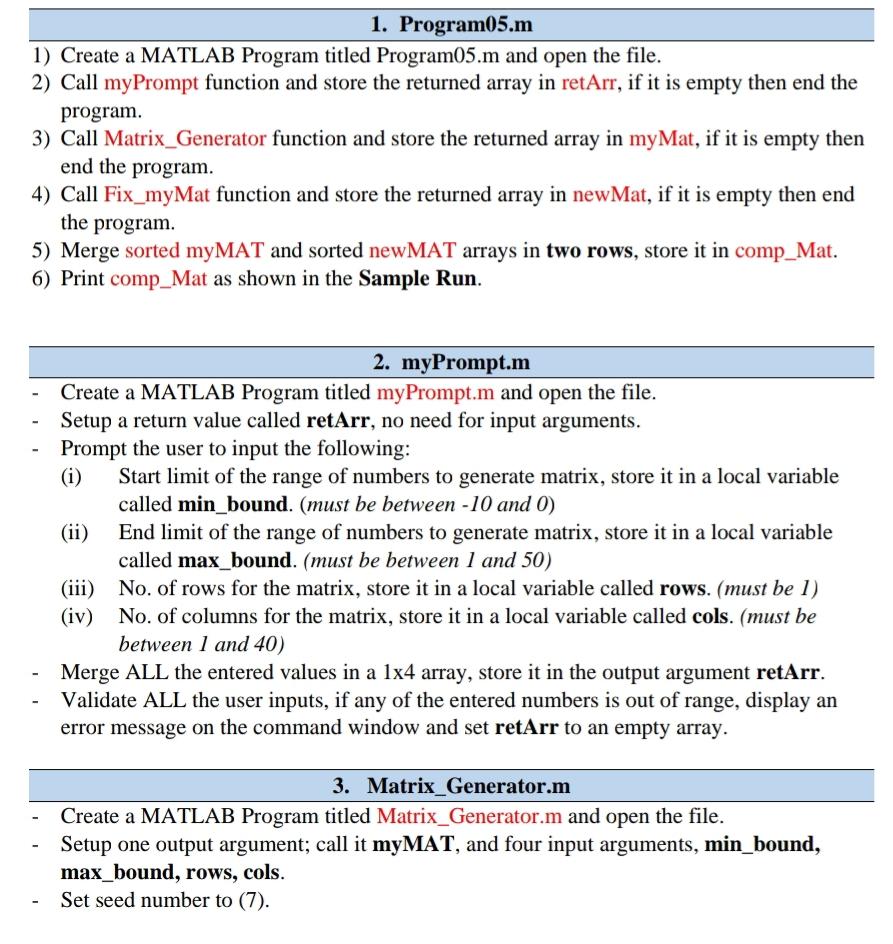
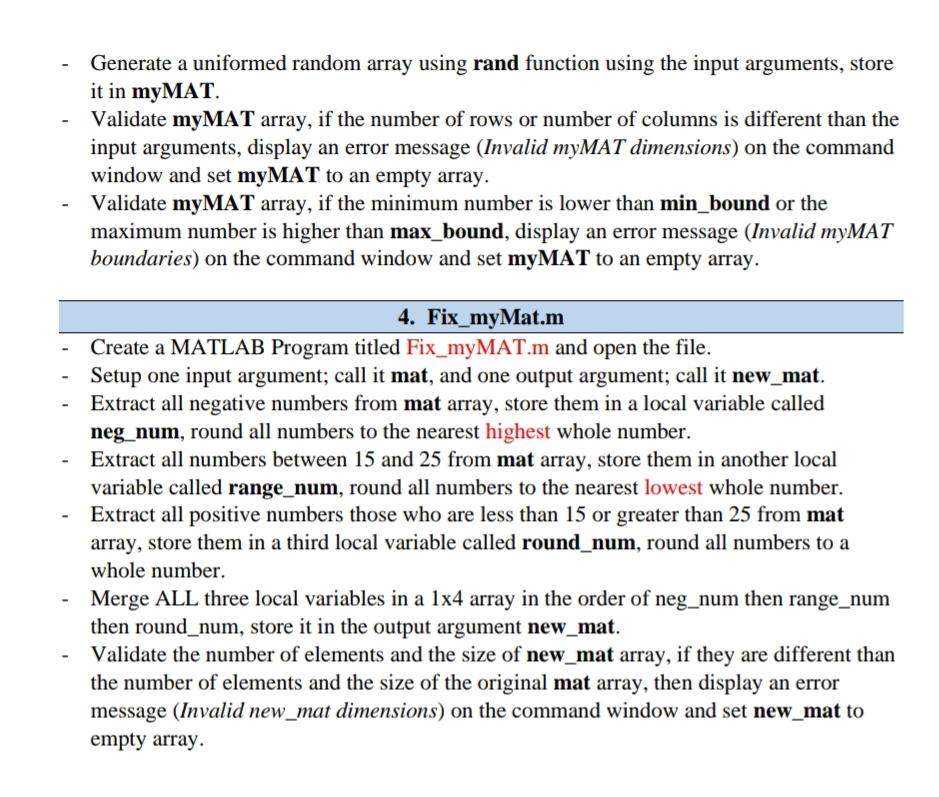
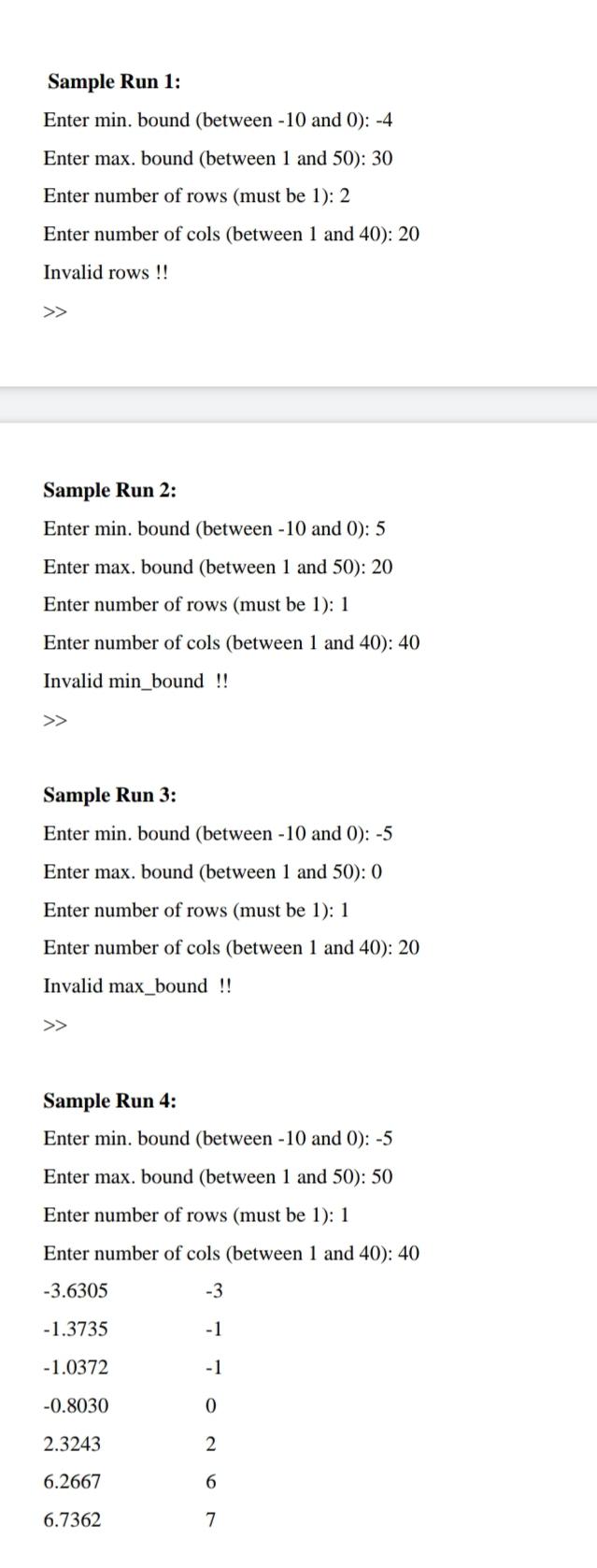
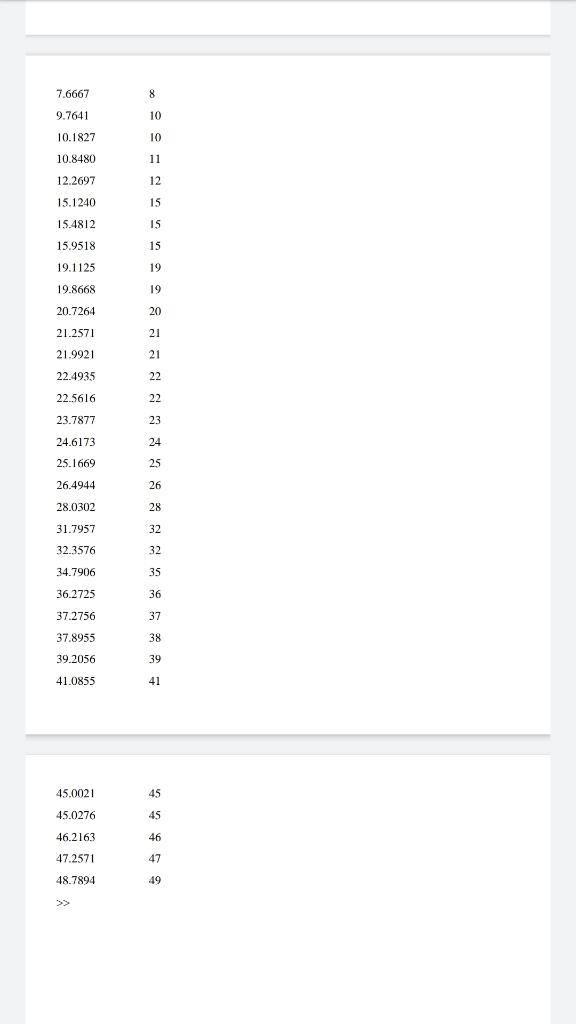
1. Program05.m 1) Create a MATLAB Program titled Program05.m and open the file. 2) Call myPrompt function and store the returned array in retArr, if it is empty then end the program. 3) Call Matrix_Generator function and store the returned array in myMat, if it is empty then end the program. 4) Call Fix_myMat function and store the returned array in new Mat, if it is empty then end the program. 5) Merge sorted myMAT and sorted newMAT arrays in two rows, store it in comp_Mat. 6) Print comp_Mat as shown in the Sample Run. 2. myPrompt.m - Create a MATLAB Program titled myPrompt.m and open the file. Setup a return value called retArr, no need for input arguments. - Prompt the user to input the following: (i) Start limit of the range of numbers to generate matrix, store it in a local variable called min_bound. (must be between -10 and 0) End limit of the range of numbers to generate matrix, store it in a local variable called max_bound. (must be between 1 and 50) (iii) No. of rows for the matrix, store it in a local variable called rows. (must be 1) (iv) No. of columns for the matrix, store it in a local variable called cols. (must be between 1 and 40) Merge ALL the entered values in a 1x4 array, store it in the output argument retArr. Validate ALL the user inputs, if any of the entered numbers is out of range, display an error message on the command window and set retArr to an empty array. 3. Matrix_Generator.m Create a MATLAB Program titled Matrix_Generator.m and open the file. Setup one output argument; call it myMAT, and four input arguments, min_bound, max_bound, rows, cols. - Set seed number to (7). Generate a uniformed random array using rand function using the input arguments, store it in myMAT. - Validate myMAT array, if the number of rows or number of columns is different than the input arguments, display an error message (Invalid myMAT dimensions) on the command window and set myMAT to an empty array. Validate myMAT array, if the minimum number is lower than min_bound or the maximum number is higher than max_bound, display an error message (Invalid myMAT boundaries) on the command window and set myMAT to an empty array. 4. Fix_myMat.m Create a MATLAB Program titled Fix_myMAT.m and open the file. Setup one input argument; call it mat, and one output argument; call it new_mat. Extract all negative numbers from mat array, store them in a local variable called neg_num, round all numbers to the nearest highest whole number. Extract all numbers between 15 and 25 from mat array, store them in another local variable called range_num, round all numbers to the nearest lowest whole number. - Extract all positive numbers those who are less than 15 or greater than 25 from mat array, store them in a third local variable called round_num, round all numbers to a whole number. Merge ALL three local variables in a 1x4 array in the order of neg_num then range_num then round_num, store it in the output argument new_mat. Validate the number of elements and the size of new_mat array, if they are different than the number of elements and the size of the original mat array, then display an error message (Invalid new_mat dimensions) on the command window and set new_mat to empty array Sample Run 1: Enter min. bound (between -10 and 0): -4 Enter max. bound (between 1 and 50): 30 Enter number of rows (must be 1): 2 Enter number of cols (between 1 and 40): 20 Invalid rows !! >> Sample Run 2: Enter min. bound (between -10 and 0): 5 Enter max. bound (between 1 and 50): 20 Enter number of rows (must be 1): 1 Enter number of cols (between 1 and 40): 40 Invalid min_bound !! Sample Run 3: Enter min. bound (between -10 and 0): -5 Enter max. bound (between 1 and 50): 0 Enter number of rows (must be 1): 1 Enter number of cols (between 1 and 40): 20 Invalid max_bound !! >> Sample Run 4: Enter min. bound (between -10 and 0): -5 Enter max. bound (between 1 and 50): 50 Enter number of rows (must be 1): 1 Enter number of cols (between 1 and 40): 40 -3.6305 -3 -1.3735 -1 -1.0372 -1 -0.8030 0 2.3243 2 6.2667 6 6.7362 7 7.6667 8 9.7641 10 10.1827 10 10.8480 11 12.2697 12 15.1240 15 15.4812 15 15.9518 15 19.1125 19 19.8668 19 20 21 20.7264 21.2571 21.9921 22.4935 21 22 22.5616 22 23.7877 23 24.6173 24 25.1669 25 26.4944 26 28.0302 28 31.7957 32 32.3576 32 34.7906 35 36.2725 36 37.2756 37 38 37.8955 39.2056 41.0855 39 41 45.0021 45 45.0276 45 46.2163 46 47.2571 47 48.7894 49
Step by Step Solution
There are 3 Steps involved in it

Get step-by-step solutions from verified subject matter experts
 Study Help