







Question: 1. Provided in the zip file for this prac are two java files, Employee.java and Employee Demo.java (these are the example files from the week
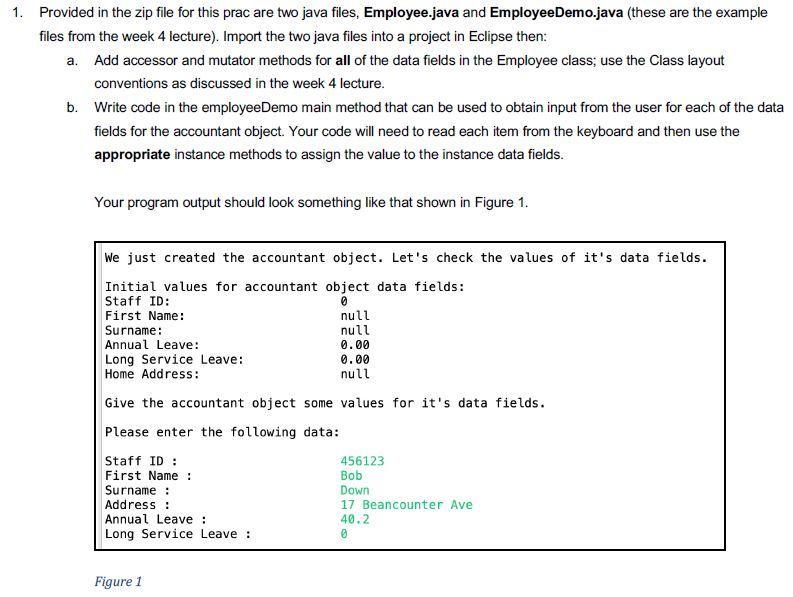
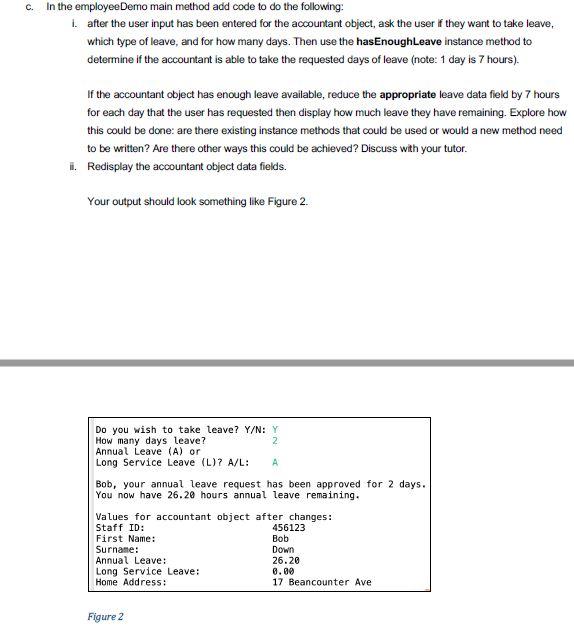
1. Provided in the zip file for this prac are two java files, Employee.java and Employee Demo.java (these are the example files from the week 4 lecture). Import the two java files into a project in Eclipse then: a. Add accessor and mutator methods for all of the data fields in the Employee class; use the Class layout conventions as discussed in the week 4 lecture. b. Write code in the employee Demo main method that can be used to obtain input from the user for each of the data fields for the accountant object. Your code will need to read each item from the keyboard and then use the appropriate instance methods to assign the value to the instance data fields. Your program output should look something like that shown in Figure 1. 0 We just created the accountant object. Let's check the values of it's data fields. Initial values for accountant object data fields: Staff ID: First Name: null Surname: null Annual Leave: 0.00 Long Service Leave: 0.00 Home Address: null Give the accountant object some values for it's data fields. Please enter the following data: Staff ID: 456123 First Name: Bob Surname : Down Address: 17 Beancounter Ave Annual Leave : 40.2 Long Service Leave : Figure 1 C. In the employee Demo main method add code to do the following: 1. after the user input has been entered for the accountant object, ask the user if they want to take leave, which type of leave, and for how many days. Then use the hasEnoughleave instance method to determine if the accountant is able to take the requested days of leave (note: 1 day is 7 hours). If the accountant object has enough leave available, reduce the appropriate leave data field by 7 hours for each day that the user has requested then display how much leave they have remaining. Explore how this could be done: are there existing instance methods that could be used or would a new method need to be written? Are there other ways this could be achieved? Discuss with your tutor. i. Redisplay the accountant object data fields. Your output should look something like Figure 2. Do you wish to take leave? Y/N: Y How many days leave? 2 Annual Leave (A) or Long Service Leave (L)? A/L: Bob, your annual leave request has been approved for 2 days. You now have 26.20 hours annual leave remaining. Values for accountant object after changes: Staff ID: 456123 First Name: Bob Surname: Down Annual Leave: 26.20 Long Service Leave: 0.00 Home Address: 17 Beancounter Ave Figure 2
Step by Step Solution
There are 3 Steps involved in it

Get step-by-step solutions from verified subject matter experts
 Study Help