







Question: Can I get new java codes ----------------------------------------------------------- Expenses.java public class Expenses { // private data members private double monthly_bal; private double tot_income; private double tot_expend;
Can I get new java codes
-----------------------------------------------------------
Expenses.java
public class Expenses {
// private data members private double monthly_bal; private double tot_income; private double tot_expend; private String month;
public Expenses(String m) { month = m; monthly_bal = 0; tot_income = 0; tot_expend = 0; }
public String getmonth() { return month; }
public void setmonth(String m) { month = m; }
// getter total income public double gettot_income() { return tot_income; }
// getter total expenditure public double gettot_expend() { return tot_expend; }
// getter monthly balance public double getmonthly_bal() { return monthly_bal; }
// setter monthly balance public void setmonthly_bal(double x) { this.monthly_bal = x; }
// method to add sale and subtract expenditure public void add(double x, double y) { monthly_bal = monthly_bal + x - y; }
// method to calculate total expenditure public void tot_expenditure(double x) { tot_expend = tot_expend + x; }
// method to calculate total income public void tot_income(double x) { tot_income = tot_income + x; }
// calculate keleven public double keleven() { // If balance is positive or 0 no keleven required if (monthly_bal >= 0) return 0; // else return required keleven else return (0 - monthly_bal); }
}
--------------------------------------------------------------------------
ExpenseDemo.java
import java.io.File;
import java.io.FileNotFoundException;
import java.io.FileWriter;
import java.io.IOException;
import java.util.Scanner;
public class ExpenseDemo {
// Method to calculate average keleven
public static double calcAvgKeleven (Expenses []expenses, int numMonth) {
// Initialize total keleven to 0
double totalKeleven = 0;
// Find the total keleven
for (int i=0; i
totalKeleven += expenses[i].keleven();
// Calculate the average keleven
double avgKeleven = totalKeleven / numMonth;
// Return the average keleven
return avgKeleven;
}
public static void main(String[] args) {
// An Array to store Expenses objects
Expenses []expenses = new Expenses[12];
// Number of months
int numMonths = 0;
// try to read the file
try {
Scanner sc = new Scanner(new File("MalonesCones2.txt"));
// read the file line by line
while (sc.hasNextLine()) {
// get month and week line
String monthAndWeek = sc.nextLine();
// split and store in month variable
String month = monthAndWeek.split(" ")[0];
// split and store in weeks variable
int weeks = Integer.parseInt(monthAndWeek.split(" ")[1]);
// create one Expenses object
Expenses expense = new Expenses(month);
// Input for sales and Expenditure for each week
for (int i = 1; i
// get sale and Expenditure line
String saleAndExpend = sc.nextLine();
// split and store in sale
double sale = Double.parseDouble(saleAndExpend.split(" ")[0]);
// split and store in expnd
double expnd = Double.parseDouble(saleAndExpend.split(" ")[1]);
// calculate Monthly Balance for each week
expense.add(sale, expnd);
// Adding total income
expense.tot_income(sale);
// Adding total expenditure
expense.tot_expenditure(expnd);
}
// add to array
expenses[numMonths] = expense;
numMonths++;
}
sc.close();// close the scanner the reading is completed
} catch (FileNotFoundException e) {
// print the error if file not found
System.err.println("File Not Found!!");
}
// print the summary
for (int i=0; i
// Printing Results using getter methods
System.out.println();
System.out.println("For Month of " + expenses[i].getmonth() + ":");
System.out.printf("%-15s $%8.2f ", "Balance:", expenses[i].getmonthly_bal());
System.out.printf("%-15s $%8.2f ", "Total Sales:", expenses[i].gettot_income());
System.out.printf("%-15s $%8.2f ", "Total Expenses:", expenses[i].gettot_expend());
System.out.printf("%-15s $%8.2f ", "Keleven:", expenses[i].keleven());
System.out.println();
}
// Call function to get the average keleven
double avgKeleven = calcAvgKeleven(expenses, numMonths);
// Display the average keleven
System.out.printf("%-15s $%8.2f ", "Keleven mean:", avgKeleven);
// write summary to the file
try {
// create and open the file
FileWriter fw = new FileWriter("expenseSummary.txt");
// write expenses summary using toString method
for (int i=0; i
fw.write(expenses[i].getmonth() + "," + expenses[i].getmonthly_bal() + "," + expenses[i].gettot_income() + "," + expenses[i].gettot_expend()
+ "," + expenses[i].keleven() + " ");
}
fw.close();
} catch (IOException e) {
//print the error if any error occurred
System.out.println("An error occurred.");
e.printStackTrace();
}
}
}
---------------------------------------------------------------------
FYI if it is needed
----------------------------------------------------------------
MalonesCones2.txt
January 5 250 200 170 190 352.40 402.45 410 350.77 225 250.20 February 4 200 300 300 450 350 250 275 275 March 5 200 200 150 150 350 400 400 350 225 200 April 5 352.35 400.10 120.50 354.75 195 120.00 200.20 365 235 120 May 5 452.35 380.10 220.50 354.75 395 420.00 300.20 365 335 220 June 5 250 400 270 290 352 302.45 400 450.77 295 350.20
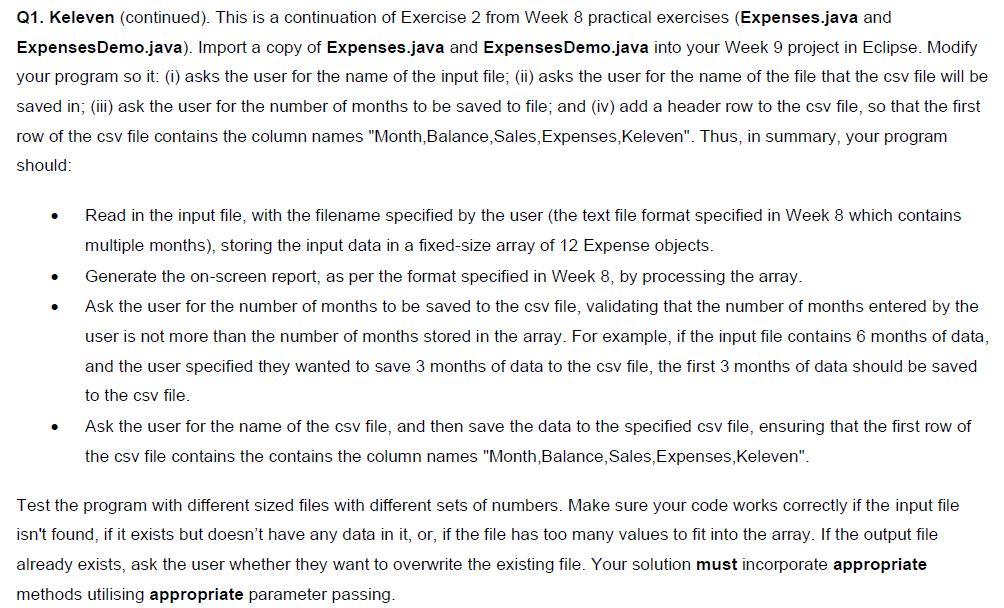
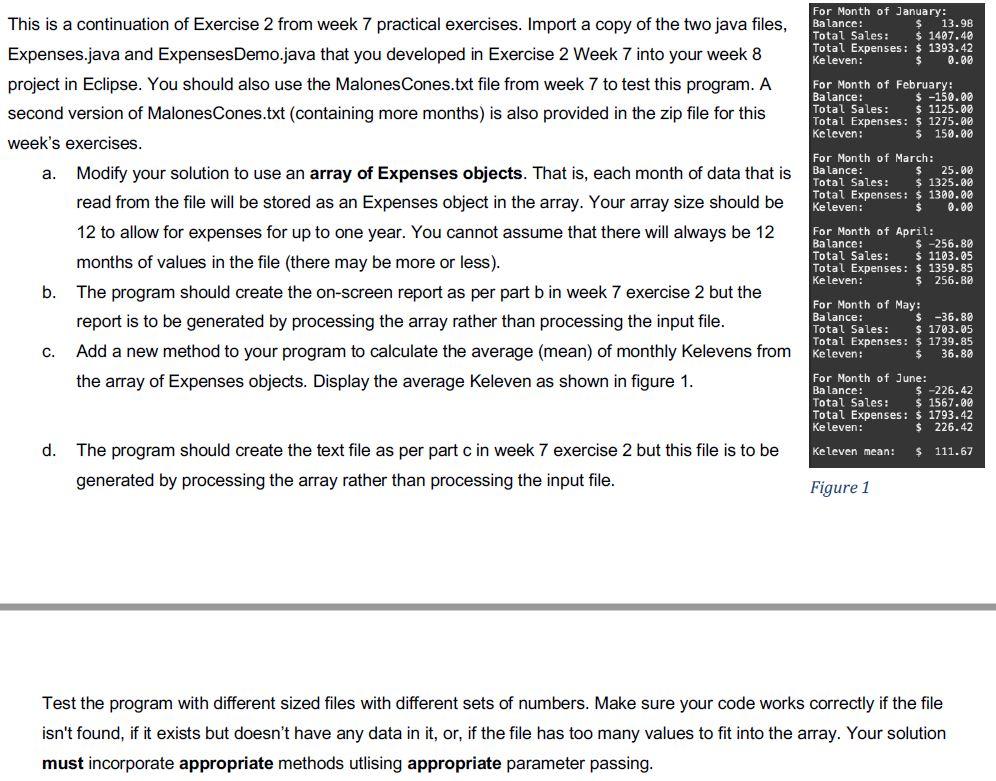
Q1. Keleven (continued). This is a continuation of Exercise 2 from Week 8 practical exercises (Expenses.java and Expenses Demo.java). Import a copy of Expenses.java and Expenses Demo.java into your Week 9 project in Eclipse. Modify your program so it: (i) asks the user for the name of the input file; (ii) asks the user for the name of the file that the csv file will be saved in; (iii) ask the user for the number of months to be saved to file; and (iv) add a header row to the csv file, so that the first row of the csv file contains the column names "Month, Balance, Sales, Expenses,Keleven". Thus, in summary, your program should: . Read in the input file, with the filename specified by the user (the text file format specified in Week 8 which contains multiple months), storing the input data in a fixed-size array of 12 Expense objects. Generate the on-screen report, as per the format specified in Week 8, by processing the array. Ask the user for the number of months to be saved to the csv file, validating that the number of months entered by the user is not more than the number of months stored in the array. For example, if the input file contains 6 months of data, and the user specified they wanted to save 3 months of data to the csv file, the first 3 months of data should be saved to the csv file. Ask the user for the name of the csv file, and then save the data to the specified csv file, ensuring that the first row of the csv file contains the contains the column names "Month, Balance, Sales, Expenses, Keleven". . Test the program with different sized files with different sets of numbers. Make sure your code works correctly if the input file isn't found, if it exists but doesn't have any data in it, or, if the file has too many values to fit into the array. If the output file already exists, ask the user whether they want to overwrite the existing file. Your solution must incorporate appropriate methods utilising appropriate parameter passing. For Month of January: Balance: 13.98 Total Sales: $ 1407.48 Total Expenses: $ 1393.42 ke leven: 0.00 For Month of February Balance: $ -150.00 Total Sales: $ 1125.00 Total Expenses: $ 1275.90 Keleven: $ 150.00 a. This is a continuation of Exercise 2 from week 7 practical exercises. Import a copy of the two java files, Expenses.java and ExpensesDemo.java that you developed in Exercise 2 Week 7 into your week 8 project in Eclipse. You should also use the Malones Cones.txt file from week 7 to test this program. A second version of MalonesCones.txt (containing more months) is also provided in the zip file for this week's exercises. Modify your solution to use an array of Expenses objects. That is, each month of data that is read from the file will be stored as an Expenses object in the array. Your array size should be 12 to allow for expenses for up to one year. You cannot assume that there will always be 12 months of values in the file (there may be more or less). b. The program should create the on-screen report as per part b in week 7 exercise 2 but the report is to be generated by processing the array rather than processing the input file. Add a new method to your program to calculate the average (mean) of monthly Kelevens from the array of Expenses objects. Display the average Keleven as shown in figure 1. For Month of March: Balance: $ 25.00 Total Sales: $ 1325.00 Total Expenses: $ 1390.00 Keleven: $ 0.08 For Month of April: Balance: $ -256.80 Total Sales: $ 1103.05 Total Expenses: $ 1359.85 Keleven: $ 256. Be For Month of May: Balance: $ -36.88 Total Sales: $ 1703.05 Total Expenses: $ 1739.85 Keleven: $ 36.80 C. For Month of June: Balance: $ -226.42 Total Sales: $ 1567.00 Total Expenses: $ 1793.42 Ke leven: $ 226.42 d. Keleven mean: $ 111.67 The program should create the text file as per part c in week 7 exercise 2 but this file is to be generated by processing the array rather than processing the input file. Figure 1 Test the program with different sized files with different sets of numbers. Make sure your code works correctly if the file isn't found, if it exists but doesn't have any data in it, or, if the file has too many values to fit into the array. Your solution must incorporate appropriate methods utlising appropriate parameter passing
Step by Step Solution
There are 3 Steps involved in it

Get step-by-step solutions from verified subject matter experts
 Study Help