



Question: 1. The switch forwards the frame out which port? YES or NO: 1. The switch adds the source MAC address to the MAC table 2.
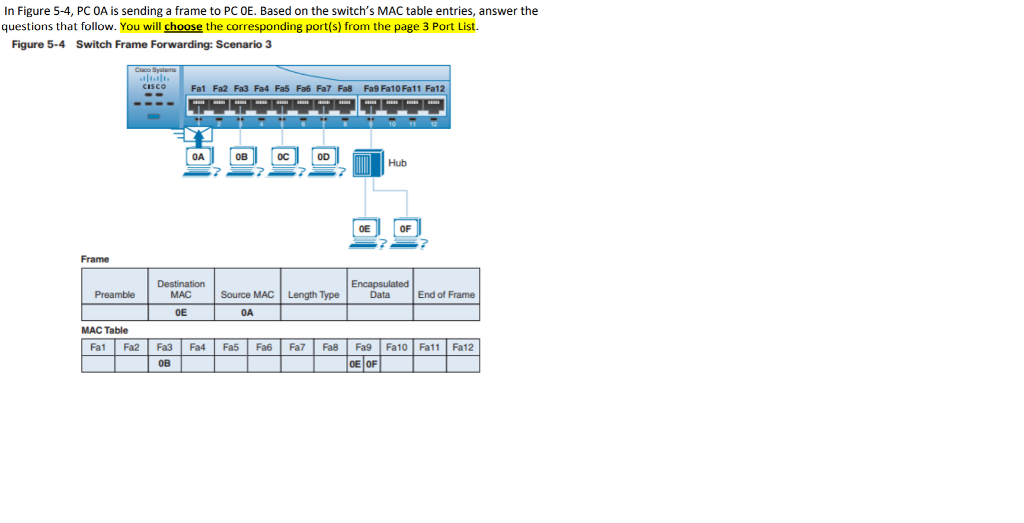
1. The switch forwards the frame out which port?
YES or NO:
1. The switch adds the source MAC address to the MAC table
2. The frame is a broadcast frame and will be forwarded to all ports.
3. The frame is a unicast frame and will be sent to a specific port only
4. The frame is a unicast frame and will be flooded out all active ports except for the port it was received on.
5. The frame is a unicast frame, but it will be dropped by the switch.
In Figure 5-4, PC OA is sending a frame to PC OE. Based on the switch's MAC table entries, answer the questions that follow. You will choose the corresponding port(s) from the page 3 Port List. Figure 5-4 Switch Frame Forwarding: Scenario 3 OA 0B1 oC 0D1 Hub OE OF Frame Destination Preamble MAC Source MAC Length Type OE End of Frame 0A MAC Table Fa2 OE OF In Figure 5-4, PC OA is sending a frame to PC OE. Based on the switch's MAC table entries, answer the questions that follow. You will choose the corresponding port(s) from the page 3 Port List. Figure 5-4 Switch Frame Forwarding: Scenario 3 OA 0B1 oC 0D1 Hub OE OF Frame Destination Preamble MAC Source MAC Length Type OE End of Frame 0A MAC Table Fa2 OE OF
Step by Step Solution
There are 3 Steps involved in it

Get step-by-step solutions from verified subject matter experts